
Web app · Health And Fitness
Skinshelf
The skincare routine builder that tells you what not to mix
Build AM and PM routines that auto-order themselves, and a bundled on-device ruleset flags retinol with acids, vitamin C with retinol and benzoyl peroxide with both — each with the why and the fix. Plus PAO expiry tracking, patch tests, a reaction diary and an adherence calendar. Free, no account.
Stored in your browser only. Nothing you do in the web version is sent to our servers. Clear your browser data and it's gone — so export a backup from the in-app menu if you want to keep it.
This app is a community proposal.
Try the full browser version now. We build the iPhone and Android app once 100 people upvote it.
We'll email you once, when it ships. Unsubscribe anytime.
In your browser
What you can do in Skinshelf on the web
AM/PM routine builder
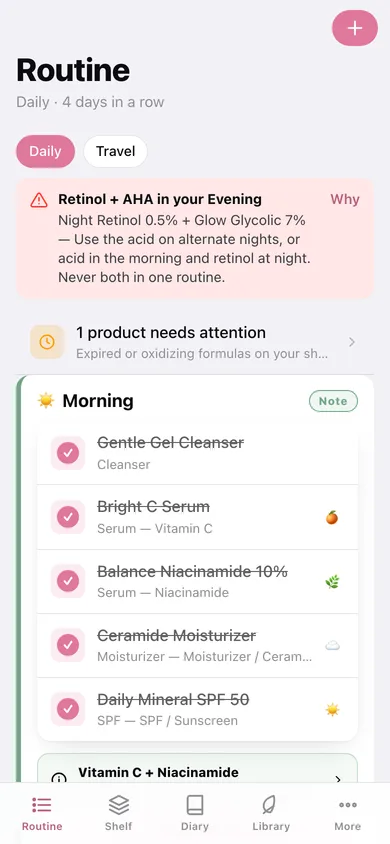
Drop products into morning and evening and Skinshelf places them in the canonical order — cleanser, toner, essence, active, serum, eye, moisturizer, oil, SPF — then you tick each step off.
Nine-rule conflict checker
Every rule from the app ships here: retinol with AHA, BHA, vitamin C, benzoyl peroxide or a physical scrub; two acids at once; benzoyl peroxide with vitamin C or AHA; and the vitamin C + niacinamide note that is fine after all. Each one names the two products, explains the risk and gives the fix.
Shelf with PAO expiry
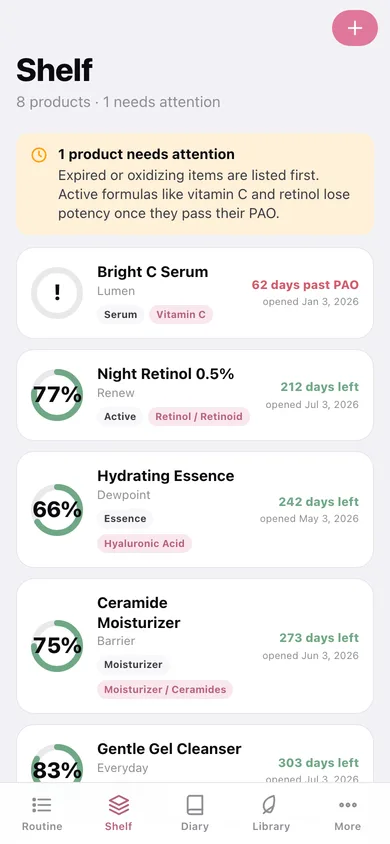
A freshness ring per product from its open date and period-after-opening, with expired and oxidizing formulas sorted to the top before you smear an old vitamin C on your face.
Patch tests before actives
Log a test with a start date and observation window, then record whether it passed or reacted — so a new active never goes straight onto your face.
Reaction diary and adherence calendar
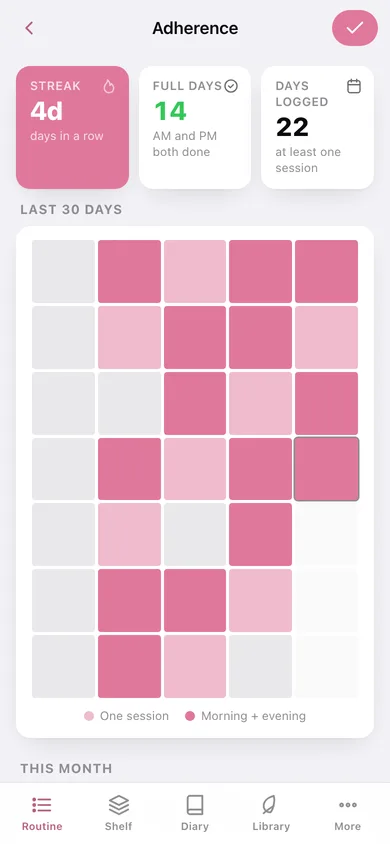
Dated entries rated calm through bad reaction so a flare-up lines up with the week you added something, plus a streak, a 30-day heatmap and a month calendar of which halves you actually did.
Ingredient library, fully offline
All ten bundled actives with what each does, how to use it, what it pairs with and what to keep away from it — and which of your own products carry it.
Screens
Every screen, rebuilt for the browser
-
1
Routine
Morning and evening cards with a traffic-light spine, tickable steps, live conflict pills and the complete button.
-
2
Edit routine
Add and remove products in each half; Skinshelf re-sorts them into the layering order.
-
3
Conflict rules
The full bundled ruleset grouped by severity, each with the why, the fix and the actives involved.
-
4
Shelf
Every product with a freshness ring, days until its PAO runs out and its tagged actives.
-
5
Product
Name, brand, actives, category, open date and PAO — plus which rules those actives appear in.
-
6
Library
The ten bundled actives as browsable cards, marked where they appear on your own shelf.
-
7
Ingredient
One active in full: what it does, how to use it, what it pairs with and what to avoid.
-
8
Patch tests
Tests in their observation window, with pass or reacted logged against each.
-
9
Diary
Dated skin entries rated calm to bad reaction, with the split of how your skin has been.
-
10
Adherence
Streak, full days, a 30-day heatmap and a month calendar of morning and evening sessions.
-
11
More
PAO preferences, JSON and CSV export, sample data and erase.
Try it with sample data: Loads an eight-product shelf (including a vitamin C that is already past its PAO), a Daily routine whose evening half deliberately trips the retinol + AHA rule, a Travel routine, three patch tests, five diary entries and 25 days of adherence. You can start fresh at any time.
Ready? It's free.
No account, no install, no subscription. Everything you do stays in this browser.
Your say
What should Skinshelf do? Tell us before we build it.
Tell us what to build next.
Comments need a free Google sign-in, so every one is from a real person.
Sign in with Google to commentNo comments yet — be the first to say what this app should do next.
Questions
Is the web version of Skinshelf free?+
Yes. Every screen is free to use: no subscription, no in-app purchases, no account.
Do I need an account?+
No. Open Skinshelf and start using it right away. Sign in with Google only if you want to upvote an app, save it to your list, or leave a comment.
Where is my data stored?+
Only in this browser's local storage. Nothing you enter is sent to our servers, so we can't see it, back it up, or restore it. Clearing site data, a private window, or another device starts empty. Export a backup from the in-app menu to keep it.
Is there a Skinshelf app for iPhone or Android?+
Not yet. Skinshelf is a community proposal: the browser version is complete, and we build the iPhone and Android app once 100 people upvote it. Upvoters get one email when it ships.