
Web app · Lifestyle
Skillswap
Write down what your humanoid can do, then trade it with the street
Keep every skill you have trained as plain numbered steps, log how each run went so a draft earns Tested and then Mastered, and hand skills to neighbours as a SKILLSWAP/1 text block you copy, message or print. Free, no install, no account.
Stored in your browser only. Nothing you do in the web version is sent to our servers. Clear your browser data and it's gone — so export a backup from the in-app menu if you want to keep it.
This app is a community proposal.
Try the full browser version now. We build the iPhone and Android app once 100 people upvote it.
We'll email you once, when it ships. Unsubscribe anytime.
In your browser
What you can do in Skillswap on the web
A skill is plain text you own
Name, category, robot, minutes a run, props, safety note and numbered steps — written so a neighbour's humanoid could follow it cold.
The run log decides the badge
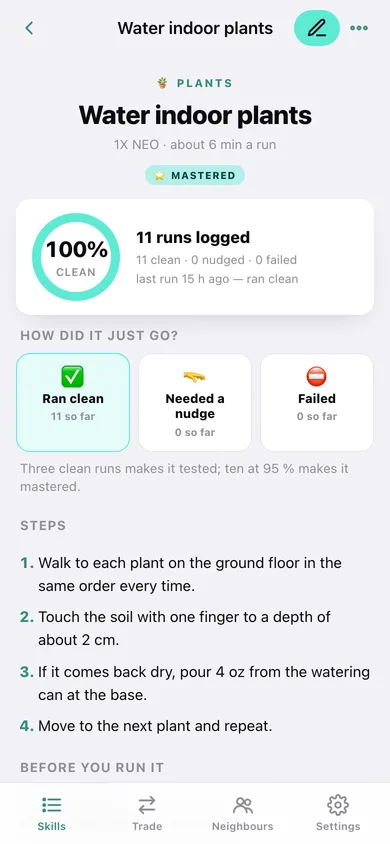
Mark every attempt Ran clean, Needed a nudge or Failed. Three clean runs makes a draft Tested; ten runs at 95% makes it Mastered — and the skill screen tells you when it is time to move it.
SKILLSWAP/1 trade blocks
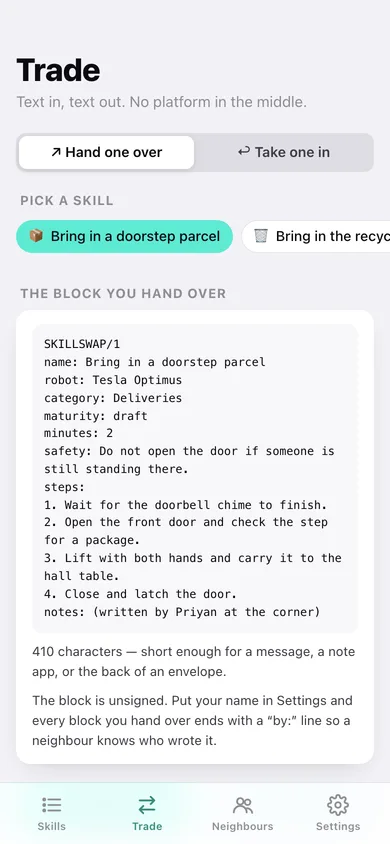
Turn any skill into a one-key-per-line text block, copy it or download the .txt, and paste a neighbour's block back in — Skillswap parses steps, props and safety straight into your library.
A neighbour ledger
Track who has a humanoid on your street, what you handed over, what came back, and whether the swap is even or you owe them one.
Reliability at a glance
Clean-run percentage per skill, a 12-week run heatmap, a skill leaderboard and the minutes of chores you have handed over.
Deliberately not a platform
Nothing is uploaded and nothing is matched for you — trades move as text you carry yourself. Everything stays in this browser.
Screens
Every screen, rebuilt for the browser
-
1
Skill library
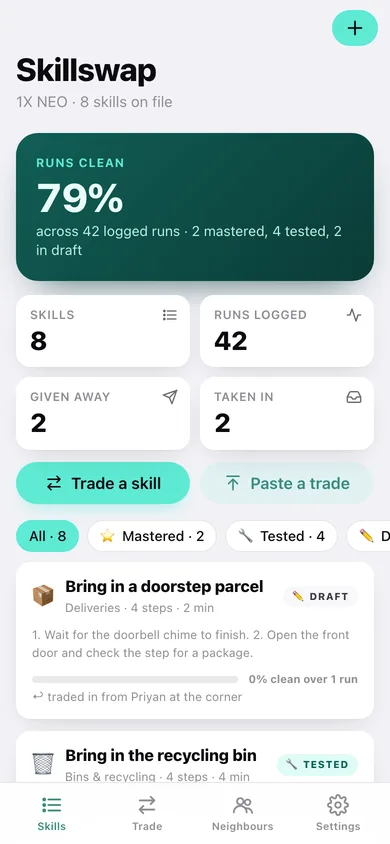
Clean-run rate across every skill, counts for given and taken-in, and a filterable card for each skill with its maturity badge.
-
2
Skill
One skill in full — reliability ring, the maturity the run log suggests, the numbered steps, props and safety, and the three run buttons.
-
3
Write a skill
Name, category, robot, minutes and maturity, plus a reorderable numbered step editor with props, safety and notes.
-
4
Trade
Hand one over — pick a skill, read the SKILLSWAP/1 block, copy or download it and log who got it. Or take one in by pasting a neighbour's block.
-
5
Neighbours
Everyone on the street with a humanoid, their robot, and whether the swap balance is even or owed.
-
6
Neighbour
One neighbour's ledger — what you handed over, what they handed you, and the running balance.
-
7
Run log
Every logged run, a 12-week heatmap, reliability ranked by skill, and a CSV export.
-
8
Settings
Your name on a trade block, your humanoid, library counts, text/JSON export, sample data and erase.
Try it with sample data: Loads eight skills (watering plants, unloading the dishwasher, bringing in the bins and more), two neighbours with a swap ledger, and about six weeks of logged runs. You can start fresh at any time.
Ready? It's free.
No account, no install, no subscription. Everything you do stays in this browser.
Your say
What should Skillswap do? Tell us before we build it.
Tell us what to build next.
Comments need a free Google sign-in, so every one is from a real person.
Sign in with Google to commentNo comments yet — be the first to say what this app should do next.
Questions
Is the web version of Skillswap free?+
Yes. Every screen is free to use: no subscription, no in-app purchases, no account.
Do I need an account?+
No. Open Skillswap and start using it right away. Sign in with Google only if you want to upvote an app, save it to your list, or leave a comment.
Where is my data stored?+
Only in this browser's local storage. Nothing you enter is sent to our servers, so we can't see it, back it up, or restore it. Clearing site data, a private window, or another device starts empty. Export a backup from the in-app menu to keep it.
Is there a Skillswap app for iPhone or Android?+
Not yet. Skillswap is a community proposal: the browser version is complete, and we build the iPhone and Android app once 100 people upvote it. Upvoters get one email when it ships.