
Web app · Lifestyle
Skein
Your yarn stash, colour-matched — and every row counter on one screen
Catalogue each skein with brand, colourway, dye lot, fibre, weight class, yardage and the bin it lives in. Sample a colour and Skein ranks your own stash by CIE-Lab distance. Projects hold as many named counters as you need, and a linked skein loses yardage as you tap rows. Free, no account.
Stored in your browser only. Nothing you do in the web version is sent to our servers. Clear your browser data and it's gone — so export a backup from the in-app menu if you want to keep it.
This app is a community proposal.
Try the full browser version now. We build the iPhone and Android app once 100 people upvote it.
We'll email you once, when it ships. Unsubscribe anytime.
In your browser
What you can do in Skein on the web
A real stash library
Brand, colourway, dye lot, fibre blend, one of the eight standard weight classes, total and remaining yardage, and the bin it lives in — searchable and sortable by recency, brand, weight, colourway or how much is left.
On-device colour matching
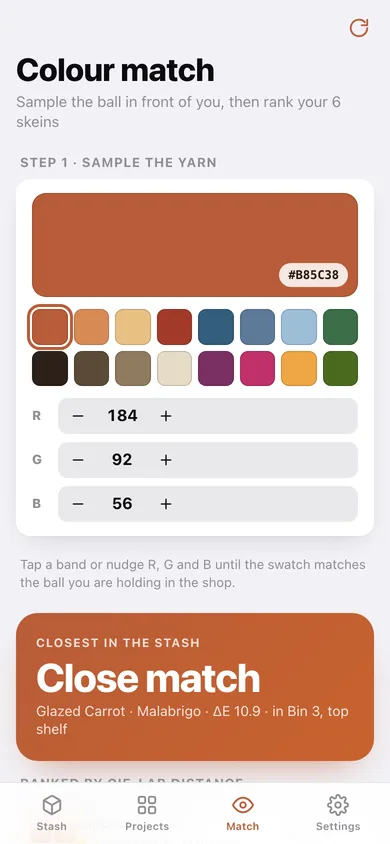
Sample a colour with sixteen preset bands or the R/G/B steppers, and Skein converts sRGB to CIE-Lab and ranks every skein you own by ΔE — excellent under 5, very close under 10, close under 20.
Several counters per project
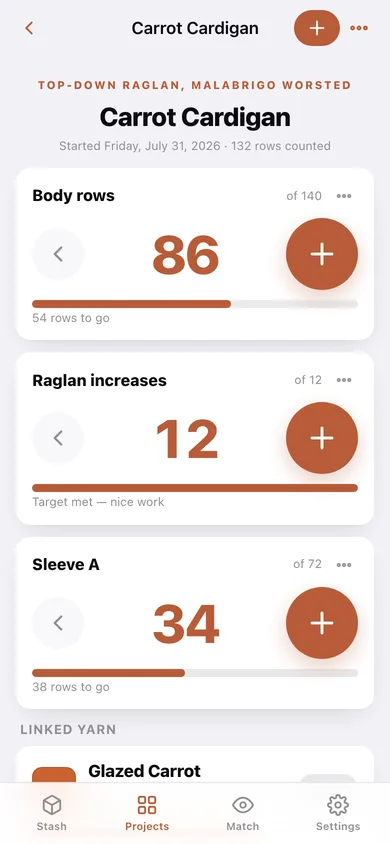
Body, sleeve A, sleeve B and the eight-row lace repeat all visible at once, each with a giant tap target, its own target row count and one-tap undo.
Linked yardage that actually moves
Set rows-per-yard on a project, link a skein, and every row you count takes the exact fraction of a yard off it — undo puts it straight back.
Progress log
File a note against the row you were on — 'yoke joined at the underarms' at row 64 — and the project builds its own timeline.
Nothing locked, nothing uploaded
Unlimited projects, unlimited counters, colour match and CSV export are all here, and the stash never leaves this browser.
Screens
Every screen, rebuilt for the browser
-
1
Stash
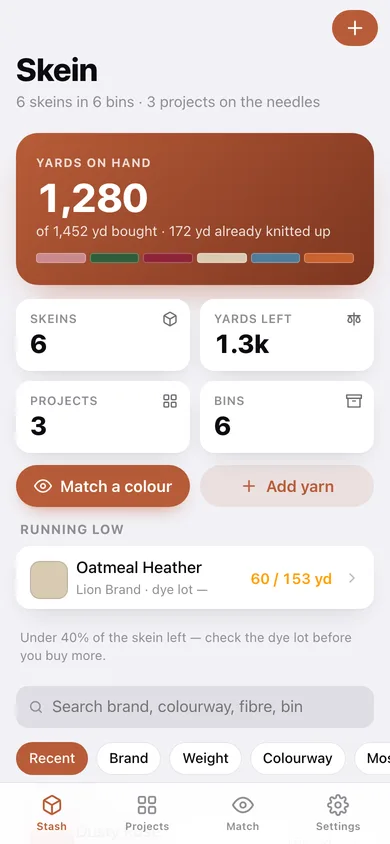
Yards on hand, a colour strip of the stash, the skeins running low, and every skein searchable and sortable.
-
2
Colour match
Sample a colour, then see your whole stash ranked by CIE-Lab ΔE with match quality and the bin each skein lives in.
-
3
Project
Every counter on one screen with giant tap targets, targets and undo, the linked skein's remaining yardage, and the progress log.
-
4
Yarn
One skein: the swatch, the label details, a remaining-yardage ring, the projects using it and the closest colours in the stash.
-
5
Add or edit a skein
Swatch picker, brand, colourway, dye lot, fibre, weight class, yardage and bin.
-
6
Projects
Everything on the needles with its counters, rows counted and progress against targets.
-
7
Project details
Name, pattern, gauge notes, the linked skein and rows-per-yard.
-
8
Settings
Row click, low-skein threshold, stash counts, CSV and JSON export, sample stash, erase.
Try it with sample data: Loads six real skeins — Malabrigo Glazed Carrot, Cascade Mineral Blue, Lion Brand Oatmeal Heather, Wollmeise Granatapfel sock yarn, Drops Forest Green and Hobbii Dusty Rose — across five weight classes and four bins, plus three projects on the needles with six counters, linked yarns and progress notes. You can start fresh at any time.
Ready? It's free.
No account, no install, no subscription. Everything you do stays in this browser.
Your say
What should Skein do? Tell us before we build it.
Tell us what to build next.
Comments need a free Google sign-in, so every one is from a real person.
Sign in with Google to commentNo comments yet — be the first to say what this app should do next.
Questions
Is the web version of Skein free?+
Yes. Every screen is free to use: no subscription, no in-app purchases, no account.
Do I need an account?+
No. Open Skein and start using it right away. Sign in with Google only if you want to upvote an app, save it to your list, or leave a comment.
Where is my data stored?+
Only in this browser's local storage. Nothing you enter is sent to our servers, so we can't see it, back it up, or restore it. Clearing site data, a private window, or another device starts empty. Export a backup from the in-app menu to keep it.
Is there a Skein app for iPhone or Android?+
Not yet. Skein is a community proposal: the browser version is complete, and we build the iPhone and Android app once 100 people upvote it. Upvoters get one email when it ships.