
Web app · Lifestyle
Sitterlog
Babysitter hours and pay, worked out for you — no spreadsheet, no payroll account
Add each sitter once with their standard, night and overtime rates. Start the timer when they arrive or type the hours in afterwards, and Sitterlog computes the exact pay, tracks what is still owed, and rolls it into monthly and year-end totals you can export. Free, no account.
Stored in your browser only. Nothing you do in the web version is sent to our servers. Clear your browser data and it's gone — so export a backup from the in-app menu if you want to keep it.
This app is a community proposal.
Try the full browser version now. We build the iPhone and Android app once 100 people upvote it.
We'll email you once, when it ships. Unsubscribe anytime.
In your browser
What you can do in Sitterlog on the web
Per-sitter rate cards
Standard hourly, night and overtime rates per person, plus the hour night starts and the hours after which overtime kicks in — all editable, all applied automatically.
Live timer or hours by hand
Tap Start when they walk in and Stop when they leave, or enter the date, start hour and hours worked afterwards with a live pay preview before you save.
The pay maths, shown
Every session shows which rate was applied and why — a session that starts at or after the night hour bills at the night rate, and anything past the overtime threshold bills at the overtime rate.
Paid / unpaid ledger
The home screen leads with what you still owe across all sitters. Mark one session paid, or settle a whole sitter in one tap.
Monthly and year summaries
Spend per month as a bar chart, a per-sitter breakdown with share bars, and a January-to-December year view with annual hours and average effective rate.
CSV for the records
Export any sitter, any year, or the whole ledger as CSV — date, sitter, hours, rate applied, overtime hours, pay and paid status — for household-employee records at tax time.
Screens
Every screen, rebuilt for the browser
-
1
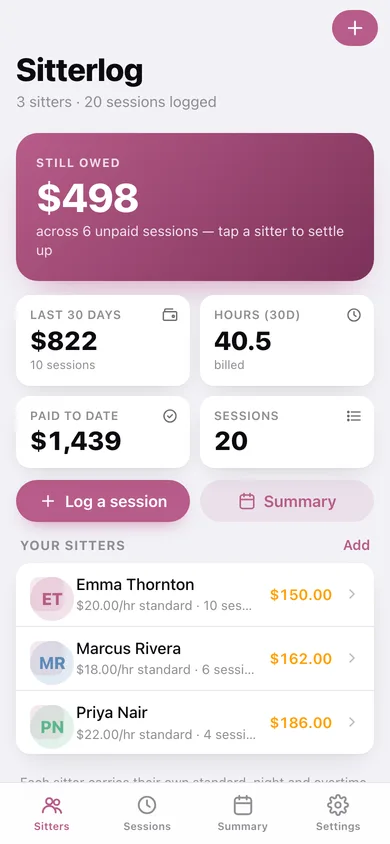
Sitters
What you still owe across every sitter, the last 30 days of spend, and each sitter with their balance.
-
2
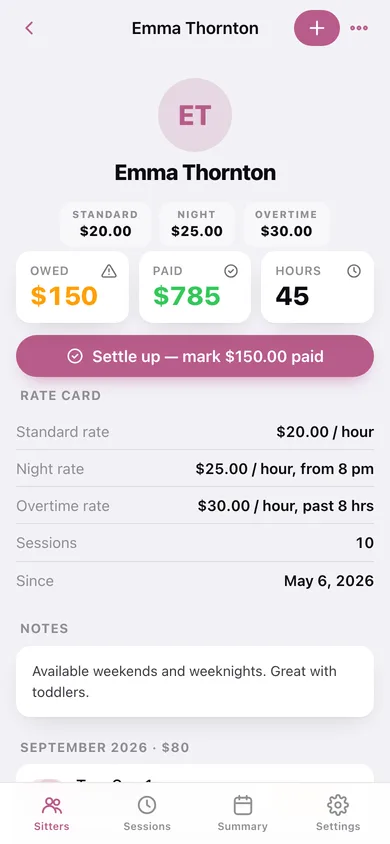
Sitter
Rate card, owed and paid balances, and every session grouped by month.
-
3
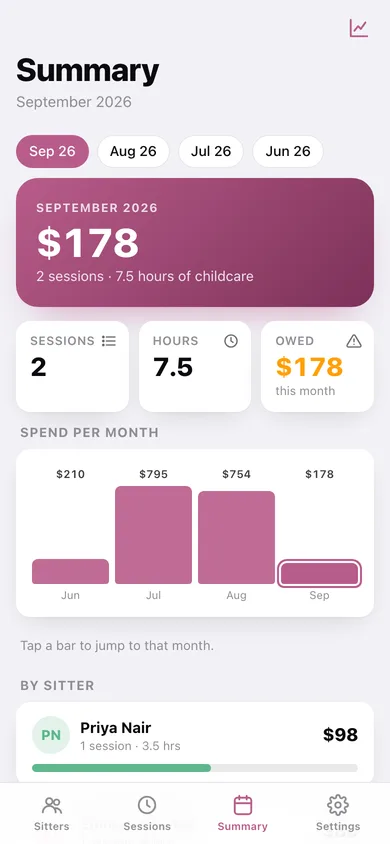
Monthly summary
Pick a month: total pay, hours, still owed, spend-per-month chart and a per-sitter breakdown.
-
4
Session
One session: hours, the rate applied, the overtime split, the total and a paid toggle.
-
5
Log a session
Start the live timer, or enter date, start hour and hours worked with a running pay preview.
-
6
Rate card
Name, colour, standard / night / overtime rates, night start hour and overtime threshold.
-
7
Sessions
Every session by month, filtered by unpaid, paid, night rate or sitter.
-
8
Year summary
Annual pay and hours, month-by-month chart, per-sitter totals and a CSV export.
-
9
Settings
Currency, defaults for new sitters, ledger counts, CSV and JSON export, sample data, erase.
Try it with sample data: Loads three sitters with real rate cards — Emma at $20/hr ($25 nights), Marcus at $18/hr, Priya at $22/hr with overtime after six hours — and twenty sessions across the last three months, some paid, some still owed, including a full-day session that runs into overtime and one entered by hand. You can start fresh at any time.
Ready? It's free.
No account, no install, no subscription. Everything you do stays in this browser.
Your say
What should Sitterlog do? Tell us before we build it.
Tell us what to build next.
Comments need a free Google sign-in, so every one is from a real person.
Sign in with Google to commentNo comments yet — be the first to say what this app should do next.
Questions
Is the web version of Sitterlog free?+
Yes. Every screen is free to use: no subscription, no in-app purchases, no account.
Do I need an account?+
No. Open Sitterlog and start using it right away. Sign in with Google only if you want to upvote an app, save it to your list, or leave a comment.
Where is my data stored?+
Only in this browser's local storage. Nothing you enter is sent to our servers, so we can't see it, back it up, or restore it. Clearing site data, a private window, or another device starts empty. Export a backup from the in-app menu to keep it.
Is there a Sitterlog app for iPhone or Android?+
Not yet. Sitterlog is a community proposal: the browser version is complete, and we build the iPhone and Android app once 100 people upvote it. Upvoters get one email when it ships.