
Web app · Lifestyle
Sideways
The BAT/LAT session log reactive-dog owners keep in a spreadsheet
Build your dog's trigger ladder, run a session against one rung, and tap one big button to mark under or over threshold. You get the time-vs-arousal trace, the shrinking safe distance, a wins log and a trainer report. Free, offline, no account.
Stored in your browser only. Nothing you do in the web version is sent to our servers. Clear your browser data and it's gone — so export a backup from the in-app menu if you want to keep it.
This app is a community proposal.
Try the full browser version now. We build the iPhone and Android app once 100 people upvote it.
We'll email you once, when it ships. Unsubscribe anytime.
In your browser
What you can do in Sideways on the web
Trigger ladder per dog
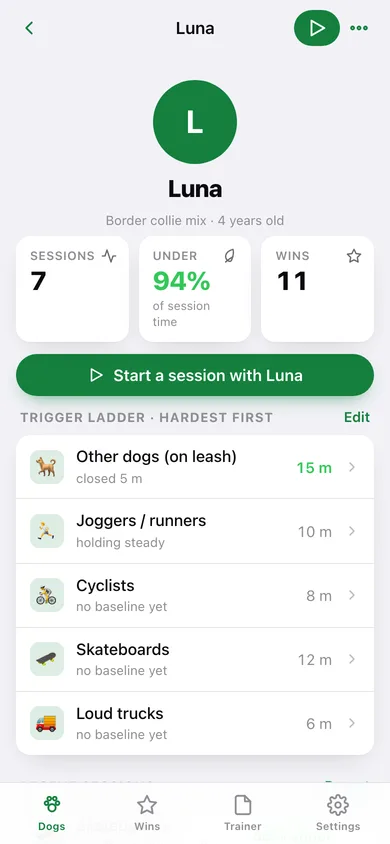
Rank what sets them off — other dogs, cyclists, skateboards, joggers, strollers, trucks — hardest first, each with today's safe distance in metres or feet.
One-tap threshold console
A 210-pixel dial flips between UNDER and OVER threshold with a tone; every flip is a timestamped sample, so the session builds its own arousal timeline.
The time-vs-arousal trace
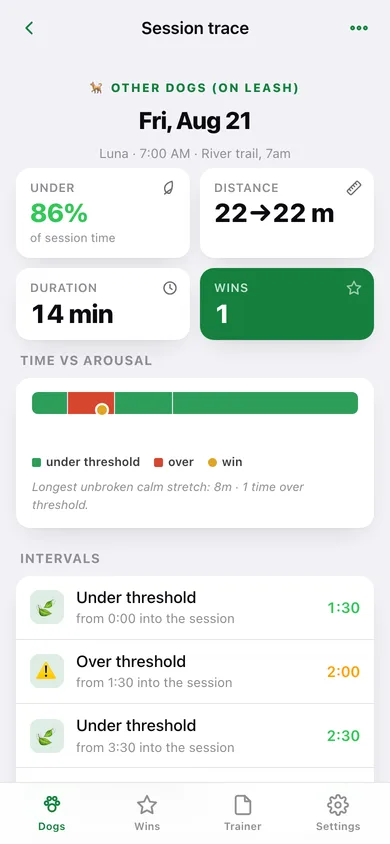
Each finished session shows a green/red trace strip with gold win markers, the under-threshold percentage, the longest unbroken calm stretch and every interval.
Watch the safe distance shrink
Ending a session writes the new safe distance back onto the rung, and each rung shows whether it has closed, held or backed off against the sessions older than a week.
Wins log
Log every above-the-line moment — disengaged, looked back, took a treat near the trigger — with a 12-week heatmap. The list your future self needs on the bad days.
Trainer report
Pick a window (2 weeks to 6 months) and copy or download the whole thing — ladder, sessions, distances, under-threshold percentages, notes and wins — plus a CSV.
Screens
Every screen, rebuilt for the browser
-
1
Dogs
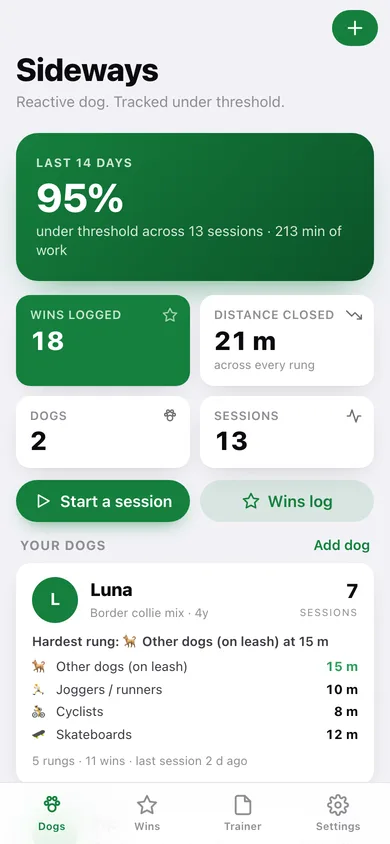
Under-threshold percentage for the last fortnight, distance closed across every rung, and a card per dog with their top rungs.
-
2
Dog
One dog's profile, ladder, recent sessions and latest wins, with Start a session on top.
-
3
Session trace
Under-threshold percentage, distance closed, the green/red arousal strip with win markers and every interval.
-
4
Trigger ladder
Add, edit, reorder and delete rungs, each with an emoji, a safe distance and a trend against last week.
-
5
New session
Pick the dog, the rung and the starting distance, add a location note, then START.
-
6
Live session
Running clock, the big under/over threshold dial, tap counters, live trace and the Win and End buttons.
-
7
Add or edit a dog
Name, breed, year of birth and the notes your trainer cares about.
-
8
Wins
Every above-the-line moment by day, filtered by dog, with a 12-week heatmap.
-
9
Trainer report
A window of sessions summarised for the next consult, copyable as text or downloadable as .txt and CSV.
-
10
Settings
Metres or feet, threshold tone, log counts, CSV and JSON export, sample dogs, erase.
Try it with sample data: Loads Luna (border collie mix, dog-reactive, five rungs) and Pip (mini schnauzer, bike-reactive, four rungs) with thirteen sessions from the last fortnight — full threshold traces, real distances closing from 22 m to 15 m and 12 m to 6 m, and eighteen logged wins. You can start fresh at any time.
Ready? It's free.
No account, no install, no subscription. Everything you do stays in this browser.
Your say
What should Sideways do? Tell us before we build it.
Tell us what to build next.
Comments need a free Google sign-in, so every one is from a real person.
Sign in with Google to commentNo comments yet — be the first to say what this app should do next.
Questions
Is the web version of Sideways free?+
Yes. Every screen is free to use: no subscription, no in-app purchases, no account.
Do I need an account?+
No. Open Sideways and start using it right away. Sign in with Google only if you want to upvote an app, save it to your list, or leave a comment.
Where is my data stored?+
Only in this browser's local storage. Nothing you enter is sent to our servers, so we can't see it, back it up, or restore it. Clearing site data, a private window, or another device starts empty. Export a backup from the in-app menu to keep it.
Is there a Sideways app for iPhone or Android?+
Not yet. Sideways is a community proposal: the browser version is complete, and we build the iPhone and Android app once 100 people upvote it. Upvoters get one email when it ships.