
Web app · Sports
Shuttlelog
Score the rally, split the court bill, settle the head-to-head argument
A big-tap 21-point badminton scorer that handles deuce, service side and best-of-three on its own, plus a session log that divides the court hire evenly and a stats screen with win rate, streaks and per-opponent records. Free, no install.
Stored in your browser only. Nothing you do in the web version is sent to our servers. Clear your browser data and it's gone — so export a backup from the in-app menu if you want to keep it.
This app is a community proposal.
Try the full browser version now. We build the iPhone and Android app once 100 people upvote it.
We'll email you once, when it ships. Unsubscribe anytime.
In your browser
What you can do in Shuttlelog on the web
Live 21-point scorer
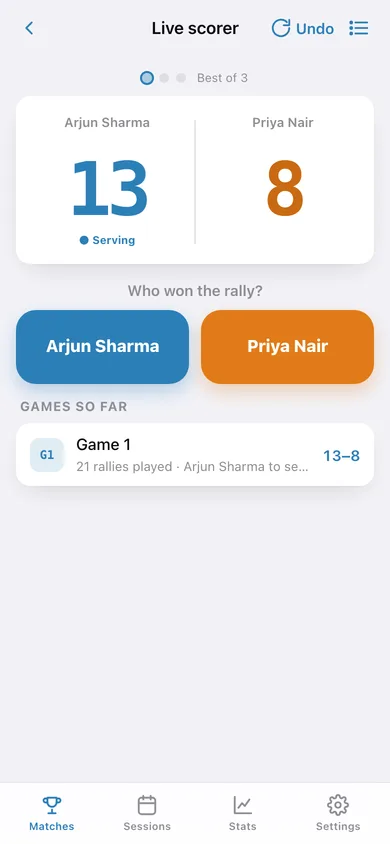
Tap the side that won the rally: Shuttlelog adds the point, moves the serve, flags deuce at 20-all, enforces win-by-two, caps at 30 and closes the game and the match by itself.
Best of three, handled
Game dots show who took each game, the next game starts automatically with the right side serving in game two, and one Undo rolls back a mis-tap including the service side.
Singles and doubles
Pick one player a side or two, from a roster you build as people turn up; the match card keeps every pairing.
Session log with even cost split
Venue, date, hours and total court cost, tick who played, and every attendee's share is worked out — plus an all-time share per player and a split you can copy into the group chat.
Win rate, streaks and head-to-head
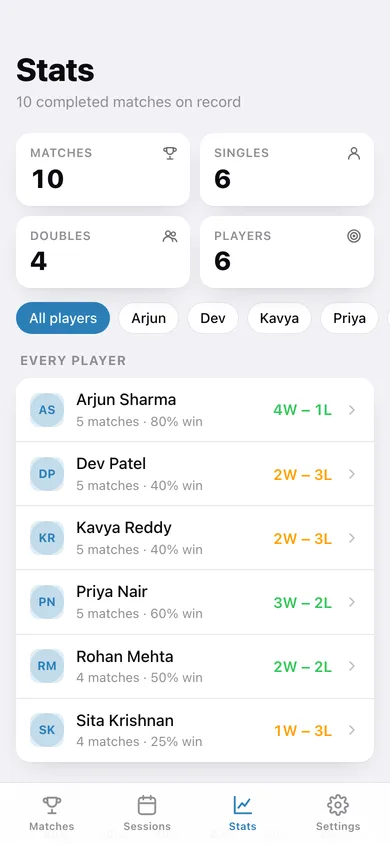
Per-player record and current W or L streak, a win-rate bar chart across the club, and a head-to-head line for every opponent.
Your currency, your court
Court hire in ₹, $, £, €, S$ or RM — it defaults to rupees because that is where club badminton lives.
Screens
Every screen, rebuilt for the browser
-
1
Matches
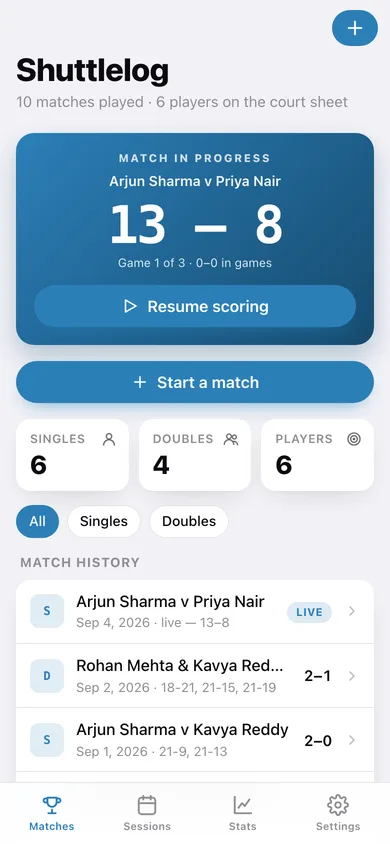
The live match banner or your all-time rally count, then the full match history filtered to singles or doubles.
-
2
New match
Singles or doubles, pick a player for each side, and start scoring.
-
3
Live scorer
The big two-column scoreboard with serving dot, game stars, deuce banner and the two rally buttons.
-
4
Match card
Final games won, the score of every game, who went to deuce, and both sides' overall records.
-
5
Sessions
Every court booking with hours, total cost and the per-player share, plus an all-time share per player.
-
6
Session split
One booking broken down: cost per hour, who was there and exactly what each person owes.
-
7
Players
The roster with each player's record and current streak, editable and removable.
-
8
Stats
Club overview, a win-rate bar chart, then any player's wins, losses, streak, win-rate bar and head-to-head.
-
9
Settings
Currency for court hire, rally sounds, the scoring rules in plain English, CSV export, sample data and erase.
Try it with sample data: Loads six club players, ten completed matches including a live one still at 13–8 in game one, and five court bookings from ₹300 to ₹1,000 already split. You can start fresh at any time.
Ready? It's free.
No account, no install, no subscription. Everything you do stays in this browser.
Your say
What should Shuttlelog do? Tell us before we build it.
Tell us what to build next.
Comments need a free Google sign-in, so every one is from a real person.
Sign in with Google to commentNo comments yet — be the first to say what this app should do next.
Questions
Is the web version of Shuttlelog free?+
Yes. Every screen is free to use: no subscription, no in-app purchases, no account.
Do I need an account?+
No. Open Shuttlelog and start using it right away. Sign in with Google only if you want to upvote an app, save it to your list, or leave a comment.
Where is my data stored?+
Only in this browser's local storage. Nothing you enter is sent to our servers, so we can't see it, back it up, or restore it. Clearing site data, a private window, or another device starts empty. Export a backup from the in-app menu to keep it.
Is there a Shuttlelog app for iPhone or Android?+
Not yet. Shuttlelog is a community proposal: the browser version is complete, and we build the iPhone and Android app once 100 people upvote it. Upvoters get one email when it ships.