
Web app · Productivity
Naitei Path
就活 selection tracking — ES締切, 面接 rounds and 内定 on one screen
One card per company through Japan's new-grad pipeline: エントリー → ES提出 → Webテスト → 一次/二次/最終面接 → 内々定/内定 → お祈り. Every dated item on one timeline, per-round interview logs with the questions asked and your 手応え, and an offer board counting down each 承諾締切. Free, offline, no account.
Stored in your browser only. Nothing you do in the web version is sent to our servers. Clear your browser data and it's gone — so export a backup from the in-app menu if you want to keep it.
This app is a community proposal.
Try the full browser version now. We build the iPhone and Android app once 100 people upvote it.
We'll email you once, when it ships. Unsubscribe anytime.
In your browser
What you can do in Naitei Path on the web
The real Japanese pipeline, not a US college tracker
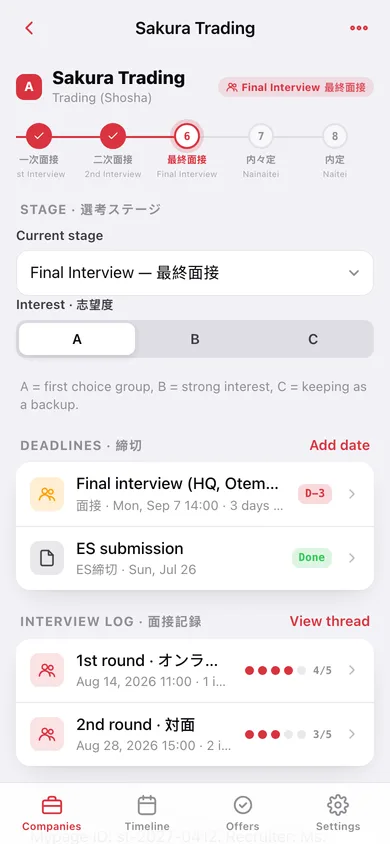
Ten stages from エントリー to 辞退, drawn as a rail you move a company along, with 志望度 A/B/C, 業界 and a マイページ memo for the login ID and recruiter name.
One timeline for every deadline
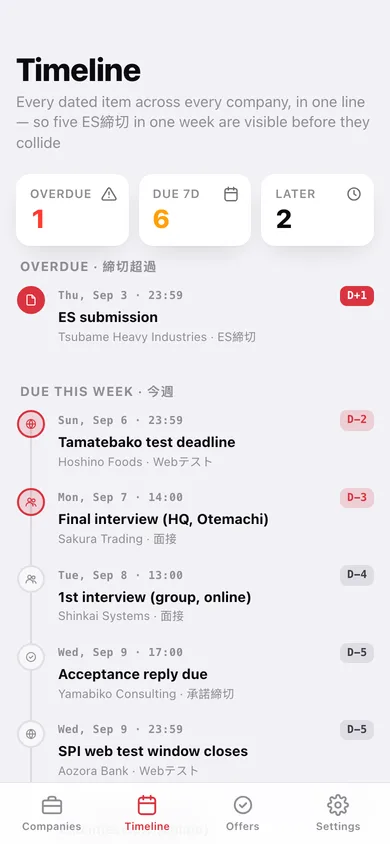
ES締切, Webテスト windows, 面接 slots, 承諾締切 and 提出物 across every company in one chronological line, split into overdue, this week and later, each with a D-day countdown.
Per-round 面接 log
Every round separately: date, format (対面/オンライン), how many interviewers, the questions they actually asked, your 手応え out of five and a reflection — read the whole thread back before the 最終面接.
Offer board with 承諾締切 countdowns
内々定 and 内定 in one place with days left, accepted/deciding/declined status, a 辞退連絡 toggle for the call people put off, and a side-by-side comparison table for the end of the season.
Home tells you what is next
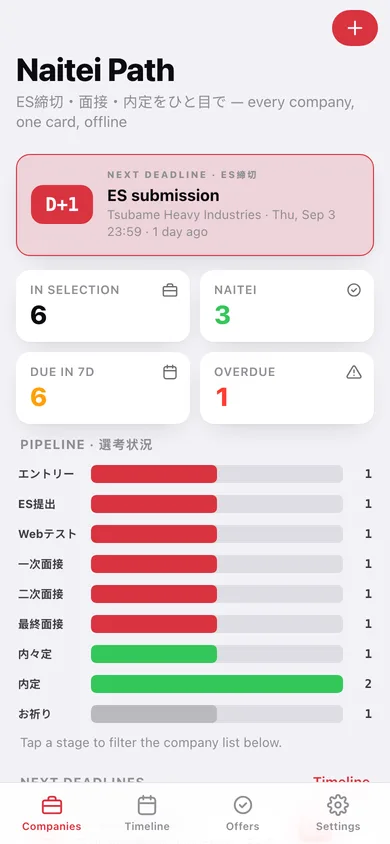
The nearest deadline as a D-day hero, counts of in-selection / 内定 / due-in-7-days / overdue, and a pipeline bar per stage you can tap to filter the list.
No account, no recruiter funnel
Your 志望企業 list and 面接 notes never leave this browser — no signup, no feed of other students' progress, and a CSV export whenever you want your own spreadsheet back.
Screens
Every screen, rebuilt for the browser
-
1
Companies
Next-deadline D-day hero, pipeline counts by stage, and every company sorted by 志望度.
-
2
Company
The stage rail, 志望度, deadlines, the 面接 log, the offer and the マイページ memo.
-
3
Add a company
Name, 業界 from the fourteen-industry list, 志望度, current stage, memo and an optional ES deadline.
-
4
Add a date
ES締切, Webテスト, 面接, 承諾締切 or 提出物 with a date and time.
-
5
Log a round
Round number, format, interviewer count, the questions asked, 手応え 1–5 and a reflection.
-
6
Interview log
One company's rounds as a thread, with the average 手応え across them.
-
7
Timeline
Every dated item across every company — overdue, this week, later and done.
-
8
Offer board
内々定/内定 with acceptance countdowns, 辞退連絡 tracking and a side-by-side comparison.
-
9
Settings
Pipeline counts, CSV and JSON export, sample data, erase, and why this app is offline.
Try it with sample data: Loads ten companies mid-season — a shosha at 最終面接 in three days, a bank with an SPI window closing, an engineer track at 二次面接, a consulting 内々定 whose 承諾締切 is five days out, an overdue ES, an お祈り, and a declined offer whose 辞退連絡 call is still to make — with eleven dates and eleven logged 面接 rounds. You can start fresh at any time.
Ready? It's free.
No account, no install, no subscription. Everything you do stays in this browser.
Your say
What should Naitei Path do? Tell us before we build it.
Tell us what to build next.
Comments need a free Google sign-in, so every one is from a real person.
Sign in with Google to commentNo comments yet — be the first to say what this app should do next.
Questions
Is the web version of Naitei Path free?+
Yes. Every screen is free to use: no subscription, no in-app purchases, no account.
Do I need an account?+
No. Open Naitei Path and start using it right away. Sign in with Google only if you want to upvote an app, save it to your list, or leave a comment.
Where is my data stored?+
Only in this browser's local storage. Nothing you enter is sent to our servers, so we can't see it, back it up, or restore it. Clearing site data, a private window, or another device starts empty. Export a backup from the in-app menu to keep it.
Is there a Naitei Path app for iPhone or Android?+
Not yet. Naitei Path is a community proposal: the browser version is complete, and we build the iPhone and Android app once 100 people upvote it. Upvoters get one email when it ships.