
Web app · Productivity
Shotbox: Screenshot Finder
Find the screenshot you took — by what it meant, not the exact words
Search “network key” and the router screen comes back even though it says Wi-Fi Password. Shotbox ranks by meaning blended with literal keywords, auto-sorts everything into Receipts, Confirmations, Links, Recipes, Addresses, Promo Codes and Chats, and pulls out the codes and links worth copying. Free, no account.
Stored in your browser only. Nothing you do in the web version is sent to our servers. Clear your browser data and it's gone — so export a backup from the in-app menu if you want to keep it.
This app is a community proposal.
Try the full browser version now. We build the iPhone and Android app once 100 people upvote it.
We'll email you once, when it ships. Unsubscribe anytime.
In your browser
What you can do in Shotbox: Screenshot Finder on the web
Search by meaning, not substring
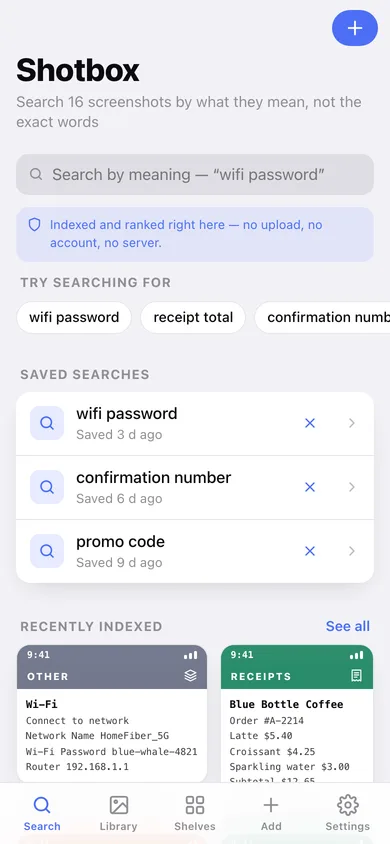
Query terms and screenshot text are both folded into concepts — wifi, money, travel, delivery, place, recipe — so a fuzzy idea resolves even when none of your words appear on the screen.
Literal hits still win instantly
Meaning and keywords are blended 62/38, the same weighting the iPhone app uses, so a tracking number or a promo code ranks first outright. Every result shows its relevance and why it matched.
Smart shelves that sort themselves
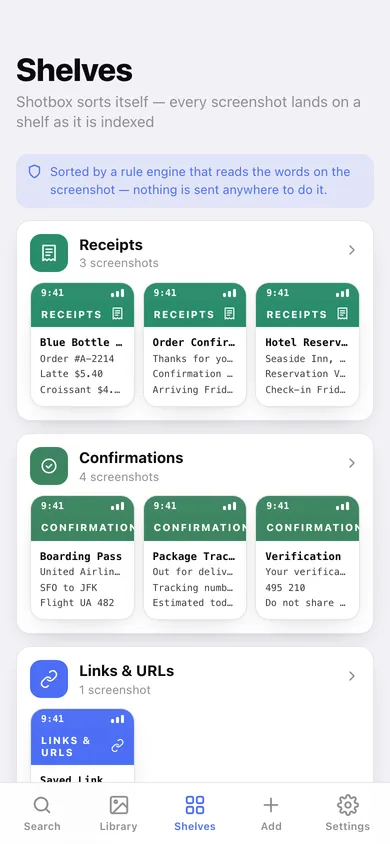
The same rule engine as the phone files each screenshot into Receipts, Confirmations, Links & URLs, Recipes, Addresses, Promo Codes, Chats or Other — and you can override a shelf or re-run the classifier over everything.
Detected links, phones, addresses and codes
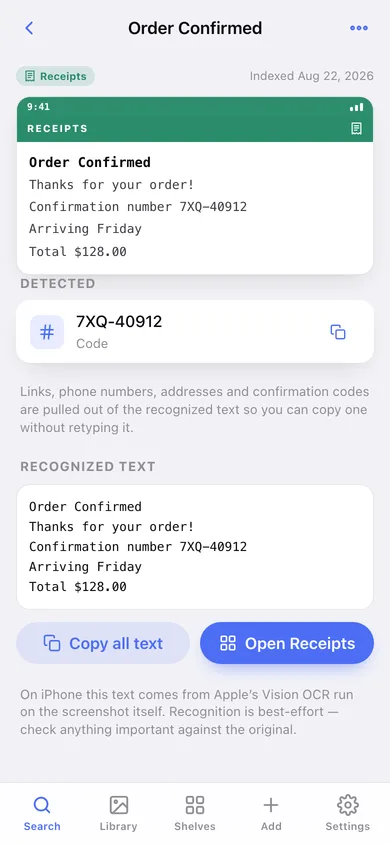
Confirmation numbers, verification codes, URLs, phone numbers and street addresses are pulled out of the recognized text and copied with one tap.
Saved searches
Pin “wifi password” or “confirmation number” and re-run it from the search screen whenever you need it.
Nothing leaves the browser
No account, no upload, no server — the reading, the ranking and the shelving all happen locally, exactly like the on-device stack on iPhone.
Screens
Every screen, rebuilt for the browser
-
1
Search
Ranked results with the matching line, a relevance meter and why it matched — plus suggestions, saved searches and recent screenshots.
-
2
Screenshot
The screenshot re-drawn as a phone screen, the line that matched, detected data and the full recognized text.
-
3
Library
Every indexed screenshot in a grid, filterable by shelf.
-
4
Shelves
Every populated shelf with its count and a strip of what is on it.
-
5
Shelf
One shelf in full — everything the classifier filed there.
-
6
Add a screenshot
Paste what the screen says and watch the classifier pick the shelf, read the concepts and detect the codes as you type.
-
7
Settings
Index stats, rebuild the shelves, per-shelf counts, CSV and JSON export, sample data and erase.
Try it with sample data: Loads the twelve demo screenshots from the iPhone app — a wifi setup screen, a coffee receipt, a banana-bread recipe, a boarding pass, a maps card, a promo code, a chat, an order confirmation, package tracking, a parking reminder, a verification code and a saved link — plus four more and three saved searches, spread across the last five weeks. You can start fresh at any time.
Ready? It's free.
No account, no install, no subscription. Everything you do stays in this browser.
Your say
What should Shotbox: Screenshot Finder do? Tell us before we build it.
Tell us what to build next.
Comments need a free Google sign-in, so every one is from a real person.
Sign in with Google to commentNo comments yet — be the first to say what this app should do next.
Questions
Is the web version of Shotbox: Screenshot Finder free?+
Yes. Every screen is free to use: no subscription, no in-app purchases, no account.
Do I need an account?+
No. Open Shotbox: Screenshot Finder and start using it right away. Sign in with Google only if you want to upvote an app, save it to your list, or leave a comment.
Where is my data stored?+
Only in this browser's local storage. Nothing you enter is sent to our servers, so we can't see it, back it up, or restore it. Clearing site data, a private window, or another device starts empty. Export a backup from the in-app menu to keep it.
Is there a Shotbox: Screenshot Finder app for iPhone or Android?+
Not yet. Shotbox: Screenshot Finder is a community proposal: the browser version is complete, and we build the iPhone and Android app once 100 people upvote it. Upvoters get one email when it ships.