
Web app · Lifestyle
Shagun
The family shagun register — who gave what, and what you still owe back
Log every envelope of shagun and neota by person, occasion and event, and Shagun keeps the reciprocity balance for you: given, received, and the auspicious amount that squares it at the next wedding. Free in your browser, nothing to install.
Stored in your browser only. Nothing you do in the web version is sent to our servers. Clear your browser data and it's gone — so export a backup from the in-app menu if you want to keep it.
This app is a community proposal.
Try the full browser version now. We build the iPhone and Android app once 100 people upvote it.
We'll email you once, when it ships. Unsubscribe anytime.
In your browser
What you can do in Shagun on the web
Reciprocity balance per person
Every person carries a running given / received split and a net balance, so you know whether the obligation still sits with you or with them.
The register your elders keep on paper
Add people with relation, family side (my family, spouse's family, friend) and city, then log each gift with amount, direction, occasion type, event name, date and a note.
Auspicious amounts built in
One-tap chips for ₹501, ₹1,100, ₹2,100, ₹5,100, ₹11,000, ₹21,000 and ₹51,000 — and a suggested next shagun that clears what you still owe someone.
Occasion roll-ups
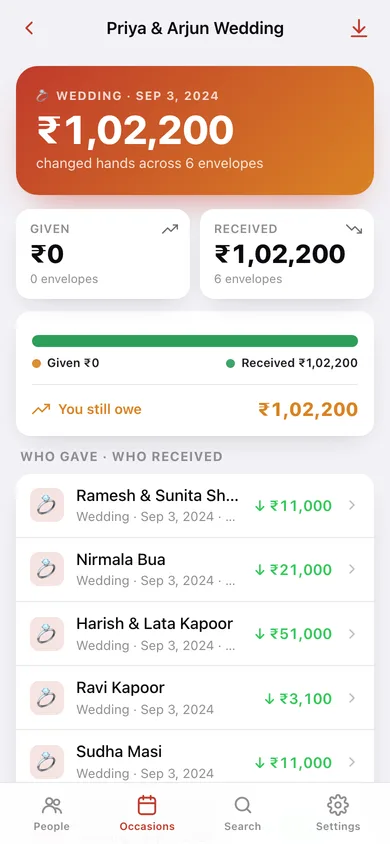
Every entry sharing an event name — 'Priya & Arjun Wedding', 'Diwali 2025' — groups into one occasion view showing who gave, who received and the totals both ways.
Search the whole register
One search box across names, relations, cities, event names, occasions, notes and amounts — the thing a handwritten register can never do.
Rupee-aware, or not
Amounts print in Indian lakh grouping (11,11,000) for ₹, or standard grouping for dollars, pounds and dirhams if the family lives abroad. Export the whole register as CSV any time.
Screens
Every screen, rebuilt for the browser
-
1
People
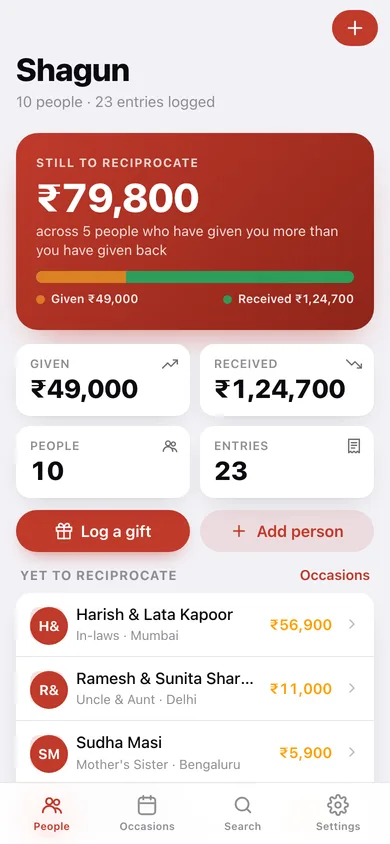
What you still owe across the family, given vs received, and everyone grouped by family side.
-
2
Person
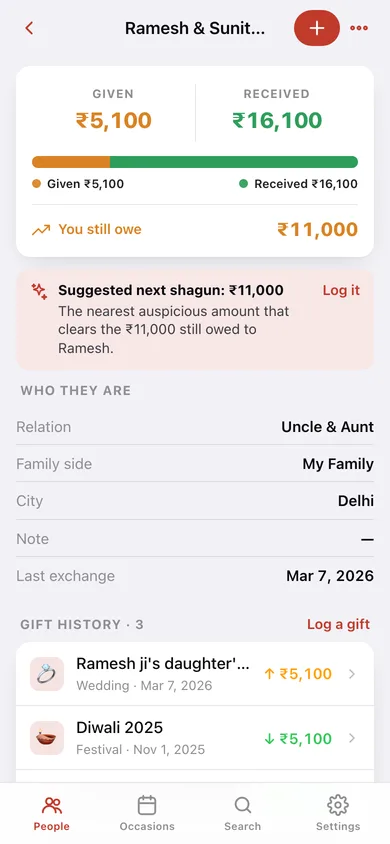
One person's reciprocity card, contact details, suggested next shagun and full gift history.
-
3
Occasion roll-up
Every envelope for one named event — who gave, who received, and the totals both ways.
-
4
Add or edit a person
Name, relation, family side, city and a note.
-
5
Log a gift
Amount with auspicious chips, direction, occasion type, event name, date and note.
-
6
Occasions
Money moved over the last 12 months, a breakdown by occasion type, and every event in the register.
-
7
Search
Full-text search across people, events, occasions, notes and amounts.
-
8
Settings
Currency and lakh grouping, default occasion, CSV and JSON export, sample register, erase.
Try it with sample data: Loads a ten-person family register — my family, spouse's family and friends across Delhi, Mumbai, Lucknow and Bengaluru — with 23 gift entries spanning a wedding two years ago, two Diwalis, a naming ceremony and this month's engagements. You can start fresh at any time.
Ready? It's free.
No account, no install, no subscription. Everything you do stays in this browser.
Your say
What should Shagun do? Tell us before we build it.
Tell us what to build next.
Comments need a free Google sign-in, so every one is from a real person.
Sign in with Google to commentNo comments yet — be the first to say what this app should do next.
Questions
Is the web version of Shagun free?+
Yes. Every screen is free to use: no subscription, no in-app purchases, no account.
Do I need an account?+
No. Open Shagun and start using it right away. Sign in with Google only if you want to upvote an app, save it to your list, or leave a comment.
Where is my data stored?+
Only in this browser's local storage. Nothing you enter is sent to our servers, so we can't see it, back it up, or restore it. Clearing site data, a private window, or another device starts empty. Export a backup from the in-app menu to keep it.
Is there a Shagun app for iPhone or Android?+
Not yet. Shagun is a community proposal: the browser version is complete, and we build the iPhone and Android app once 100 people upvote it. Upvoters get one email when it ships.