
Web app · Lifestyle
Sewbench
Patterns, projects and yardage on one bench — and the mods you always forget
A tagged pattern library with bookmarks and modification notes pinned to the tile page, a project log with a steps checklist, a fabric stash that decrements as you cut, cutting-list maths for your bolt width, and a wishlist. Free, offline, no account.
Stored in your browser only. Nothing you do in the web version is sent to our servers. Clear your browser data and it's gone — so export a backup from the in-app menu if you want to keep it.
This app is a community proposal.
Try the full browser version now. We build the iPhone and Android app once 100 people upvote it.
We'll email you once, when it ships. Unsubscribe anytime.
In your browser
What you can do in Sewbench on the web
Pattern library with page notes
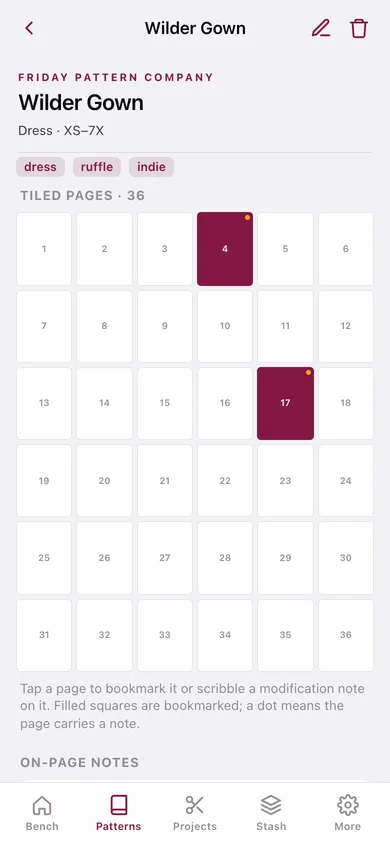
Title, maker, garment type, size range and tags, plus a tiled-page preview where you bookmark pages and pin a modification note — "shortened bodice 1.5 cm" — to the exact page it belongs on.
Project log that remembers
Pattern, fabric, size cut, modifications, start and finish dates, and a steps checklist that ticks the project finished when the last step is done.
Fabric stash by the yard
Every cut with content, colour, width, type, shop and where it is stored — with −0.5 yd and −1 yd buttons so the stash stays honest as you cut.
Cutting-list maths
The pattern's yardage scaled to your bolt width, with the real stretch factors (woven 1.00, 2-way 0.97, 4-way 0.90) and an 8% shrinkage allowance — then run against every cut in your stash.
Wishlist
Patterns to buy when they go on sale and fabric to hunt down at the next show, kept separate from the stash on purpose.
Yours, offline
No account, no cloud, no subscription. Export the stash and the project log as CSV, or everything as a JSON backup.
Screens
Every screen, rebuilt for the browser
-
1
Workbench
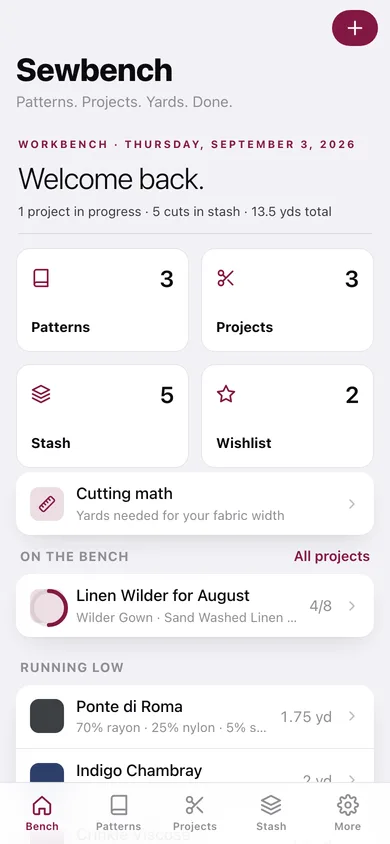
Projects in progress, cuts in stash and total yards, four tiles into the library, plus what is on the bench and what is running low.
-
2
Patterns
The library, searchable and filtered by tag, grouped by garment type.
-
3
Pattern detail
Maker, size range, tags, the tiled-page grid with bookmarks and on-page notes, and every project made from it.
-
4
Add a pattern
Title, maker, garment type, size range, tags and the tile layout of the PDF.
-
5
Projects
Every make grouped by finished, in progress and planned, with step progress.
-
6
Project detail
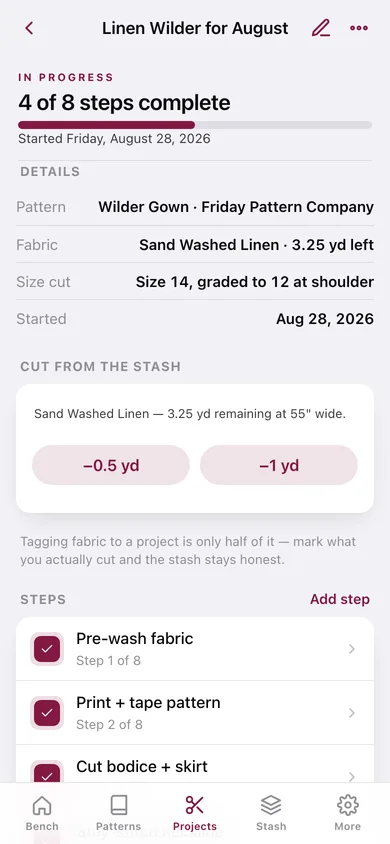
Status and step checklist, pattern and fabric, size cut, stash decrement buttons and the modification notes.
-
7
Start a project
Name, pattern, fabric from the stash, size cut, status, start date and modifications.
-
8
Stash
Total yards and cuts, yardage by fabric type, and every cut you own.
-
9
Fabric detail
Content, colour, width, type, shop and storage, cut-down buttons and the projects it is tagged to.
-
10
Add a cut
Name, content, colour, yards, width, type, shop and where it lives.
-
11
Cutting math
Yards needed for your fabric width, with the width ratio, stretch factor and shrinkage shown — and checked against your stash.
-
12
Wishlist
Patterns to buy and fabric to find, with a note on each.
-
13
Settings
Cutting-math and auto-finish preferences, CSV and JSON export, sample data and erase.
Try it with sample data: Loads a real bench: three indie patterns (Wilder Gown, Sapporo Coat, Sienna Maker Jacket) with bookmarks and on-page mod notes, five cuts of fabric totalling 13.5 yards, and three projects — one finished, one half-sewn, one still planned. You can start fresh at any time.
Ready? It's free.
No account, no install, no subscription. Everything you do stays in this browser.
Your say
What should Sewbench do? Tell us before we build it.
Tell us what to build next.
Comments need a free Google sign-in, so every one is from a real person.
Sign in with Google to commentNo comments yet — be the first to say what this app should do next.
Questions
Is the web version of Sewbench free?+
Yes. Every screen is free to use: no subscription, no in-app purchases, no account.
Do I need an account?+
No. Open Sewbench and start using it right away. Sign in with Google only if you want to upvote an app, save it to your list, or leave a comment.
Where is my data stored?+
Only in this browser's local storage. Nothing you enter is sent to our servers, so we can't see it, back it up, or restore it. Clearing site data, a private window, or another device starts empty. Export a backup from the in-app menu to keep it.
Is there a Sewbench app for iPhone or Android?+
Not yet. Sewbench is a community proposal: the browser version is complete, and we build the iPhone and Android app once 100 people upvote it. Upvoters get one email when it ships.