
Web app · Music
Setpay
Build the setlist and track what the gig actually paid
One road kit: a repertoire with key, tempo and length, setlists whose runtime updates as you drag songs in, and a gig log with pay, expenses and IRS-rate mileage that adds up to a Schedule C number. Free, no account.
Stored in your browser only. Nothing you do in the web version is sent to our servers. Clear your browser data and it's gone — so export a backup from the in-app menu if you want to keep it.
This app is a community proposal.
Try the full browser version now. We build the iPhone and Android app once 100 people upvote it.
We'll email you once, when it ships. Unsubscribe anytime.
In your browser
What you can do in Setpay on the web
Repertoire library
Every song you play with artist, key, tempo and performed length, plus cue notes — searchable and reusable across any set.
Setlist builder with live runtime
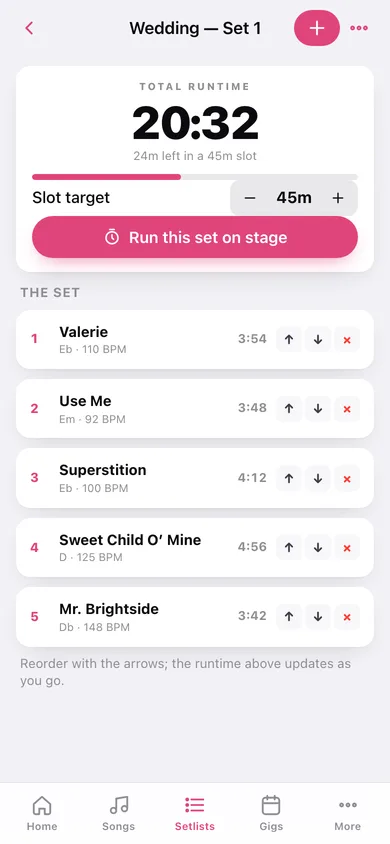
Pull songs in, reorder them, and watch the total against your slot target: green while you fit, amber the moment you go over.
Gig log with the money on it
Venue, date, set length, pay, direct expenses and round-trip miles per show, split into Upcoming and Played, with an unpaid tally on the home screen.
Schedule C earnings
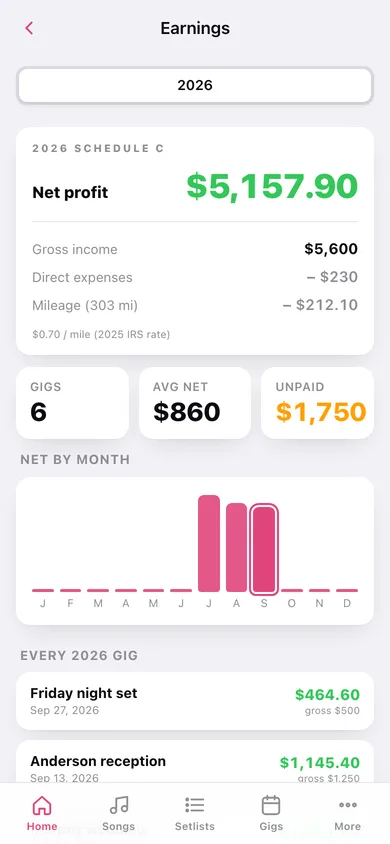
Gross income minus direct expenses minus mileage at the bundled 2025 IRS rate of $0.70/mile, by year, with net-by-month and a CSV export for your accountant.
Venue contacts
A card per room with the booker's name and number, address and load-in notes, linked to every gig you played there.
On-stage set timer
A full-screen clock you can read from a mic stand, with your running order underneath, a 5-minutes-left warning and an over-slot flash.
Screens
Every screen, rebuilt for the browser
-
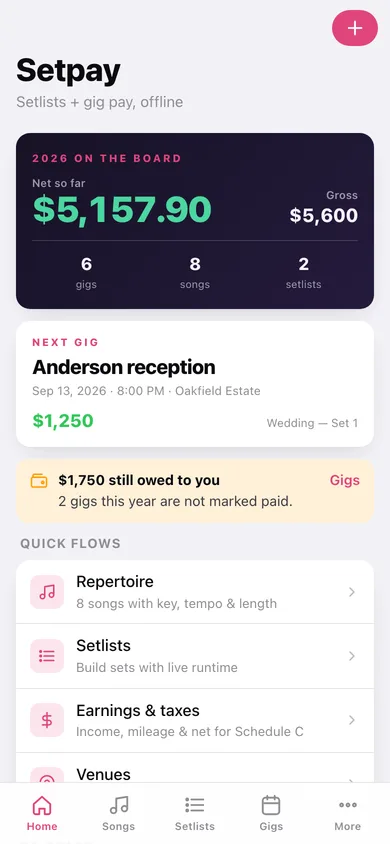
1
Backstage
This year's net and gross on the marquee, your next gig, unpaid money and quick flows.
-
2
Repertoire
Every song with key, tempo and length, searchable by title, artist or key.
-
3
Song
Title, artist, key, tempo and a minute/second length, plus cue notes.
-
4
Setlists
All your sets with runtime against the slot they have to fill.
-
5
Setlist
Live total runtime, the slot target stepper, the running order with reorder and remove, and a jump to the stage timer.
-
6
Gigs
Upcoming and played shows with pay, miles and net per card.
-
7
Gig detail
The money breakdown, paid toggle, venue card, setlist and notes.
-
8
Edit gig
Date, venue, setlist, set length, pay, expenses and miles with a live net preview.
-
9
Earnings & taxes
A year's gross, expenses, mileage deduction and net profit, net by month, and a CSV export.
-
10
Venues
Booker, phone, address and load-in notes for every room you play.
-
11
Venue
Add or edit a venue contact card.
-
12
Set timer
Full-screen on-stage clock with the running order, a 5-minute warning and an over-slot state.
-
13
More
Venues, earnings, the stage timer, the mileage rate, exports and erase.
Try it with sample data: Loads a working band: eight songs with keys and tempos, two setlists (a 45-minute wedding set and a 30-minute bar closer), three venues with bookers and load-in notes, and six gigs — four played, two booked — with pay, expenses and miles. You can start fresh at any time.
Ready? It's free.
No account, no install, no subscription. Everything you do stays in this browser.
Your say
What should Setpay do? Tell us before we build it.
Tell us what to build next.
Comments need a free Google sign-in, so every one is from a real person.
Sign in with Google to commentNo comments yet — be the first to say what this app should do next.
Questions
Is the web version of Setpay free?+
Yes. Every screen is free to use: no subscription, no in-app purchases, no account.
Do I need an account?+
No. Open Setpay and start using it right away. Sign in with Google only if you want to upvote an app, save it to your list, or leave a comment.
Where is my data stored?+
Only in this browser's local storage. Nothing you enter is sent to our servers, so we can't see it, back it up, or restore it. Clearing site data, a private window, or another device starts empty. Export a backup from the in-app menu to keep it.
Is there a Setpay app for iPhone or Android?+
Not yet. Setpay is a community proposal: the browser version is complete, and we build the iPhone and Android app once 100 people upvote it. Upvoters get one email when it ships.