
Web app · Health And Fitness
Sendlog Climbing Log
Log the send, watch the pyramid build, then hang on the timer
A private climbing logbook: boulders and routes logged in seconds with V-scale, Font and YDS kept on one ladder, sessions tagged gym or outdoor, a grade pyramid that shows your weak band, projects tracked across sessions, and six fingerboard protocols with a full-screen timer. Free, everything unlocked.
Stored in your browser only. Nothing you do in the web version is sent to our servers. Clear your browser data and it's gone — so export a backup from the in-app menu if you want to keep it.
This app is a community proposal.
Try the full browser version now. We build the iPhone and Android app once 100 people upvote it.
We'll email you once, when it ships. Unsubscribe anytime.
In your browser
What you can do in Sendlog Climbing Log on the web
One-tap send log
Grade, flash / send / repeat / project / fail, attempts, wall angle and hold colour — and the grade you type stays aligned across V-scale, Font and YDS on a shared ladder.
Sessions that make themselves
Logging a climb starts or joins today's session; each one shows volume, hardest send, flashes and total attempts, tagged gym or outdoor with the crag or gym name.
The grade pyramid
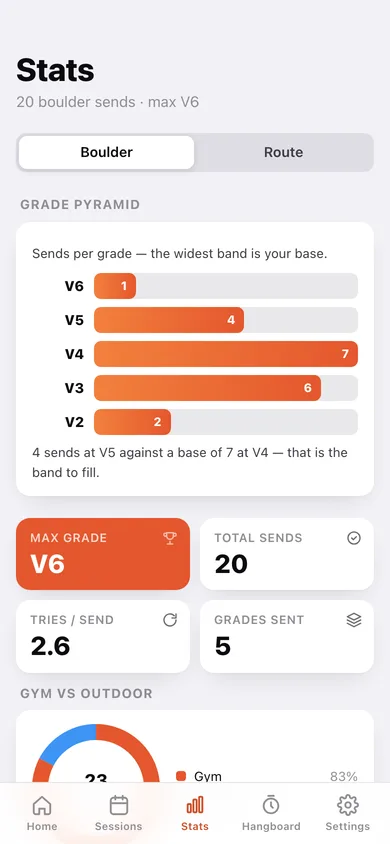
Sends per grade, widest band at the base, with the thin band between your base and your max called out — plus max grade, tries per send, flash rate and a gym-versus-outdoor split.
Projects across sessions
Pin an unsent climb, bank tries session by session, keep the beta, and mark the day you finally send it.
Hangboard timer, full library
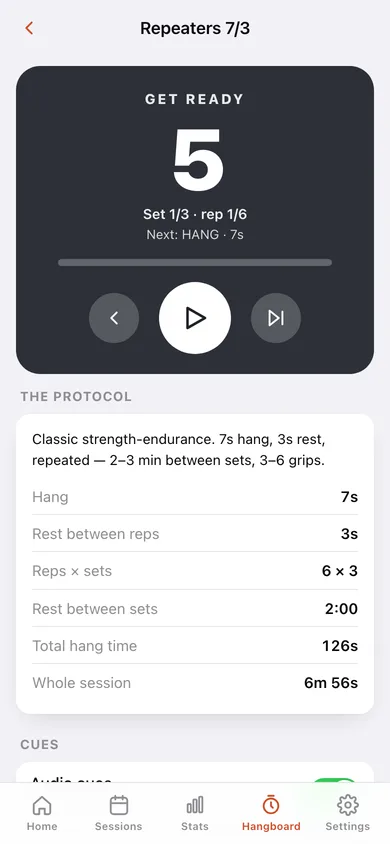
Repeaters 7/3, Max Hangs 10/180, Repeaters 5/2 and 10/5, 7/53 Max Hangs and Density 12/8 — plus your own hang/rest/sets builder — driven by a colour-changing countdown with bell, 3-2-1 beeps and spoken phases.
Body, skin and export
Log bodyweight, sleep and finger condition (flapper, splits, tweaky pulley) with trend charts, and export every climb as CSV or the whole logbook as JSON.
Screens
Every screen, rebuilt for the browser
-
1
Home
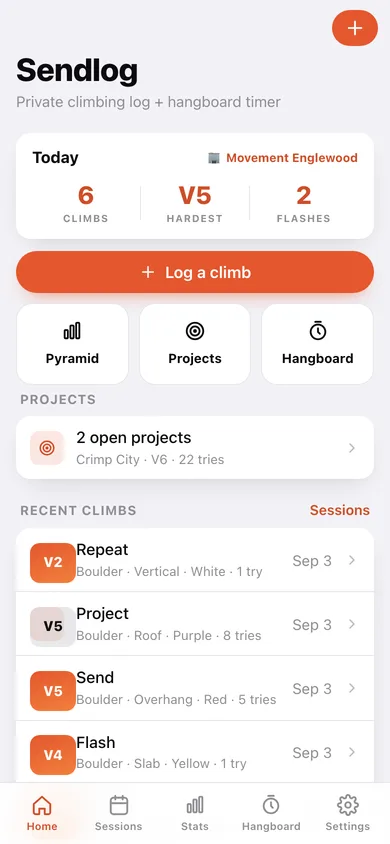
Today's session at a glance, the log button, quick tiles into pyramid, projects and hangboard, and your recent climbs.
-
2
Log a climb
Discipline, the grade ladder with live V / Font / YDS conversion, outcome, attempts, angle and colour.
-
3
Sessions
Every session with its volume, flashes and hardest send, filterable by gym or outdoor.
-
4
Session detail
Hardest send as the headline, climbs, sends, flashes and attempts, and every climb in order.
-
5
Stats
The grade pyramid, max grade, tries per send, gym-versus-outdoor split and flash rate.
-
6
Projects
Open and sent projects with the tries banked against each.
-
7
Project detail
Grade, beta, attempts and sessions worked, with +1 try and the send button.
-
8
Hangboard
The six bundled protocols plus your own, each with its summary and total session length.
-
9
Hangboard timer
Colour-changing full countdown per phase with set and rep counters, cues and a run history.
-
10
Body & skin
Bodyweight trend, sleep quality bars and every skin and finger check-in.
-
11
Settings
V-scale or Font, kg or lb, the full conversion table, CSV and JSON export, sample data and erase.
Try it with sample data: Loads six sessions across the last two and a half weeks — five bouldering (gym and Joe's Valley) and one route day at Shelf Road — plus three projects, six body-and-skin check-ins and two logged hangboard runs. You can start fresh at any time.
Ready? It's free.
No account, no install, no subscription. Everything you do stays in this browser.
Your say
What should Sendlog Climbing Log do? Tell us before we build it.
Tell us what to build next.
Comments need a free Google sign-in, so every one is from a real person.
Sign in with Google to commentNo comments yet — be the first to say what this app should do next.
Questions
Is the web version of Sendlog Climbing Log free?+
Yes. Every screen is free to use: no subscription, no in-app purchases, no account.
Do I need an account?+
No. Open Sendlog Climbing Log and start using it right away. Sign in with Google only if you want to upvote an app, save it to your list, or leave a comment.
Where is my data stored?+
Only in this browser's local storage. Nothing you enter is sent to our servers, so we can't see it, back it up, or restore it. Clearing site data, a private window, or another device starts empty. Export a backup from the in-app menu to keep it.
Is there a Sendlog Climbing Log app for iPhone or Android?+
Not yet. Sendlog Climbing Log is a community proposal: the browser version is complete, and we build the iPhone and Android app once 100 people upvote it. Upvoters get one email when it ships.