
Web app · Lifestyle
Seedstart
One frost date turns into every sowing date for your whole garden
Pick crops from a catalog of 24 vegetables and Seedstart counts back from your last frost: sow indoors, pot up, harden off, transplant, direct sow — as a weekly task list, a per-crop timeline and a season calendar. Free, offline, no account.
Stored in your browser only. Nothing you do in the web version is sent to our servers. Clear your browser data and it's gone — so export a backup from the in-app menu if you want to keep it.
This app is a community proposal.
Try the full browser version now. We build the iPhone and Android app once 100 people upvote it.
We'll email you once, when it ships. Unsubscribe anytime.
In your browser
What you can do in Seedstart on the web
Frost-date calendar engine
Enter your last spring frost once and every crop's dates are counted back from it — change the date and all your schedules rebuild at once, keeping what you have already ticked off.
24-crop catalog with real timing
Tomato through Swiss chard, each with indoor-start weeks, transplant weeks and direct-sow timing, searchable and filterable by whether you start it indoors or sow it straight into the ground.
Weekly task list
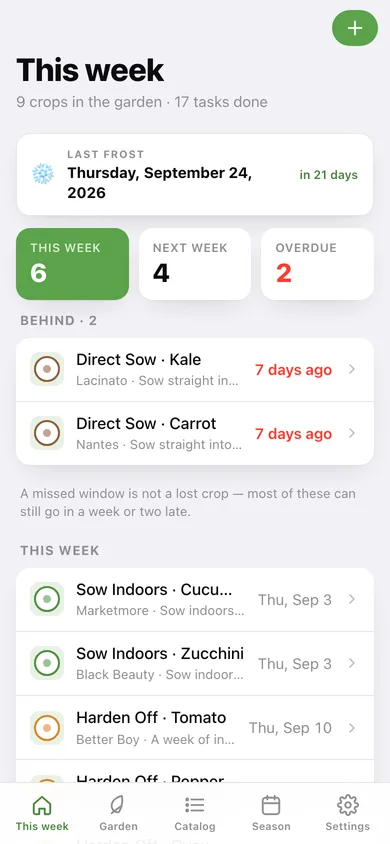
What is due this week and next, what you are behind on, and a one-tap tick for each job — sow indoors, pot up, harden off, transplant, direct sow.
Per-crop planting timeline
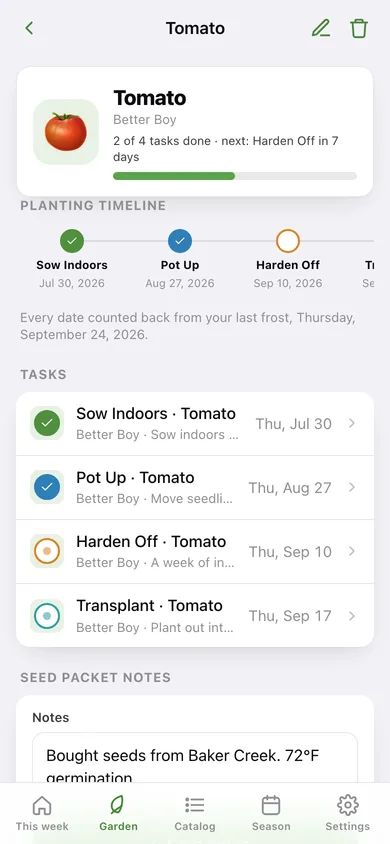
A horizontal timeline from first sowing to transplant, plus tasks, your seed-packet notes and the growing advice for that vegetable.
Season calendar
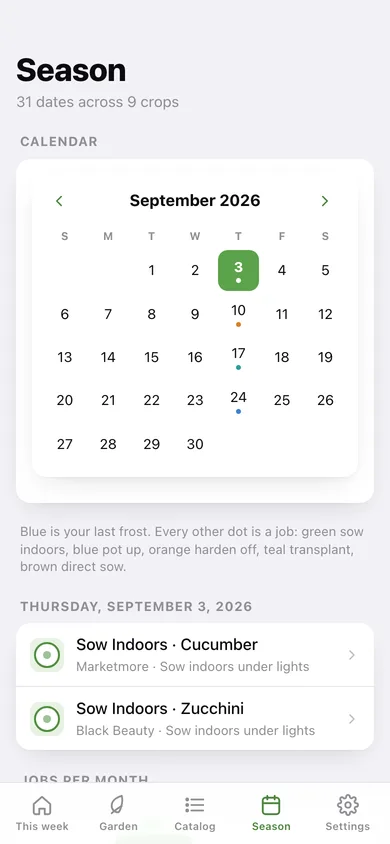
A month calendar with a colour-coded dot for every job and your frost date marked, jobs-per-month bars, and progress by job type.
Yours and offline
No weather API, no account, no sign-in. Export the whole calendar as CSV or a JSON backup whenever you like.
Screens
Every screen, rebuilt for the browser
-
1
This week
Your frost date, what is due this week and next, anything overdue, and every crop's progress.
-
2
My garden
Every crop you are growing with a progress ring and its next job.
-
3
Crop detail
The planting timeline, all tasks, seed-packet notes and growing advice for one crop.
-
4
Edit crop
Variety and seed-packet notes for a crop already in your garden.
-
5
Catalog
All 24 vegetables with your real sowing dates, filtered by start-indoors or direct-sow.
-
6
Season
A calendar of every job with your frost date marked, jobs per month, and progress by job type.
-
7
Frost date
Set the last spring frost, with common USDA-zone dates as shortcuts, and rebuild every schedule.
-
8
Settings
Frost date, rebuild, CSV and JSON export, sample data and erase.
Try it with sample data: Loads a Zone 7-style garden three weeks out from frost: nine crops (tomato, pepper, lettuce, broccoli, kale, cucumber, spinach, carrot, zucchini) with varieties, seed-packet notes, jobs already ticked off and two you are running late on. You can start fresh at any time.
Ready? It's free.
No account, no install, no subscription. Everything you do stays in this browser.
Your say
What should Seedstart do? Tell us before we build it.
Tell us what to build next.
Comments need a free Google sign-in, so every one is from a real person.
Sign in with Google to commentNo comments yet — be the first to say what this app should do next.
Questions
Is the web version of Seedstart free?+
Yes. Every screen is free to use: no subscription, no in-app purchases, no account.
Do I need an account?+
No. Open Seedstart and start using it right away. Sign in with Google only if you want to upvote an app, save it to your list, or leave a comment.
Where is my data stored?+
Only in this browser's local storage. Nothing you enter is sent to our servers, so we can't see it, back it up, or restore it. Clearing site data, a private window, or another device starts empty. Export a backup from the in-app menu to keep it.
Is there a Seedstart app for iPhone or Android?+
Not yet. Seedstart is a community proposal: the browser version is complete, and we build the iPhone and Android app once 100 people upvote it. Upvoters get one email when it ships.