
Web app · Lifestyle
Seatcraft
Drag your tables, seat your guests, and print the chart the week of the wedding
The offline wedding seating chart: a guest list with sides, tags and dietary needs, a drag-and-drop floorplan of rounds, rectangles and the head table, tag-aware seating suggestions with keep-apart flags, RSVP and meal counts, a day-of coordinator view and a printable plan. Free, no account.
Stored in your browser only. Nothing you do in the web version is sent to our servers. Clear your browser data and it's gone — so export a backup from the in-app menu if you want to keep it.
This app is a community proposal.
Try the full browser version now. We build the iPhone and Android app once 100 people upvote it.
We'll email you once, when it ships. Unsubscribe anytime.
In your browser
What you can do in Seatcraft on the web
Guest list that knows the room
Side (bride, groom, both), family / friends / colleagues, dietary need with allergy notes for the kitchen, plus-one and name, free-form tags, and notes — searchable and grouped.
Drag-and-drop floorplan
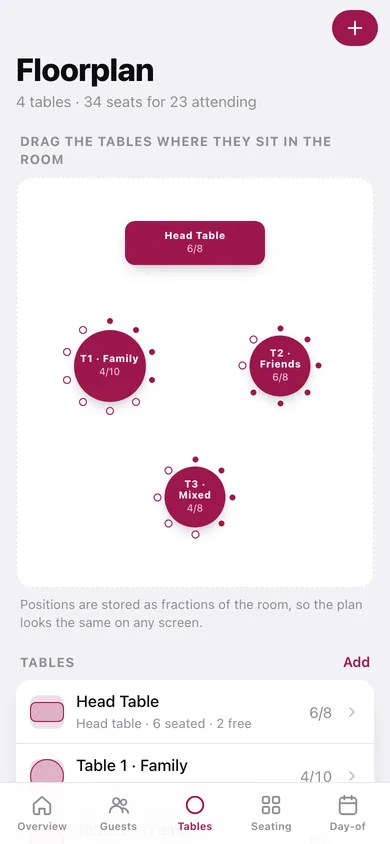
Round 8, 10 and 12, rectangles of 6 and 8, and the head table, dragged where they sit in the room. Positions are stored as fractions so the plan looks right on any screen.
Tag-aware seating suggestions
Guests sharing a tag get clustered and seated together, largest group into the largest table first — and two guests sharing a keep-apart flag are never put at the same table.
RSVP and meal counts
Yes / no / maybe / pending with meal choice and confirmed plus-ones, filtered into piles, with caterer-ready plate counts on the overview.
Day-of coordinator view
Type a name to get the guest's table and seat number, or scroll big per-table lists with meals and allergies for the tablet at the door.
Printable plan and CSV
Per-table lists plus an A–Z guest index as text, the whole guest list as CSV, or the plan straight to the clipboard for an email to the venue.
Screens
Every screen, rebuilt for the browser
-
1
Overview
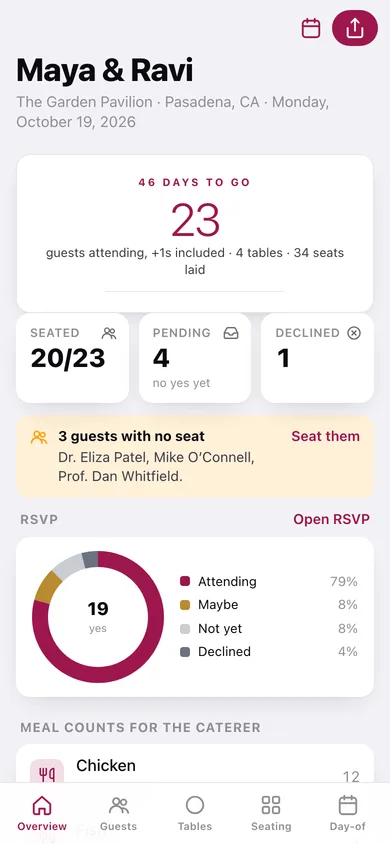
Head-count with +1s, days to go, seating and RSVP progress, clash and unseated warnings, meal counts and every table at a glance.
-
2
Guests
The whole invitation list, searchable and filterable by side, grouped by family, friends and colleagues.
-
3
Guest detail
RSVP, meal, plus-one, seat, side, dietary needs, tags and keep-apart flags for one guest.
-
4
Add a guest
Name, side, group, RSVP, plus-one, dietary need, meal and tags in one form.
-
5
Floorplan
The room as a canvas — drag rounds, rectangles and the head table where they sit, with chair dots showing who is seated.
-
6
Table detail
Every seat at one table, who is in it, their meal and allergy, and a keep-apart warning.
-
7
Seating board
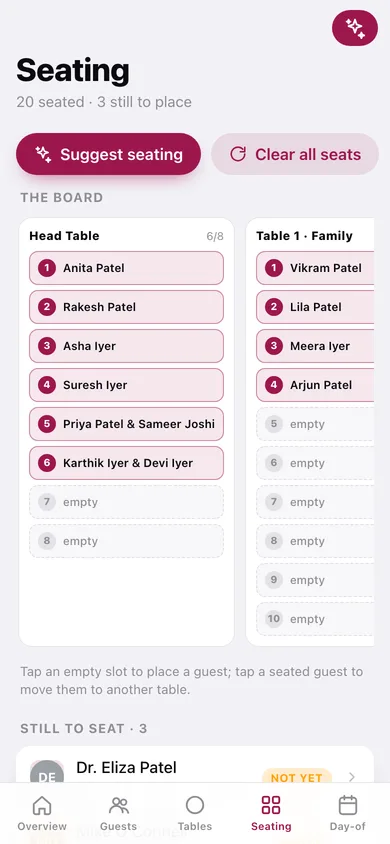
A column per table with numbered slots, the still-to-seat pool, and one-tap suggested seating.
-
8
RSVP tracker
Yes, maybe, declined and pending piles with quick response and meal changes.
-
9
Day-of
Search a guest to get their table, or read the big per-table lists with meals and allergies.
-
10
Export
The binder as text and CSV: per-table lists, A–Z index, guest list, clipboard and share.
-
11
Weddings
Every event you are planning, with attendance counts and which one is open.
-
12
New wedding
Couple name, venue, date and the guest count you expect.
-
13
Settings
Seating preferences, RSVP and export shortcuts, backup, sample data and erase.
Try it with sample data: Loads Maya & Ravi at The Garden Pavilion: 24 guests across both sides with tags, dietary needs, plus-ones and RSVPs, four tables (head, two rounds of 8, a round of 10) already partly seated — including a keep-apart pair kept at different tables. You can start fresh at any time.
Ready? It's free.
No account, no install, no subscription. Everything you do stays in this browser.
Your say
What should Seatcraft do? Tell us before we build it.
Tell us what to build next.
Comments need a free Google sign-in, so every one is from a real person.
Sign in with Google to commentNo comments yet — be the first to say what this app should do next.
Questions
Is the web version of Seatcraft free?+
Yes. Every screen is free to use: no subscription, no in-app purchases, no account.
Do I need an account?+
No. Open Seatcraft and start using it right away. Sign in with Google only if you want to upvote an app, save it to your list, or leave a comment.
Where is my data stored?+
Only in this browser's local storage. Nothing you enter is sent to our servers, so we can't see it, back it up, or restore it. Clearing site data, a private window, or another device starts empty. Export a backup from the in-app menu to keep it.
Is there a Seatcraft app for iPhone or Android?+
Not yet. Seatcraft is a community proposal: the browser version is complete, and we build the iPhone and Android app once 100 people upvote it. Upvoters get one email when it ships.