
Web app · Sports
ScentBook
Sixteen leg counters per dog, in one coloured grid you can read at a glance
Log each search ringside, watch the AKC element-by-level grid seal cell by cell, follow the NACSW ladder from ORT to Summit, and let the title engine tell you exactly which class to enter next. Free, no install, no account.
Stored in your browser only. Nothing you do in the web version is sent to our servers. Clear your browser data and it's gone — so export a backup from the in-app menu if you want to keep it.
This app is a community proposal.
Try the full browser version now. We build the iPhone and Android app once 100 people upvote it.
We'll email you once, when it ships. Unsubscribe anytime.
In your browser
What you can do in ScentBook on the web
The leg grid
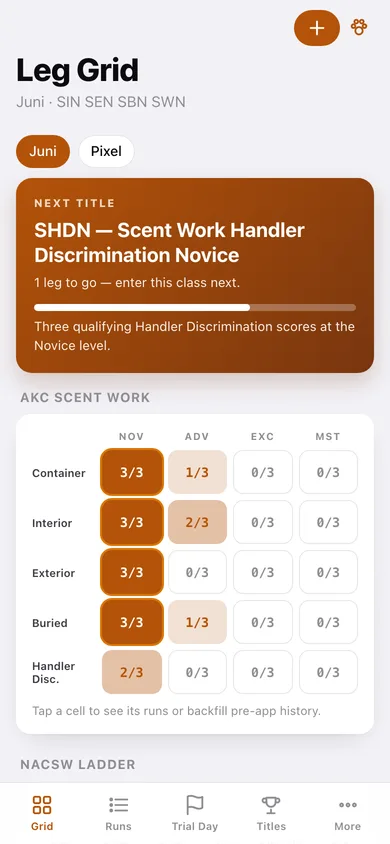
Container, Interior, Exterior, Buried and Handler Discrimination against Novice, Advanced, Excellent and Master — every cell shows legs held out of the three a title needs, and seals in gold when it is done.
Title engine on real requirements
All 25 AKC Scent Work titles (element titles, the SWN/SWA/SWE/SWM composites, Handler Discrimination, Detective) plus the seven NACSW rungs, with the exact legs remaining for each.
Ringside run log
Venue, element, level, search time, hides found and missed, faults, Q or NQ, placement, judge and the note you swear you will remember — logged in seconds between runs.
Grid-tap backfill
Already mid-career? Tap legs you earned before the app straight into a cell and the standings recompute instantly.
Trial-day mode
The day's running order across every dog, a warm-up countdown with a bell, and one-tap scoring of a planned entry.
Element analytics
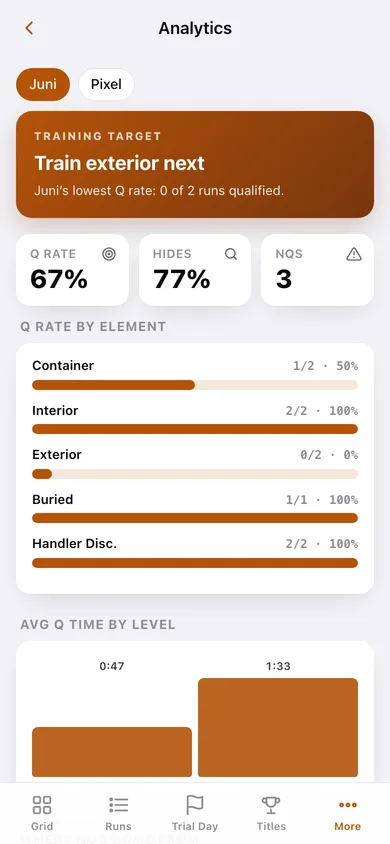
Which element costs the most NQs, average Q time by level, where NQs come from, and a training target picked from your own lowest Q rate.
Multi-dog kennel and export
Every dog keeps its own grid, ladder and history, and any dog's title history plus every scored search downloads as a CSV.
Screens
Every screen, rebuilt for the browser
-
1
Leg grid
The signature screen: next-title ribbon, the AKC element-by-level grid, the NACSW ladder and the dog's Q rate.
-
2
Cell detail
One element-and-level cell: the runs inside it, legs to go, and one-tap backfill of pre-app history.
-
3
Run log
Every search grouped by trial day with Q or NQ, search time and element, filterable to Q, NQ or planned entries.
-
4
Search detail
One search in full — hides found, faults, placement, judge and your ringside note.
-
5
Log a search
The ringside form: dog, venue, trial, element, level, minutes and seconds, hides, faults, Q, placement, judge and notes.
-
6
Trial day
The upcoming trial's running order across dogs, a warm-up countdown with a bell, and one-tap scoring.
-
7
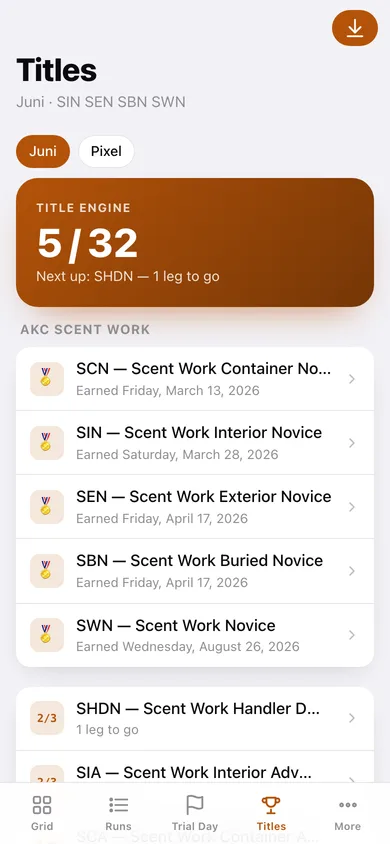
Titles
Earned titles with the date they sealed, then everything in progress sorted by fewest legs remaining, per venue.
-
8
Analytics
Q rate by element, average Q time by level, where NQs come from, and the element to train next.
-
9
Kennel
Every dog with call name, registered name, breed, registration numbers and its own title line.
-
10
Title history
A certificate list of earned titles plus every scored search, previewed and downloadable as CSV.
-
11
More
Warm-up length, whether the NACSW ladder shows, backup export, re-check titles, sample data and erase.
Try it with sample data: Loads two dogs — Juni the Golden and Pixel the rescue — with three trials, a backfilled Novice season, an in-progress Advanced campaign, a NACSW ORT and NW1 pass, and three planned entries waiting in trial-day mode. You can start fresh at any time.
Ready? It's free.
No account, no install, no subscription. Everything you do stays in this browser.
Your say
What should ScentBook do? Tell us before we build it.
Tell us what to build next.
Comments need a free Google sign-in, so every one is from a real person.
Sign in with Google to commentNo comments yet — be the first to say what this app should do next.
Questions
Is the web version of ScentBook free?+
Yes. Every screen is free to use: no subscription, no in-app purchases, no account.
Do I need an account?+
No. Open ScentBook and start using it right away. Sign in with Google only if you want to upvote an app, save it to your list, or leave a comment.
Where is my data stored?+
Only in this browser's local storage. Nothing you enter is sent to our servers, so we can't see it, back it up, or restore it. Clearing site data, a private window, or another device starts empty. Export a backup from the in-app menu to keep it.
Is there a ScentBook app for iPhone or Android?+
Not yet. ScentBook is a community proposal: the browser version is complete, and we build the iPhone and Android app once 100 people upvote it. Upvoters get one email when it ships.