
Web app · Productivity
Scanrock
A document archive that never deletes anything and never uploads anything
Keep every receipt, lease, warranty and visit summary as a multi-page document whose text is searchable to the word, tagged the way you think, exported as text, Markdown or a CSV index — and stored only in this browser. Free, no account, no install.
Stored in your browser only. Nothing you do in the web version is sent to our servers. Clear your browser data and it's gone — so export a backup from the in-app menu if you want to keep it.
This app is a community proposal.
Try the full browser version now. We build the iPhone and Android app once 100 people upvote it.
We'll email you once, when it ships. Unsubscribe anytime.
In your browser
What you can do in Scanrock on the web
Multi-page documents
One document, as many pages as it takes — each with its own header line and text, renumbered automatically when you add or delete a page.
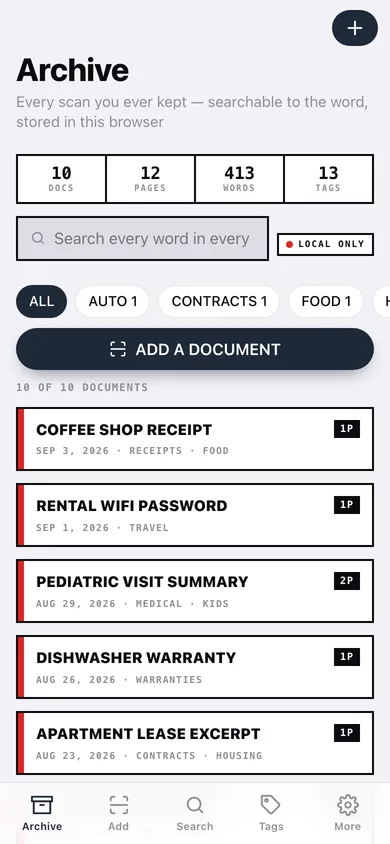
Full-text search that shows the line that matched
Search titles, tags and every line of every page. Results carry the matching lines with the term highlighted and a hit count, not just a filename.
Flat tags, no folder tree
Sixteen suggested tags (receipts, invoices, ids, contracts, medical, school, warranties, auto, housing, travel, utilities, work, taxes, food, kids, pets) or your own; rename a tag once and it rewrites across every document.
Export to anywhere you control
One document or the whole archive as plain text, Markdown or a CSV index, previewed before you download it — plus a full JSON backup.
Permanent by design
No cleanup feature, no expiry, no auto-deletion. A document leaves the archive only when you delete it yourself.
Nothing leaves the browser
No account, no sync, no network call — the publishing harness refuses a module that makes one. Importing a text file reads it locally and uploads nothing.
Screens
Every screen, rebuilt for the browser
-
1
Archive
Every document with page counts, tags and live search across all recognized text.
-
2
Document
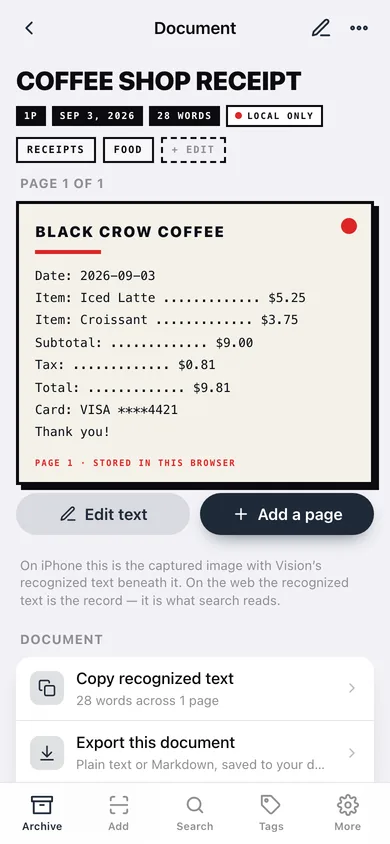
The page sheet with its recognized text, page selector, tags, copy and export.
-
3
Add a document
Title, tags, header line and text — typed, pasted or imported from a local text file.
-
4
Page
Add or rewrite one page of a document; deleting a page renumbers the rest.
-
5
Search
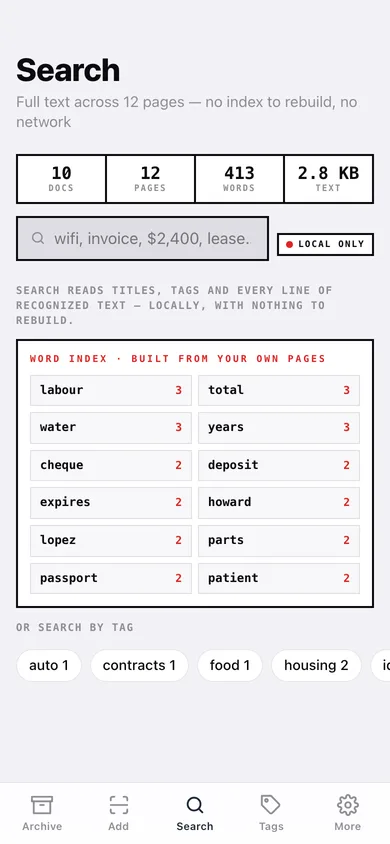
Full-text search with the matching lines highlighted, hit counts and common-word suggestions.
-
6
Tags
Every tag with its document count, plus rename, remove and an untagged list.
-
7
Export
Plain text, Markdown or CSV index, for one document or the whole archive, with a preview.
-
8
Settings
Archive stats, the no-cloud manifesto, backup, sample data and erase.
Try it with sample data: Loads nine documents across twelve pages from the last six weeks — a coffee receipt, a rental wifi password, a two-page pediatric visit summary, a dishwasher warranty, a lease excerpt, an auto insurance card, a plumber invoice, a two-page school field-trip form, a utility bill and a passport renewal checklist. You can start fresh at any time.
Ready? It's free.
No account, no install, no subscription. Everything you do stays in this browser.
Your say
What should Scanrock do? Tell us before we build it.
Tell us what to build next.
Comments need a free Google sign-in, so every one is from a real person.
Sign in with Google to commentNo comments yet — be the first to say what this app should do next.
Questions
Is the web version of Scanrock free?+
Yes. Every screen is free to use: no subscription, no in-app purchases, no account.
Do I need an account?+
No. Open Scanrock and start using it right away. Sign in with Google only if you want to upvote an app, save it to your list, or leave a comment.
Where is my data stored?+
Only in this browser's local storage. Nothing you enter is sent to our servers, so we can't see it, back it up, or restore it. Clearing site data, a private window, or another device starts empty. Export a backup from the in-app menu to keep it.
Is there a Scanrock app for iPhone or Android?+
Not yet. Scanrock is a community proposal: the browser version is complete, and we build the iPhone and Android app once 100 people upvote it. Upvoters get one email when it ships.