
Web app · Productivity
SAR K9 Log
The append-only K9 record book — training hours, callouts and amendments, in your browser
Log air scent, trailing, tracking, HRD, avalanche, article search and obedience sessions that lock on save; correct them with dated, annotated amendments; watch hours roll up by discipline and by month; produce the whole record on demand. Free, no install.
Stored in your browser only. Nothing you do in the web version is sent to our servers. Clear your browser data and it's gone — so export a backup from the in-app menu if you want to keep it.
This app is a community proposal.
Try the full browser version now. We build the iPhone and Android app once 100 people upvote it.
We'll email you once, when it ships. Unsubscribe anytime.
In your browser
What you can do in SAR K9 Log on the web
Entries lock on save
A saved training session is never silently edited. The journal reads as one continuous, unedited history — the standard SAR doctrine and canine records guidance actually ask for.
Annotate, don't erase
Every correction is a dated amendment carrying the field changed, the original value, the corrected value and the reason — shown beside the original for the rest of the record's life.
Hours by discipline and by month
Career and 12/6/3-month totals across all seven working disciplines, a hours-per-month bar chart and a month × discipline rollup grid — the numbers renewals and unit reviews ask for.
Deployments kept apart from training
Incident name, requesting agency, county, hours on task, area covered, task assigned, outcome (find / no find / suspended / area cleared) and finds — with the same lock and the same amendment trail.
Certification tracker with expiry flags
Organization, evaluator, date earned and expiry, sorted by what lapses first, with EXPIRES SOON and EXPIRED tags on a window you set yourself.
A records package you can produce in minutes
Chronological training and deployment record, hour totals and every amendment with its annotation — previewed on screen, copied or downloaded as a plain-text file.
Screens
Every screen, rebuilt for the browser
-
1
Training log
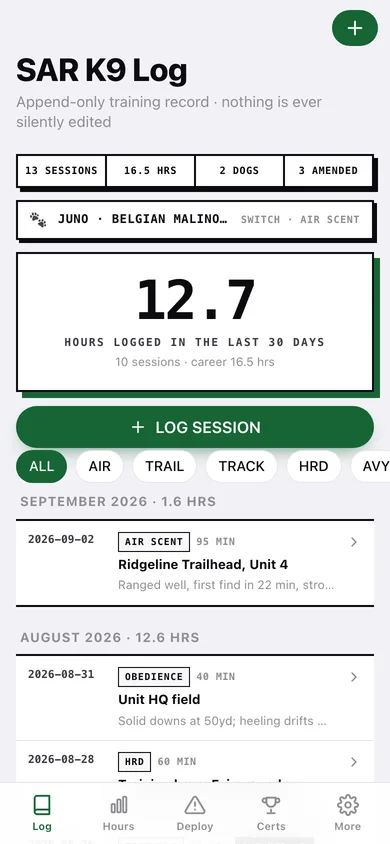
Hours in the last 30 days, the open record book, and every session grouped by month with amendment tags.
-
2
Session record
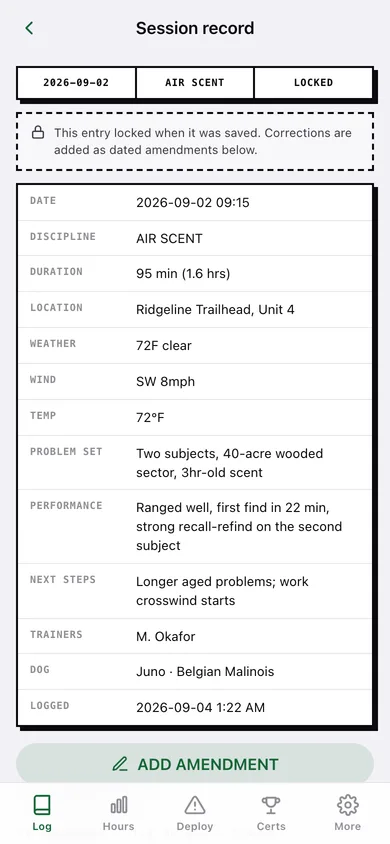
The locked entry field by field, with its amendment trail underneath.
-
3
Log session
Discipline, duration, location, weather and wind, the problem set, the dog's performance and next steps.
-
4
Add amendment
Pick the field, see the untouched original, enter the corrected value and the reason.
-
5
Hour totals
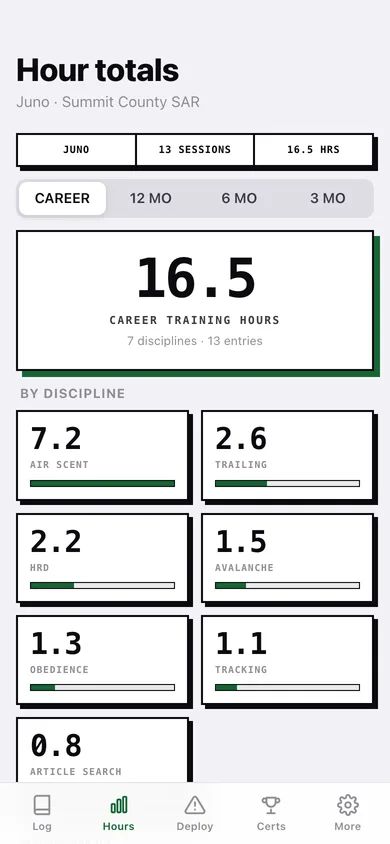
Career or 3/6/12-month hours, per-discipline totals, hours per month and the month × discipline rollup.
-
6
Deployments
Callouts with hours on task, outcome tags and finds.
-
7
Deployment record
The locked callout record with agency, area covered, task, outcome and amendments.
-
8
New deployment
Incident, agency, county, hours on task, area covered, task and outcome.
-
9
Certifications
Evaluations sorted by expiry with EXPIRED and EXPIRES SOON flags.
-
10
Record books
One book per dog, with career hours, callout count and active/retired status.
-
11
Records export
Choose what to include, preview the full record and download or copy it.
-
12
More
Default session length, the certification-expiry window, backup, sample data and erase.
Try it with sample data: Loads two record books — Juno, an active Belgian Malinois, and Rigg, a retired German Shepherd — with fourteen training sessions over the last six weeks, three amendments, three deployments and five certifications including one lapsed and one expiring soon. You can start fresh at any time.
Ready? It's free.
No account, no install, no subscription. Everything you do stays in this browser.
Your say
What should SAR K9 Log do? Tell us before we build it.
Tell us what to build next.
Comments need a free Google sign-in, so every one is from a real person.
Sign in with Google to commentNo comments yet — be the first to say what this app should do next.
Questions
Is the web version of SAR K9 Log free?+
Yes. Every screen is free to use: no subscription, no in-app purchases, no account.
Do I need an account?+
No. Open SAR K9 Log and start using it right away. Sign in with Google only if you want to upvote an app, save it to your list, or leave a comment.
Where is my data stored?+
Only in this browser's local storage. Nothing you enter is sent to our servers, so we can't see it, back it up, or restore it. Clearing site data, a private window, or another device starts empty. Export a backup from the in-app menu to keep it.
Is there a SAR K9 Log app for iPhone or Android?+
Not yet. SAR K9 Log is a community proposal: the browser version is complete, and we build the iPhone and Android app once 100 people upvote it. Upvoters get one email when it ships.