
Web app · Health And Fitness
SafeBite
Three shelves that remember what still works for your body on a GLP-1
Rate a meal in five seconds — Fine, Queasy or Rough — and SafeBite stamps it with your dose and shot-week day. Foods live on Works, Iffy or No-Go with the portion that stays comfortable, and your Works shelf becomes a shareable My Safe Foods card. Free, no account.
Stored in your browser only. Nothing you do in the web version is sent to our servers. Clear your browser data and it's gone — so export a backup from the in-app menu if you want to keep it.
This app is a community proposal.
Try the full browser version now. We build the iPhone and Android app once 100 people upvote it.
We'll email you once, when it ships. Unsubscribe anytime.
In your browser
What you can do in SafeBite on the web
Three-shelf food memory
Every food you try sits on Works, Iffy or No-Go with its portion ceiling, its notes and its whole check-in history — and moves shelves the moment your body changes.
Five-second meal check-in
Pick the food (recents first), tap a face, optionally add the portion and symptom tags. Your dose and shot-week day are stamped automatically.
Dose and shot-week context
Record the medication, dose and shot day your prescriber set; every check-in inherits it, so a food's dose history and day-2-vs-day-6 split build themselves.
My Safe Foods card
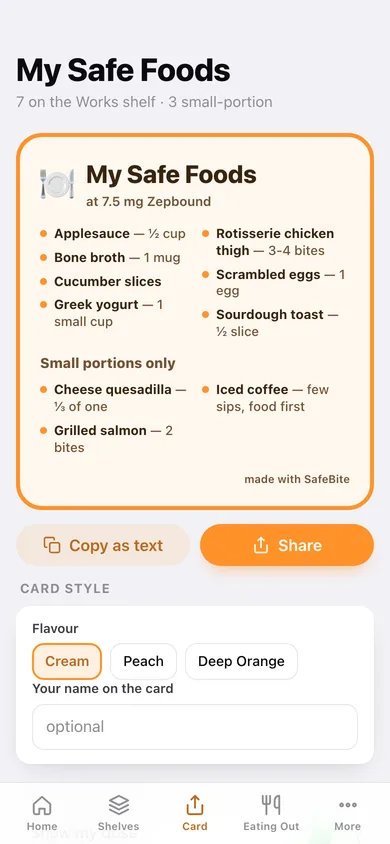
Turn the Works shelf into a clean two-column card in cream, peach or deep orange — with or without your name, dose and portion ceilings — then copy, share or save it.
Restaurant survival list
Saved spots with the exact orders that have never let you down, the portion note that keeps them that way, and when each last worked.
Patterns and a dietitian export
Outcomes by shot day, by food category and by dose step, plus biggest shelf movers — exportable as JSON or a per-meal CSV.
Screens
Every screen, rebuilt for the browser
-
1
Home
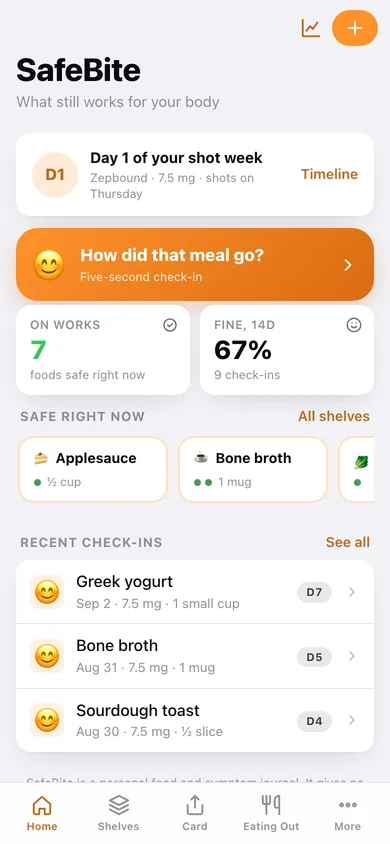
Which day of your shot week it is, the five-second check-in, your Works shelf and recent meals.
-
2
Meal check-in
Pick the food, tap Fine / Queasy / Rough, add portion and symptom tags.
-
3
Shelves
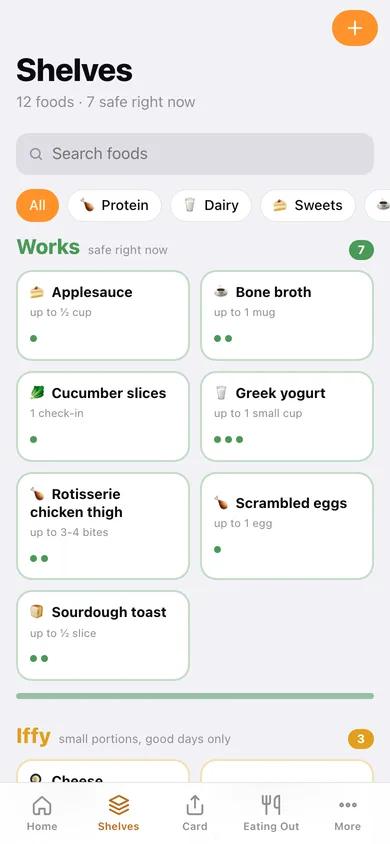
Works, Iffy and No-Go with search and category filters, each food showing its portion ceiling and last outcomes.
-
4
Food detail
Shelf switcher, dose history, shot-week split and every check-in for one food.
-
5
Add or edit a food
Name, category, shelf and the portion that stays comfortable.
-
6
Meal history
Every check-in grouped by day, filterable by outcome.
-
7
Patterns
Outcomes by shot day, by food category and by dose, plus the foods that changed shelves recently.
-
8
My Safe Foods card
The shareable card built from your Works shelf, in three flavours with your own name and dose.
-
9
Dose timeline
The medication, dose and shot day you recorded, and which one is current.
-
10
Eating Out
Saved restaurants with the count of proven orders and when each last worked.
-
11
Spot detail
One restaurant's proven orders with portion notes and a one-tap “it worked again”.
-
12
More
Symptom tags, JSON and CSV export, sample data and erase.
Try it with sample data: Loads a Zepbound titration from 5 mg to 7.5 mg with Thursday shots, twelve foods across all three shelves, eighteen meal check-ins over the last six weeks and two restaurants with three proven orders. You can start fresh at any time.
Ready? It's free.
No account, no install, no subscription. Everything you do stays in this browser.
Your say
What should SafeBite do? Tell us before we build it.
Tell us what to build next.
Comments need a free Google sign-in, so every one is from a real person.
Sign in with Google to commentNo comments yet — be the first to say what this app should do next.
Questions
Is the web version of SafeBite free?+
Yes. Every screen is free to use: no subscription, no in-app purchases, no account.
Do I need an account?+
No. Open SafeBite and start using it right away. Sign in with Google only if you want to upvote an app, save it to your list, or leave a comment.
Where is my data stored?+
Only in this browser's local storage. Nothing you enter is sent to our servers, so we can't see it, back it up, or restore it. Clearing site data, a private window, or another device starts empty. Export a backup from the in-app menu to keep it.
Is there a SafeBite app for iPhone or Android?+
Not yet. SafeBite is a community proposal: the browser version is complete, and we build the iPhone and Android app once 100 people upvote it. Upvoters get one email when it ships.