
Web app · Utilities
RxScribe
Turn the consult you just had into a printable Rx — in the browser
Type, paste or dictate a Hindi / English / Hinglish OPD consult; RxScribe hears the complaints, drafts a prescription from 27 commonly-prescribed Indian brands, and you review, edit, confirm and print. Free, nothing to install.
Stored in your browser only. Nothing you do in the web version is sent to our servers. Clear your browser data and it's gone — so export a backup from the in-app menu if you want to keep it.
This app is a community proposal.
Try the full browser version now. We build the iPhone and Android app once 100 people upvote it.
We'll email you once, when it ships. Unsubscribe anytime.
In your browser
What you can do in RxScribe on the web
Bilingual complaint engine
The same offline trigger table as the iPhone app — bukhar, खांसी, khatti dakar, loose motions — with nukta folding so बुख़ार and बुखार both match, and every match shown with the phrase it heard.
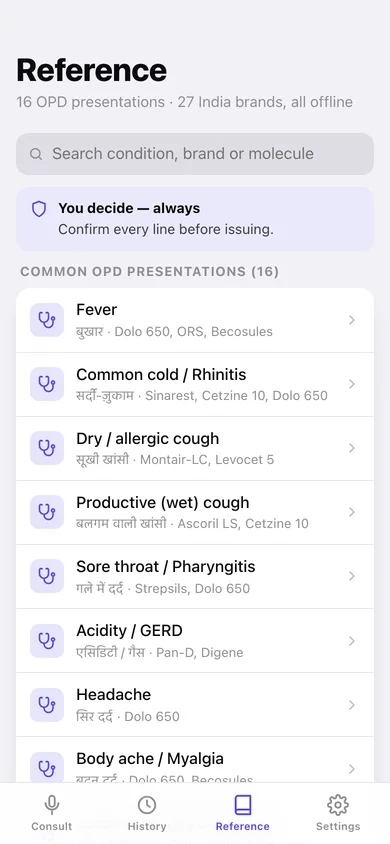
16 OPD presentations, 27 India brands
Fever, acidity, loose motions, allergy, worms, hypertension and more, each mapped to its first-line options with real default dosing (Dolo 650 · TDS · after food · 3 days) and safety notes.
A draft you edit, never an order
Tap any medicine to change frequency, timing, duration or note, swap to a same-molecule brand, remove it, or add one from the formulary — nothing is issued until you confirm.
Printable prescription
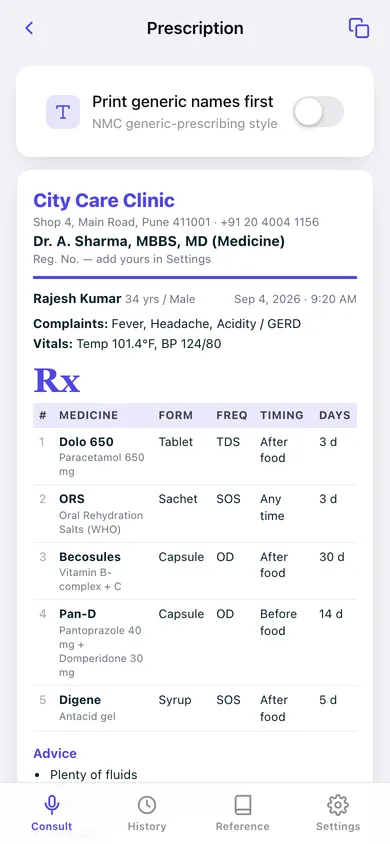
Your clinic letterhead, patient line, complaints, vitals, the Rx table, advice and follow-up, plus a signature block — print it, copy it, or download it as text.
Generic-first prescribing
One toggle prints the molecule and strength first with the brand underneath, in line with NMC generic-prescribing guidance.
History that stays yours
Consults per week, your most common complaint, a searchable archive of every transcript and draft — all saved in this browser, exportable as JSON or CSV.
Screens
Every screen, rebuilt for the browser
-
1
Consult
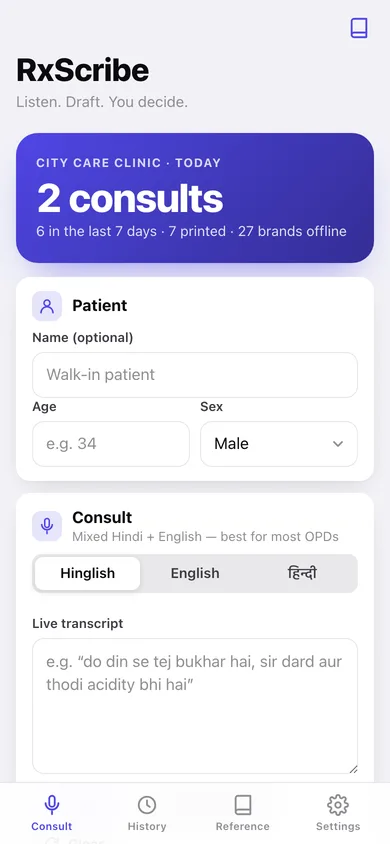
Today's count, the patient card, the live transcript with dictation, and the complaints RxScribe hears as you type.
-
2
Prescription
The finished Rx on clinic letterhead — medicine table, advice, follow-up and signature block.
-
3
Reference
Every OPD presentation with its Hindi name and first-line options, plus the whole formulary by category.
-
4
Consult detail
One saved consult: patient, complaints with the phrase heard, medicines, advice, red flags and the transcript.
-
5
Draft Rx
The editor: patient details, tap-to-edit medicine cards, brand swaps, advice and follow-up, then confirm.
-
6
History
Consults per week, most common complaint, and a search across patients, complaints and medicines.
-
7
Presentation
One complaint in full: first-line medicines, non-drug advice and the red flags that mean refer.
-
8
Medicine
Default dosing, the safety note, same-molecule brands, and the presentations it is drafted for.
-
9
Settings
Clinic letterhead, generic-first prescribing, default language and follow-up, export and erase.
Try it with sample data: Loads eleven OPD consults from the last three weeks — fever with acidity, cough and cold, loose motions, a chronic BP review, a paediatric deworming — each with its transcript, detected complaints and drafted medicines, most already printed. You can start fresh at any time.
Ready? It's free.
No account, no install, no subscription. Everything you do stays in this browser.
Your say
What should RxScribe do? Tell us before we build it.
Tell us what to build next.
Comments need a free Google sign-in, so every one is from a real person.
Sign in with Google to commentNo comments yet — be the first to say what this app should do next.
Questions
Is the web version of RxScribe free?+
Yes. Every screen is free to use: no subscription, no in-app purchases, no account.
Do I need an account?+
No. Open RxScribe and start using it right away. Sign in with Google only if you want to upvote an app, save it to your list, or leave a comment.
Where is my data stored?+
Only in this browser's local storage. Nothing you enter is sent to our servers, so we can't see it, back it up, or restore it. Clearing site data, a private window, or another device starts empty. Export a backup from the in-app menu to keep it.
Is there a RxScribe app for iPhone or Android?+
Not yet. RxScribe is a community proposal: the browser version is complete, and we build the iPhone and Android app once 100 people upvote it. Upvoters get one email when it ships.