
Web app · Health And Fitness
Roxsplit
Run a Hyrox sim, tap at every changeover, see where the time went
A lap timer pre-loaded with the real race shape — eight 1 km runs, eight stations and the roxzone between them — plus per-station PRs and technique notes, an even-pacing plan for your goal finish, and a race log with plan vs actual. Free, offline, no account.
Stored in your browser only. Nothing you do in the web version is sent to our servers. Clear your browser data and it's gone — so export a backup from the in-app menu if you want to keep it.
This app is a community proposal.
Try the full browser version now. We build the iPhone and Android app once 100 people upvote it.
We'll email you once, when it ships. Unsubscribe anytime.
In your browser
What you can do in Roxsplit on the web
Simulation timer built on the race sequence
Full or half sim, pre-loaded run → roxzone → station → roxzone. One tap at every changeover captures 31 splits without you thinking about it.
Roxzone tracked as its own time
Transitions have no timer of their own but count fully toward your finish — Roxsplit shows exactly what share of your sim they ate.
All eight stations as first-class entities
SkiErg, sled push, sled pull, burpee broad jumps, row, farmers carry, sandbag lunges and wall balls — each with Open and Pro standards, a PR, a trend and your own technique notes.
Even-pacing plan for any goal time
Set a goal finish and get a target for every run (5.8% each), every station (2.8–6.6% each) and the whole roxzone budget (12.8%).
Plan vs actual on race day
Type your official splits next to the plan and every segment shows a signed delta, with the three biggest losses called out.
Station PRs fed automatically
Every station split from a sim lands in that station's history, so a sled push dropping from 4:10 to 3:20 shows up without extra logging.
Screens
Every screen, rebuilt for the browser
-
1
Train
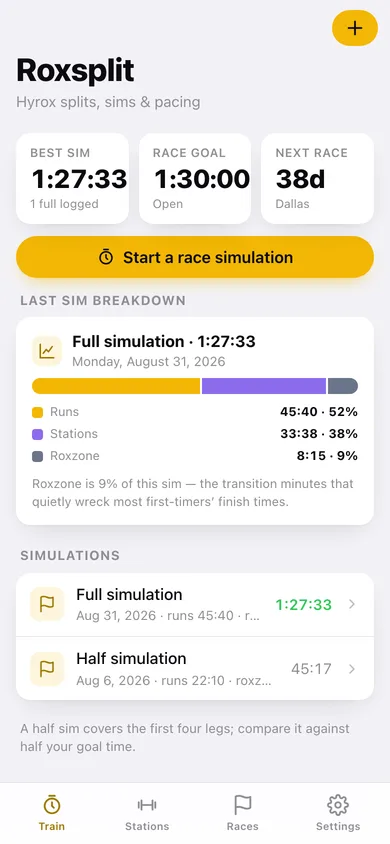
Best full sim, race goal, days to the next race, and the last sim's run/station/roxzone breakdown.
-
2
Sim summary
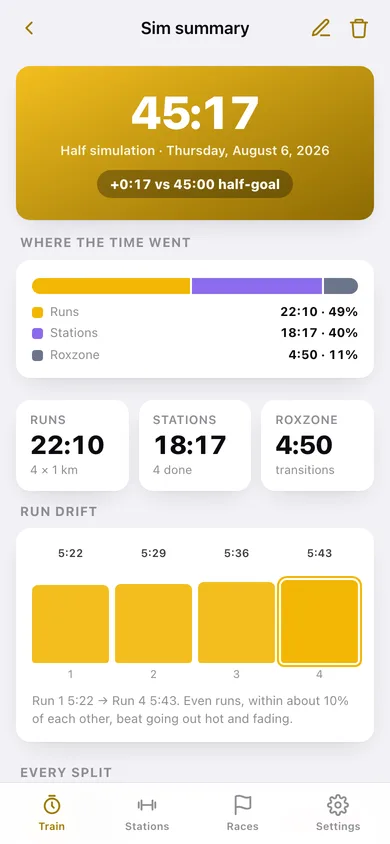
Total vs goal, where the time went, run drift across the eight legs and every split against its target.
-
3
Pacing plan
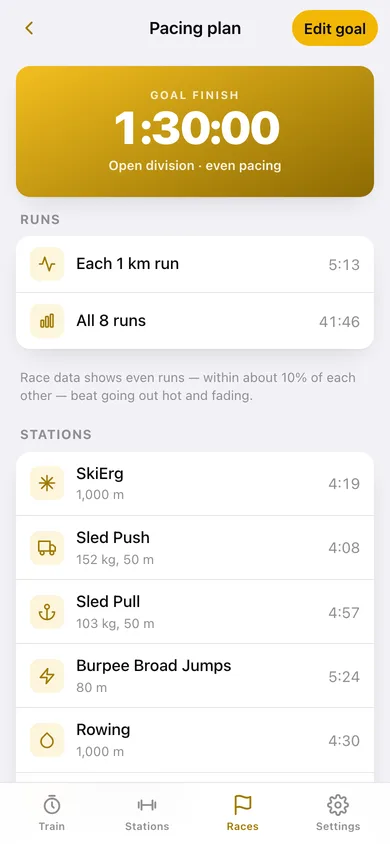
Target splits for every run, every station and the roxzone at your goal finish time.
-
4
Simulation timer
Lap timer pre-loaded with the race sequence — one tap at every changeover.
-
5
Stations
All eight stations with PRs against their pacing targets.
-
6
Station detail
PR, latest, target, race standard, trend, full history and technique notes.
-
7
Races
Upcoming and finished races plus the pacing plan card.
-
8
Race detail
Plan vs actual for every official split, with the biggest losses named.
-
9
Settings
Goal time, division, JSON backup, split CSV, sample data and erase.
Try it with sample data: Loads a six-week block: the eight stations with technique notes, 32 logged station attempts trending faster, a half sim and a full dress-rehearsal sim, a finished Hyrox Chicago with official splits, and Hyrox Dallas on the calendar. You can start fresh at any time.
Ready? It's free.
No account, no install, no subscription. Everything you do stays in this browser.
Your say
What should Roxsplit do? Tell us before we build it.
Tell us what to build next.
Comments need a free Google sign-in, so every one is from a real person.
Sign in with Google to commentNo comments yet — be the first to say what this app should do next.
Questions
Is the web version of Roxsplit free?+
Yes. Every screen is free to use: no subscription, no in-app purchases, no account.
Do I need an account?+
No. Open Roxsplit and start using it right away. Sign in with Google only if you want to upvote an app, save it to your list, or leave a comment.
Where is my data stored?+
Only in this browser's local storage. Nothing you enter is sent to our servers, so we can't see it, back it up, or restore it. Clearing site data, a private window, or another device starts empty. Export a backup from the in-app menu to keep it.
Is there a Roxsplit app for iPhone or Android?+
Not yet. Roxsplit is a community proposal: the browser version is complete, and we build the iPhone and Android app once 100 people upvote it. Upvoters get one email when it ships.