
Web app · Productivity
Robosafe
A safety log for your household humanoid — the paper trail before you need it
Log every mishap and odd behavior with severity, date and notes, keep the firmware history beside it, and finish the five-item insurance prep checklist. One tap builds the report a carrier or manufacturer asks for. Free, kept on your device.
Stored in your browser only. Nothing you do in the web version is sent to our servers. Clear your browser data and it's gone — so export a backup from the in-app menu if you want to keep it.
This app is a community proposal.
Try the full browser version now. We build the iPhone and Android app once 100 people upvote it.
We'll email you once, when it ships. Unsubscribe anytime.
In your browser
What you can do in Robosafe on the web
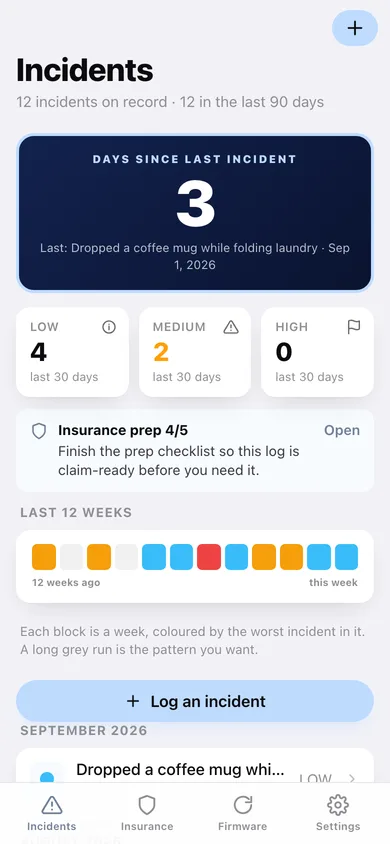
Days since last incident
The counter every safety board has, backed by the real log — plus low, medium and high counts for the last 30 days.
Incident log with severity
What happened, when, how bad and what you did about it — the same three-level severity the iPhone app uses, with guidance for each level.
Twelve-week severity strip
One block per week coloured by the worst incident in it, so a run of quiet weeks — or a bad patch — is visible at a glance.
Firmware history that lines up with incidents
Log each version and its install date; every version shows how many incidents happened while it was running.
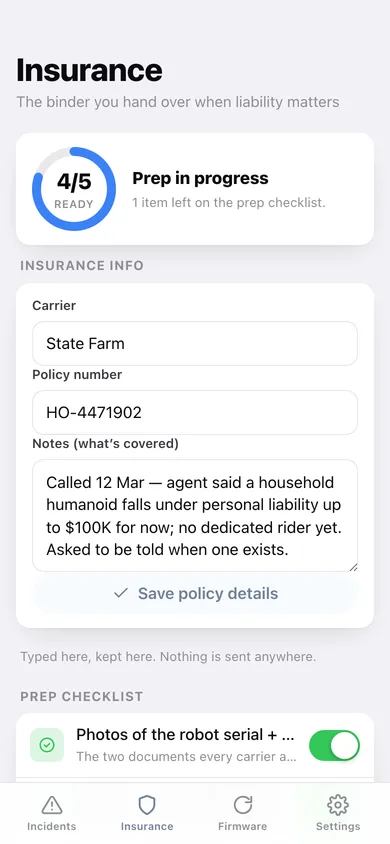
Insurance prep checklist
Serial and receipt photos, dated incidents, firmware history, home modifications and the carrier call — with a readiness ring and your carrier, policy number and coverage notes.
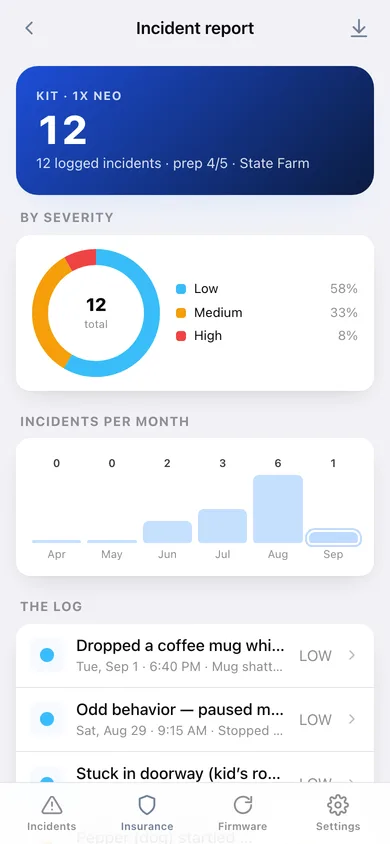
One-tap incident report
Severity donut, incidents per month, the full dated log, firmware history and the checklist — copied or downloaded as plain text you can attach to a claim.
Screens
Every screen, rebuilt for the browser
-
1
Incidents
Days since the last incident, 30-day severity counts, the 12-week strip and every incident by month.
-
2
Incident detail
The full record, the firmware running at the time and how many similar incidents you've logged.
-
3
Log an incident
What happened, severity, date and time, and notes for next time.
-
4
Insurance
Readiness ring, carrier and policy details, the five-item prep checklist and the liability guidance.
-
5
Firmware
Every logged update with the incidents that happened while that version was running.
-
6
Incident report
Severity donut, incidents per month, the dated log and firmware history — copy or download it.
-
7
Settings
Robot name, model and serial, binder counts, report/CSV/JSON export, sample data and erase.
Try it with sample data: Loads three months of a believable household log — a dropped mug, a doorway it got stuck in, a startled dog, a pinched finger and a freeze that needed a restart — with four firmware versions and a part-finished insurance checklist. You can start fresh at any time.
Ready? It's free.
No account, no install, no subscription. Everything you do stays in this browser.
Your say
What should Robosafe do? Tell us before we build it.
Tell us what to build next.
Comments need a free Google sign-in, so every one is from a real person.
Sign in with Google to commentNo comments yet — be the first to say what this app should do next.
Questions
Is the web version of Robosafe free?+
Yes. Every screen is free to use: no subscription, no in-app purchases, no account.
Do I need an account?+
No. Open Robosafe and start using it right away. Sign in with Google only if you want to upvote an app, save it to your list, or leave a comment.
Where is my data stored?+
Only in this browser's local storage. Nothing you enter is sent to our servers, so we can't see it, back it up, or restore it. Clearing site data, a private window, or another device starts empty. Export a backup from the in-app menu to keep it.
Is there a Robosafe app for iPhone or Android?+
Not yet. Robosafe is a community proposal: the browser version is complete, and we build the iPhone and Android app once 100 people upvote it. Upvoters get one email when it ships.