
Web app · Productivity
Robonotes
A daily journal of what your humanoid robot actually did
One entry a day — wins, fails and notes for tomorrow — and the journal starts telling you something: a logging streak, a win rate, wins-versus-fails per week and the fails that keep repeating. Export it when the manufacturer's feedback channel is ready. Free, no account.
Stored in your browser only. Nothing you do in the web version is sent to our servers. Clear your browser data and it's gone — so export a backup from the in-app menu if you want to keep it.
This app is a community proposal.
Try the full browser version now. We build the iPhone and Android app once 100 people upvote it.
We'll email you once, when it ships. Unsubscribe anytime.
In your browser
What you can do in Robonotes on the web
One entry per day
Wins, fails and notes for tomorrow, one line each. Saving a day again overwrites it — the journal never doubles up.
Yesterday's note surfaces today
Whatever you wrote as a note for tomorrow is the first thing the journal shows you the next morning.
Win rate and streak
A 30-day win rate, wins and fails counted from your own lines, a logging streak and your best run of consecutive days.
Wins and fails per week
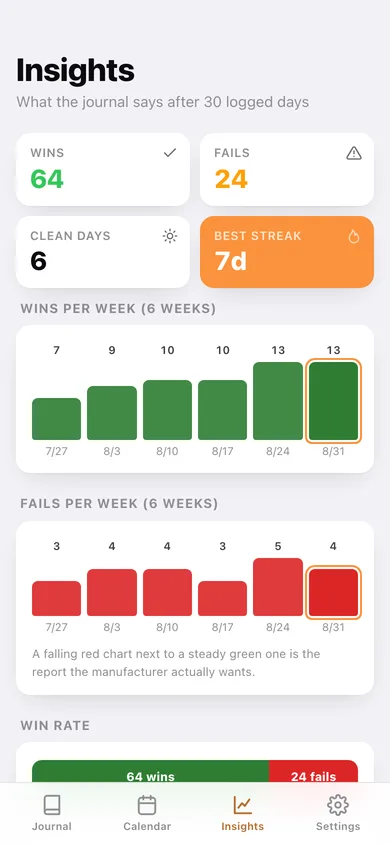
Eight weeks of green wins over red fails — a falling red chart beside a steady green one is the report worth sending.
Fails that keep repeating
Words appearing in more than one logged fail are surfaced as patterns — a one-off is noise, a repeat is a behaviour.
Calendar and export
A month calendar colour-coded by clean, mixed and fail-only days, plus text, CSV and JSON exports of the whole journal.
Screens
Every screen, rebuilt for the browser
-
1
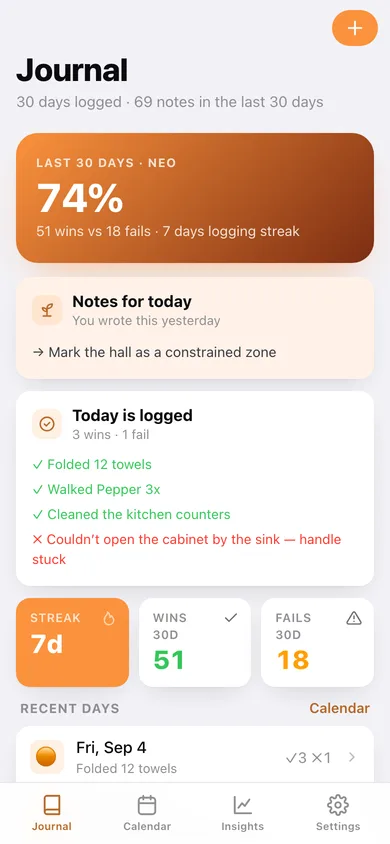
Journal
30-day win rate, yesterday's note for today, today's entry and the recent days.
-
2
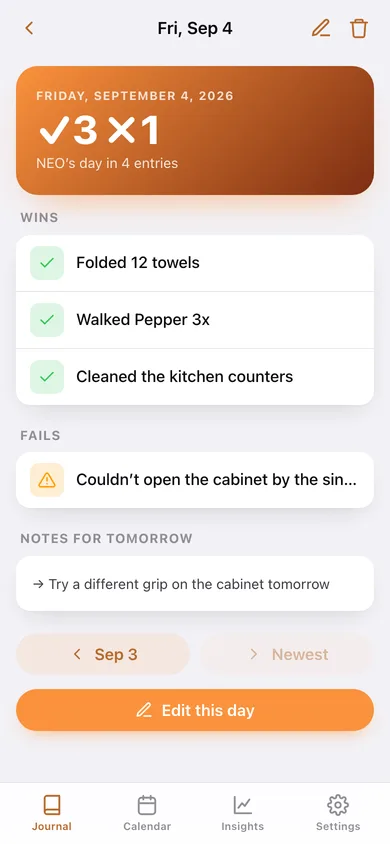
Robot day
One day in full — every win, every fail and the notes carried forward.
-
3
Log a day
Wins, fails and notes for tomorrow, with one-tap prompts for the tasks you log most.
-
4
Calendar
Colour-coded month calendar, a 12-week heatmap and this month's entries.
-
5
Insights
Wins and fails per week, overall win rate and the fails that keep repeating.
-
6
Settings
Robot name and model, journal totals, text/CSV/JSON export, sample data and erase.
Try it with sample data: Loads three weeks of a believable NEO journal — folded towels, dog walks and dishwasher runs against a sticky sink cabinet, a doorway it keeps getting stuck in and a floor lamp it keeps clipping. You can start fresh at any time.
Ready? It's free.
No account, no install, no subscription. Everything you do stays in this browser.
Your say
What should Robonotes do? Tell us before we build it.
Tell us what to build next.
Comments need a free Google sign-in, so every one is from a real person.
Sign in with Google to commentNo comments yet — be the first to say what this app should do next.
Questions
Is the web version of Robonotes free?+
Yes. Every screen is free to use: no subscription, no in-app purchases, no account.
Do I need an account?+
No. Open Robonotes and start using it right away. Sign in with Google only if you want to upvote an app, save it to your list, or leave a comment.
Where is my data stored?+
Only in this browser's local storage. Nothing you enter is sent to our servers, so we can't see it, back it up, or restore it. Clearing site data, a private window, or another device starts empty. Export a backup from the in-app menu to keep it.
Is there a Robonotes app for iPhone or Android?+
Not yet. Robonotes is a community proposal: the browser version is complete, and we build the iPhone and Android app once 100 people upvote it. Upvoters get one email when it ships.