
Web app · Lifestyle
Robohome
Get the house ready before the humanoid arrives
Map every room approved, caution or no-go, work the nine-step pre-deployment checklist, and print a one-page house brief for the family. Owner-side prep only — nothing syncs to the robot. Free, in your browser.
Stored in your browser only. Nothing you do in the web version is sent to our servers. Clear your browser data and it's gone — so export a backup from the in-app menu if you want to keep it.
This app is a community proposal.
Try the full browser version now. We build the iPhone and Android app once 100 people upvote it.
We'll email you once, when it ships. Unsubscribe anytime.
In your browser
What you can do in Robohome on the web
A house map with three rules
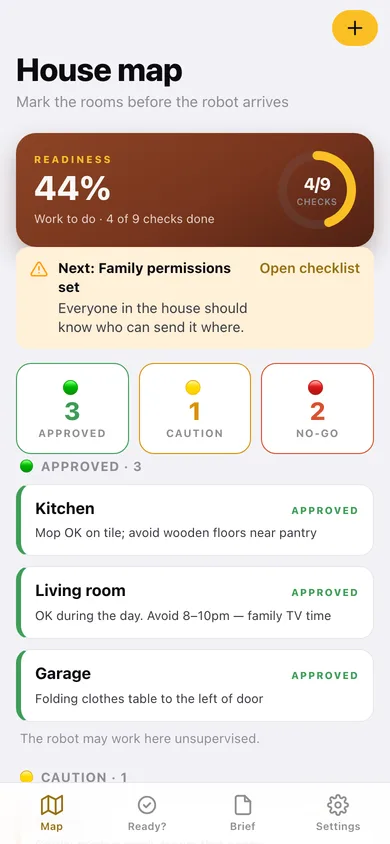
Approved, caution and no-go, each with the notes the household actually needs: stairs, cords, pet bowls, times of day to avoid.
The nine-step readiness checklist
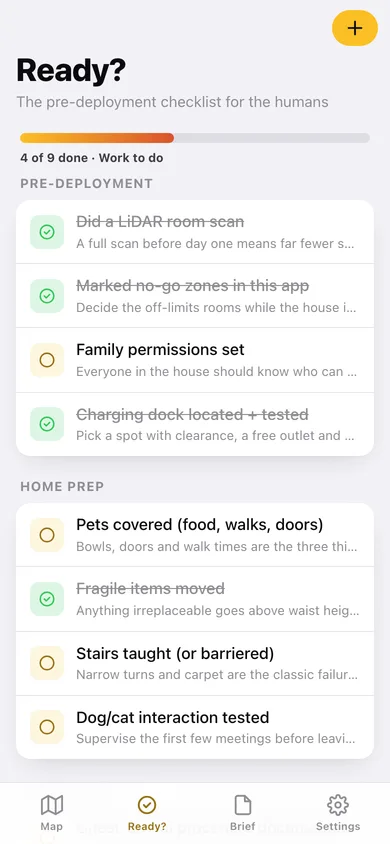
Pre-deployment, home prep and procedure — LiDAR scan, no-go zones, family permissions, charging dock, pets, fragile items, stairs, animal introductions and the guest-arrival plan, each with why it matters.
A readiness percentage that means something
Checks done over checks total, shown as a ring on the map and a bar on the checklist, with a plain verdict from Not ready yet to House is ready.
Your own steps
Add anything the standard list misses — the rug in the hallway, the sticky back door — and remove it again when it is done.
A printable house brief
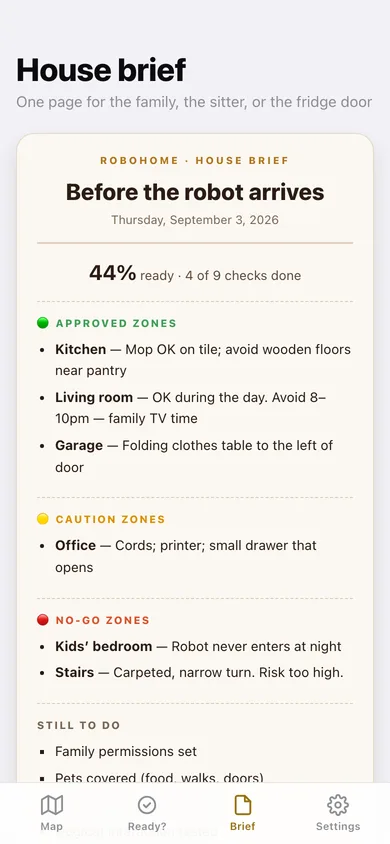
One page listing every no-go and caution room with its notes plus what is still outstanding — copy it, download it as text, or share it with whoever will be home.
Nothing leaves the browser
No account, no sync, and no channel to the robot: this is the household's own record.
Screens
Every screen, rebuilt for the browser
-
1
House map
Readiness ring, zone counts, and every mapped room grouped by rule.
-
2
Ready?
The pre-deployment checklist with progress and the reason behind each step.
-
3
House brief
The one-page brief for the family or the sitter, ready to copy, download or share.
-
4
Zone
One room: its rule, the notes for the household, and a one-tap rule change.
-
5
Add or edit a zone
Label, rule and the notes that matter on arrival day.
-
6
Settings
What Robohome promises, your house counts, backup, brief download, sample data and erase.
Try it with sample data: Maps six rooms from a real prep walk-through — kids' bedroom and stairs as no-go, the office as caution, kitchen, living room and garage approved — and marks four of the nine readiness checks done. You can start fresh at any time.
Ready? It's free.
No account, no install, no subscription. Everything you do stays in this browser.
Your say
What should Robohome do? Tell us before we build it.
Tell us what to build next.
Comments need a free Google sign-in, so every one is from a real person.
Sign in with Google to commentNo comments yet — be the first to say what this app should do next.
Questions
Is the web version of Robohome free?+
Yes. Every screen is free to use: no subscription, no in-app purchases, no account.
Do I need an account?+
No. Open Robohome and start using it right away. Sign in with Google only if you want to upvote an app, save it to your list, or leave a comment.
Where is my data stored?+
Only in this browser's local storage. Nothing you enter is sent to our servers, so we can't see it, back it up, or restore it. Clearing site data, a private window, or another device starts empty. Export a backup from the in-app menu to keep it.
Is there a Robohome app for iPhone or Android?+
Not yet. Robohome is a community proposal: the browser version is complete, and we build the iPhone and Android app once 100 people upvote it. Upvoters get one email when it ships.