
Web app · Reference
Robocrash
First-aid manual for the minute your humanoid acts up
Ten common "oh no" scenarios — frozen mid-task, stuck in a doorway, a child or pet too close, an interrupted firmware update — each with calm step-by-step recovery you tick off, plus your support, dealer and fix-it numbers and an incident log support will actually read. Free, offline, no account.
Stored in your browser only. Nothing you do in the web version is sent to our servers. Clear your browser data and it's gone — so export a backup from the in-app menu if you want to keep it.
This app is a community proposal.
Try the full browser version now. We build the iPhone and Android app once 100 people upvote it.
We'll email you once, when it ships. Unsubscribe anytime.
In your browser
What you can do in Robocrash on the web
Ten scenarios, grouped by what is happening
People & pets, it stopped responding, moving & docking, something broke — every scenario the app ships, none held back.
Steps you tick off, not a wall of text
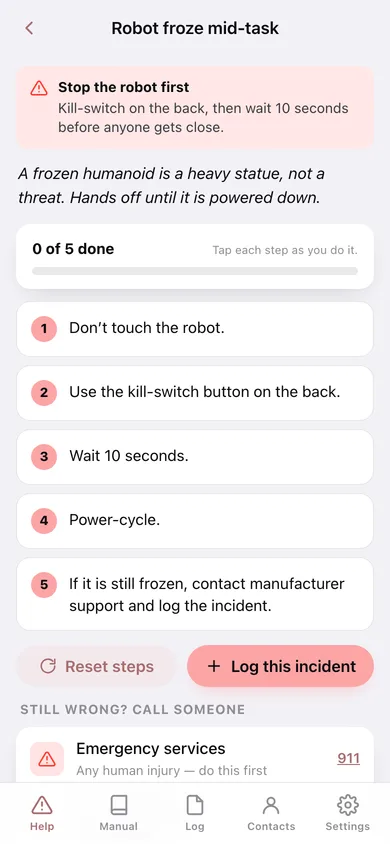
Each recovery is a numbered checklist with a progress bar, so you can put the phone down mid-step and know exactly where you were.
Stop-it-first warnings
Scenarios that need the kill-switch before anyone goes near the robot are flagged in red on the list and again at the top of the steps.
Who to call, saved before you need it
Manufacturer support, dealer and local fix-it with tap-to-dial links — and 911 pinned above all three for any human injury.
An incident log with severity
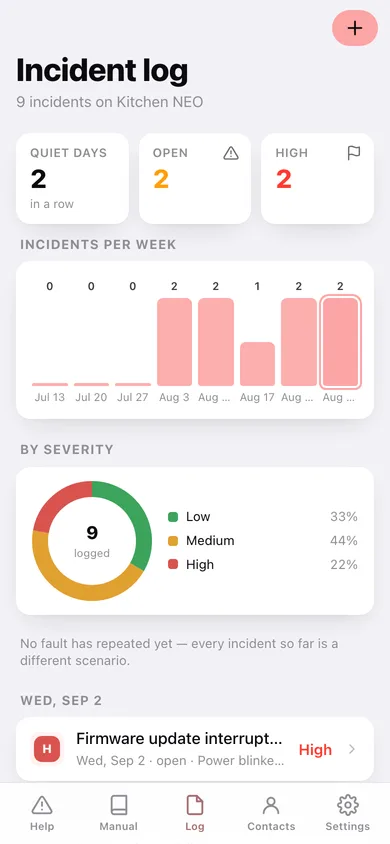
The manual keeps telling you to log it with a severity; here it goes in one tap, with days-since-the-last-incident, incidents per week, a severity donut and your most common fault.
The card support asks for
Nickname, make, model/serial, firmware and where the dock lives — filled in now, not while the robot is face-down in the hallway.
Screens
Every screen, rebuilt for the browser
-
1
Help
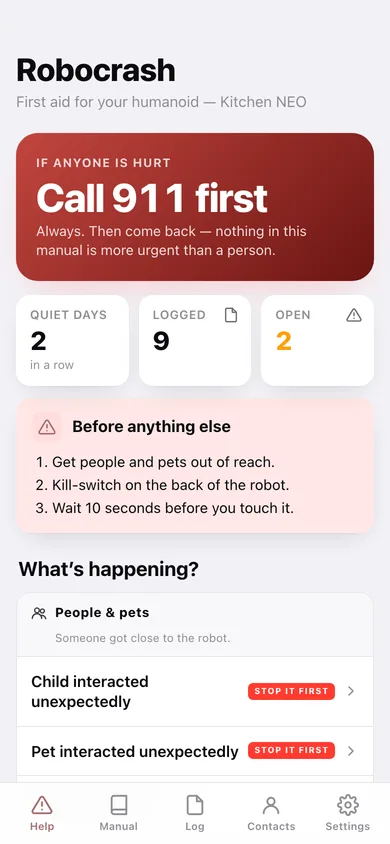
911 first, the three things to do before anything else, days incident-free, and every scenario grouped by what is happening.
-
2
The manual
All ten scenarios, searchable and filterable by group.
-
3
Scenario
The calm line, the numbered recovery steps you tick off, and who to call if it is still wrong.
-
4
Incident log
Incidents per week, a severity donut, your most common fault, and every incident by day.
-
5
One incident
Severity, status, what happened, how it ended, and the steps for that scenario.
-
6
Log an incident
Scenario, severity, date, which robot, what happened, and whether it is already resolved.
-
7
Contacts
911, manufacturer support, dealer and local fix-it, with the robot card support will ask for.
-
8
Settings
Your robot's nickname, make, model, firmware and dock, the privacy promises, and backup/sample/erase.
Try it with sample data: Sets up a demo "Kitchen NEO" with support, dealer and fix-it numbers, and logs nine incidents across the last month — a frozen dishwasher unload, a dock that would not charge, a cat swipe, a dropped mug, and an interrupted 4.3 firmware update still open. You can start fresh at any time.
Ready? It's free.
No account, no install, no subscription. Everything you do stays in this browser.
Your say
What should Robocrash do? Tell us before we build it.
Tell us what to build next.
Comments need a free Google sign-in, so every one is from a real person.
Sign in with Google to commentNo comments yet — be the first to say what this app should do next.
Questions
Is the web version of Robocrash free?+
Yes. Every screen is free to use: no subscription, no in-app purchases, no account.
Do I need an account?+
No. Open Robocrash and start using it right away. Sign in with Google only if you want to upvote an app, save it to your list, or leave a comment.
Where is my data stored?+
Only in this browser's local storage. Nothing you enter is sent to our servers, so we can't see it, back it up, or restore it. Clearing site data, a private window, or another device starts empty. Export a backup from the in-app menu to keep it.
Is there a Robocrash app for iPhone or Android?+
Not yet. Robocrash is a community proposal: the browser version is complete, and we build the iPhone and Android app once 100 people upvote it. Upvoters get one email when it ships.