
Web app · Lifestyle
Rite Path
Track the OCIA year — stage by stage, rite by rite
The five stages of the journey into the Catholic Church as a path you advance through, plus the rites you receive with their dates, a sponsor-meeting log, a questions queue, a reflection journal and an offline glossary. Free, in your browser, nothing leaves it.
Stored in your browser only. Nothing you do in the web version is sent to our servers. Clear your browser data and it's gone — so export a backup from the in-app menu if you want to keep it.
This app is a community proposal.
Try the full browser version now. We build the iPhone and Android app once 100 people upvote it.
We'll email you once, when it ships. Unsubscribe anytime.
In your browser
What you can do in Rite Path on the web
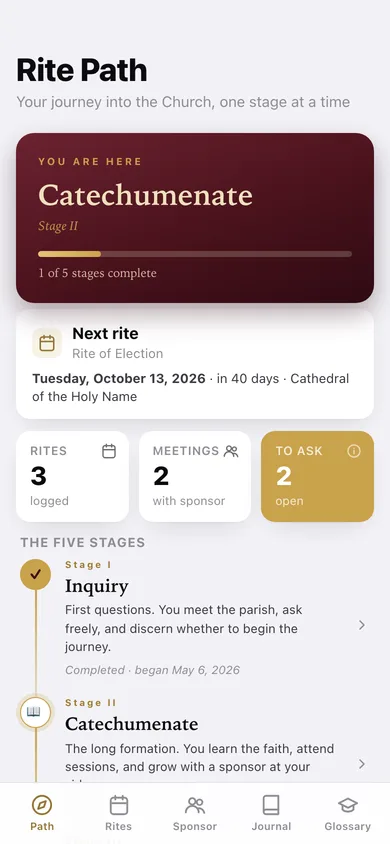
The five stages as a path
Inquiry, Catechumenate, Purification & Enlightenment, the Easter Vigil and Mystagogy on a gold spine — mark each reached and completed, and the banner always tells you where you are.
Every rite, with its date
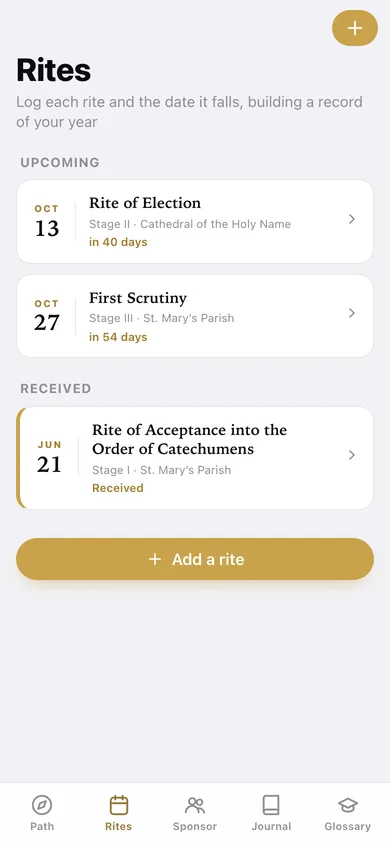
Log the Rite of Acceptance, the Rite of Election, the three Scrutinies, the Presentations and the Sacraments of Initiation; upcoming and received split apart, with days-until on each.
Sponsor-meeting log
Date, who you met, what you discussed and what was assigned — the record that replaces the notes in the back of a missal.
Questions queue
Jot a question the moment it surfaces, then record the answer and mark it addressed; reopen it if the answer raises another.
Reflection journal
Timestamped entries stamped with the stage you were in, so the year reads back in order — and exports as plain text.
16-term offline glossary
Catechumen, candidate, scrutiny, the Elect, mystagogy, neophyte and the rest, each with a pronunciation and a plain-language definition, searchable.
Screens
Every screen, rebuilt for the browser
-
1
Path
Where you are, progress through the five stages, your next rite and the whole path.
-
2
Stage
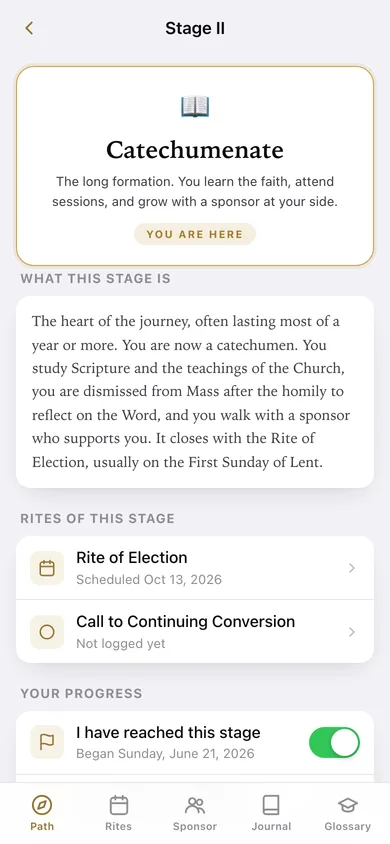
What one stage means, the rites that belong to it, and the toggles to mark it reached or complete.
-
3
Rites
Upcoming and received rites as a dated timeline of your year.
-
4
Rite
One rite in full — date, parish, notes and the received toggle.
-
5
Add or edit a rite
Name, date, stage, parish and notes, with the canonical rite names one tap away.
-
6
Sponsor
Every meeting with your sponsor or catechist, with what was discussed and assigned.
-
7
Log a meeting
Date, who you met, topics and the assignment.
-
8
Questions
The to-ask queue, with answers recorded once they are addressed.
-
9
Journal
Every reflection, newest first, stamped with the stage you wrote it in.
-
10
Reflection
One journal entry in full.
-
11
Write a reflection
Title, what landed, and the stage it belongs to.
-
12
Glossary
All sixteen catechumenate terms, searchable, with pronunciations.
-
13
Term
One term in full, with its pronunciation and neighbours to keep reading.
-
14
Settings
Your local journey counts, JSON and text export, progress reset and erase.
Try it with sample data: Loads a realistic mid-journey: Inquiry complete and the Catechumenate underway, the Rite of Acceptance received with the Rite of Election and First Scrutiny ahead, two sponsor meetings, three questions and two reflections. You can start fresh at any time.
Ready? It's free.
No account, no install, no subscription. Everything you do stays in this browser.
Your say
What should Rite Path do? Tell us before we build it.
Tell us what to build next.
Comments need a free Google sign-in, so every one is from a real person.
Sign in with Google to commentNo comments yet — be the first to say what this app should do next.
Questions
Is the web version of Rite Path free?+
Yes. Every screen is free to use: no subscription, no in-app purchases, no account.
Do I need an account?+
No. Open Rite Path and start using it right away. Sign in with Google only if you want to upvote an app, save it to your list, or leave a comment.
Where is my data stored?+
Only in this browser's local storage. Nothing you enter is sent to our servers, so we can't see it, back it up, or restore it. Clearing site data, a private window, or another device starts empty. Export a backup from the in-app menu to keep it.
Is there a Rite Path app for iPhone or Android?+
Not yet. Rite Path is a community proposal: the browser version is complete, and we build the iPhone and Android app once 100 people upvote it. Upvoters get one email when it ships.