
Web app · Productivity
RigCheck
Your harness, rope and SRL records — pre-use stamps and inspections, in the browser
Log each item once with serial, manufacturer and date of manufacture, then stamp a pre-use check in one tap and walk the real competent-person checkpoint pack for its gear type. Service-life countdowns, retired archive and a printable history. Free, no account.
Stored in your browser only. Nothing you do in the web version is sent to our servers. Clear your browser data and it's gone — so export a backup from the in-app menu if you want to keep it.
This app is a community proposal.
Try the full browser version now. We build the iPhone and Android app once 100 people upvote it.
We'll email you once, when it ships. Unsubscribe anytime.
In your browser
What you can do in RigCheck on the web
Gear locker with real identity records
Name, category, manufacturer, model, serial, date of manufacture, in-service date and your own inspection interval — the record that survives a worn-off label.
One-tap pre-use checks
Stamp each item you inspected before use, or the whole kit at once, with the date and time recorded — plus a 12-week heatmap and a stamp streak.
Guided inspections, checkpoint by checkpoint
The full harness, rope, lanyard, SRL, connector and helmet packs (6/6/5/6/5/5 checkpoints) with the same guidance text, a pass or flag per checkpoint, findings notes, and your own pass, monitor or retire call recorded.
Service-life countdowns
Age from date of manufacture, time in service, and days to the next formal inspection computed from your interval — sorted so the overdue item is always first.
Retired archive
Retiring an item keeps its whole record — every stamp, every inspection, the reason and the date.
History export
One tap builds a printable per-item history — identity, every pre-use stamp, every inspection with checkpoint results — plus a CSV of all pre-use checks.
Screens
Every screen, rebuilt for the browser
-
1
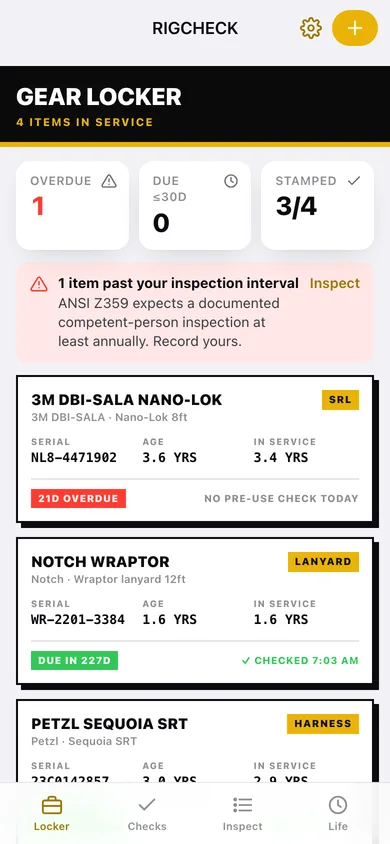
Gear Locker
Overdue and due-soon counts, today's stamps, and every item in service as a hazard-striped card.
-
2
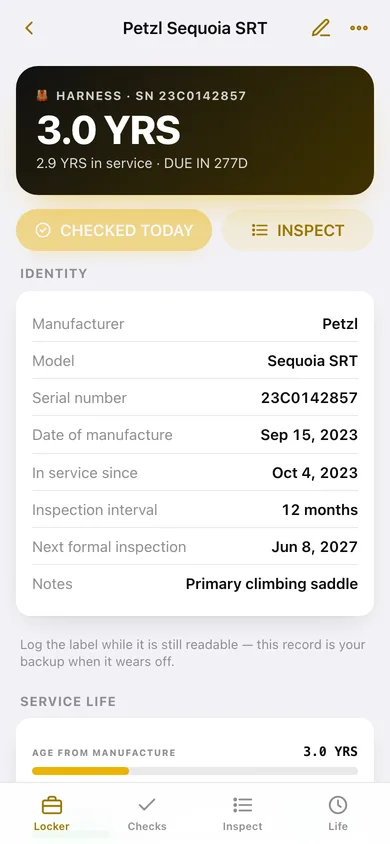
Gear item
Identity record, service-life bars, pre-use history and every formal inspection for one item.
-
3
Add or edit gear
Serial, manufacturer, model, date of manufacture, in-service date and inspection interval.
-
4
Pre-Use Checks
Today's kit — tap each item you inspected before use, or check all at once.
-
5
Check history
Every stamp grouped by day with a 12-week heatmap and your stamp streak.
-
6
Inspections
What is due or overdue, a start button per item, and the recent inspection records.
-
7
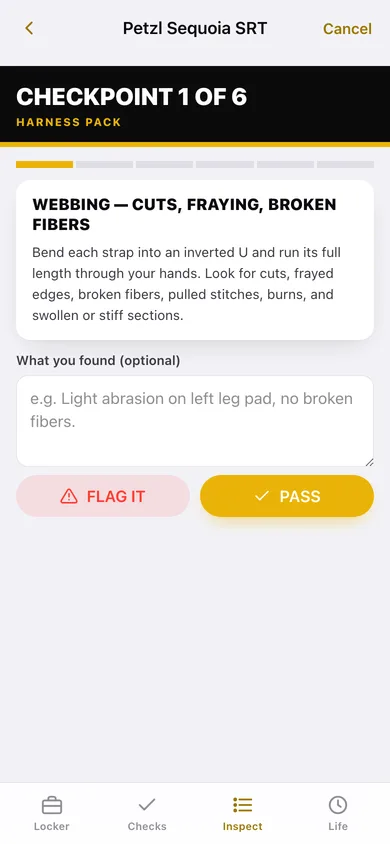
Guided inspection
One checkpoint at a time with its guidance, pass or flag, and a findings note.
-
8
Inspection record
The decision you recorded with every checkpoint result and finding.
-
9
Service Life
Age bars on a 10-year scale, time in service, last inspection and next due for each item.
-
10
Retired archive
Retired gear with the reason, the date and the record preserved.
-
11
Settings
Inspector name, default interval, backup, CSV export, sample data and erase.
Try it with sample data: Loads a five-item kit — Petzl Sequoia SRT saddle, Samson Velocity climb line, an overdue 3M Nano-Lok SRL, a Notch Wraptor lanyard and a retired Vertex Vent helmet — with a month of pre-use stamps and six formal inspections. You can start fresh at any time.
Ready? It's free.
No account, no install, no subscription. Everything you do stays in this browser.
Your say
What should RigCheck do? Tell us before we build it.
Tell us what to build next.
Comments need a free Google sign-in, so every one is from a real person.
Sign in with Google to commentNo comments yet — be the first to say what this app should do next.
Questions
Is the web version of RigCheck free?+
Yes. Every screen is free to use: no subscription, no in-app purchases, no account.
Do I need an account?+
No. Open RigCheck and start using it right away. Sign in with Google only if you want to upvote an app, save it to your list, or leave a comment.
Where is my data stored?+
Only in this browser's local storage. Nothing you enter is sent to our servers, so we can't see it, back it up, or restore it. Clearing site data, a private window, or another device starts empty. Export a backup from the in-app menu to keep it.
Is there a RigCheck app for iPhone or Android?+
Not yet. RigCheck is a community proposal: the browser version is complete, and we build the iPhone and Android app once 100 people upvote it. Upvoters get one email when it ships.