
Web app · Lifestyle
Reverie
Catch the dream before it fades — then see what keeps coming back
A private dream journal for the two minutes after waking: title, what happened, a lucid flag, mood and clarity out of five, and tags for the people, places and themes your sleeping mind circles. Insights ranks them. Free, nothing leaves your browser.
Stored in your browser only. Nothing you do in the web version is sent to our servers. Clear your browser data and it's gone — so export a backup from the in-app menu if you want to keep it.
This app is a community proposal.
Try the full browser version now. We build the iPhone and Android app once 100 people upvote it.
We'll email you once, when it ships. Unsubscribe anytime.
In your browser
What you can do in Reverie on the web
Capture in seconds
Title, free-form text, the night it happened, a lucid toggle and two five-point sliders — enough to save a dream half-awake.
Tag people, places and themes
Three kinds of tag, colour-coded, multi-select while you write; add a new one without leaving the sheet.
Mood and clarity, 1–5
Distressing to Joyful and Hazy to Vivid, exactly as the iPhone app scores them, shown on every card and rolled into your averages.
Insights that actually read your journal
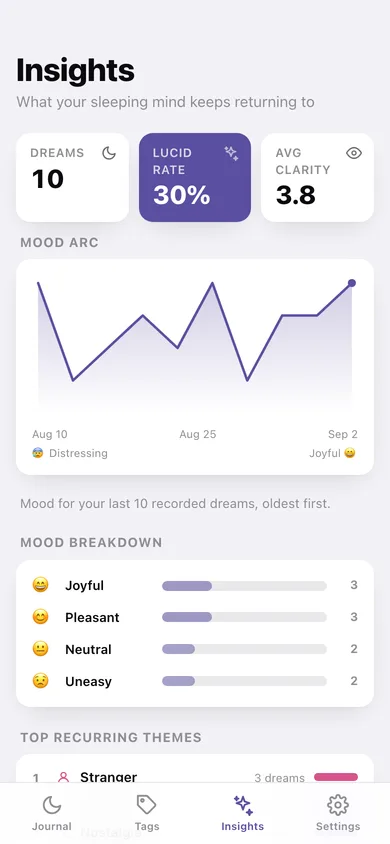
Lucid rate as a ring, the mood arc across your last 14 dreams, a mood breakdown by count, and your top six recurring themes ranked.
A page per tag
Open any tag to read every dream it appears in, with its own lucid count and average mood — then rename or delete it.
Yours to take away
Export the whole journal as JSON, or as a plain-text file with every dream, date, rating and tag.
Screens
Every screen, rebuilt for the browser
-
1
Journal
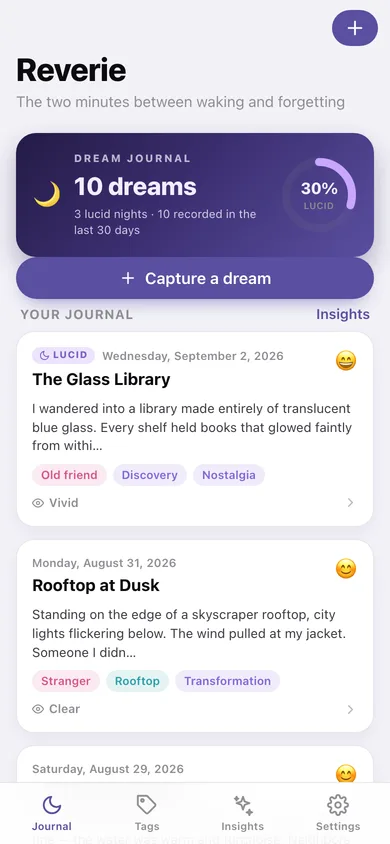
Dream count and lucid rate, then every dream as a card with its mood, tags and clarity.
-
2
Dream
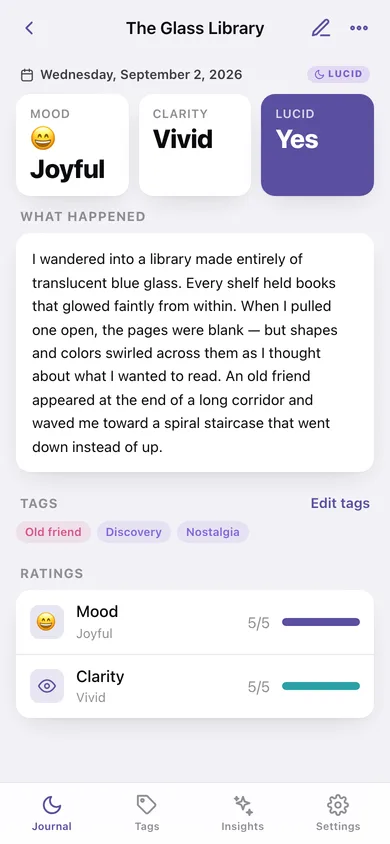
One dream in full: date, lucid badge, mood and clarity, the text and its tags.
-
3
Insights
Lucid rate, mood arc, mood breakdown and your top recurring themes.
-
4
Capture a dream
The capture sheet: title, what happened, lucid, mood, clarity and tags.
-
5
Tags & Themes
Every tag you have created, grouped into Themes, People and Places with dream counts.
-
6
Tag
Every dream carrying one tag, with its lucid count and average mood.
-
7
Settings
Capture defaults, JSON and text export, sample data and erase.
Try it with sample data: Loads ten dreams from the last month — three of them lucid — plus fourteen tags across people, places and themes, so the journal, tag gallery and Insights are all full. You can start fresh at any time.
Ready? It's free.
No account, no install, no subscription. Everything you do stays in this browser.
Your say
What should Reverie do? Tell us before we build it.
Tell us what to build next.
Comments need a free Google sign-in, so every one is from a real person.
Sign in with Google to commentNo comments yet — be the first to say what this app should do next.
Questions
Is the web version of Reverie free?+
Yes. Every screen is free to use: no subscription, no in-app purchases, no account.
Do I need an account?+
No. Open Reverie and start using it right away. Sign in with Google only if you want to upvote an app, save it to your list, or leave a comment.
Where is my data stored?+
Only in this browser's local storage. Nothing you enter is sent to our servers, so we can't see it, back it up, or restore it. Clearing site data, a private window, or another device starts empty. Export a backup from the in-app menu to keep it.
Is there a Reverie app for iPhone or Android?+
Not yet. Reverie is a community proposal: the browser version is complete, and we build the iPhone and Android app once 100 people upvote it. Upvoters get one email when it ships.