
Web app · Shopping
Returnly
Never miss a return window — the countdown for every online order
Log what arrived, pick the retailer's return window, and Returnly counts the days left, colours the urgency and totals the dollars at risk if you forget. Keep, return, returned — plus refund tracking, restocking-fee maths and CSV export, all unlocked. No email scanning, no account.
Stored in your browser only. Nothing you do in the web version is sent to our servers. Clear your browser data and it's gone — so export a backup from the in-app menu if you want to keep it.
This app is a community proposal.
Try the full browser version now. We build the iPhone and Android app once 100 people upvote it.
We'll email you once, when it ships. Unsubscribe anytime.
In your browser
What you can do in Returnly on the web
Dollars at risk, on the home screen
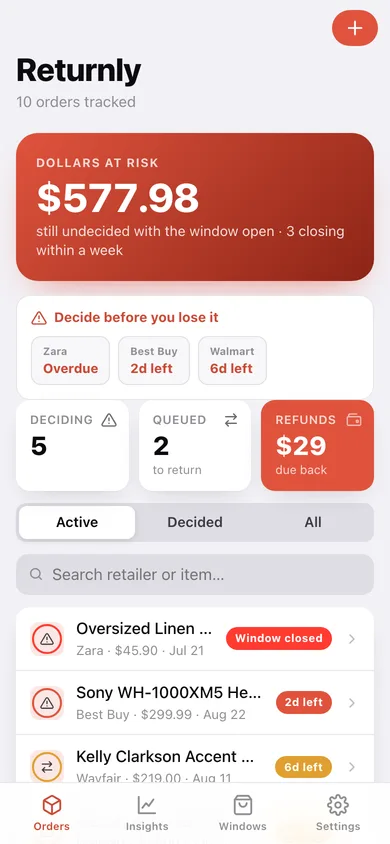
Everything still undecided with an open window adds up to one number, with a row of chips for the orders closing within a week.
Countdown per order
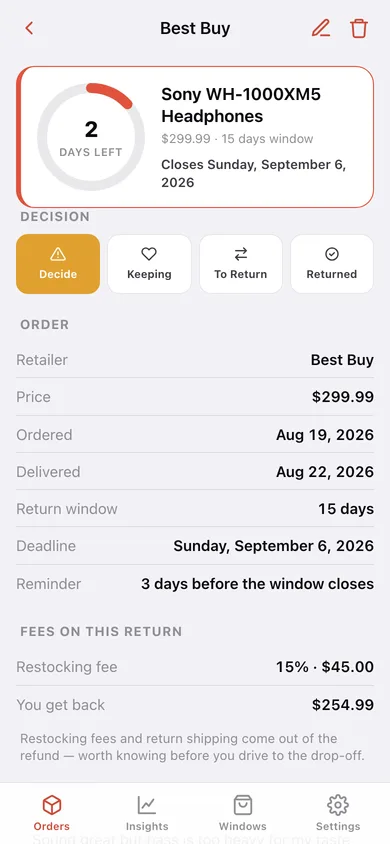
The window is counted from the delivery date, shown as a ring with days left and coloured green, amber, orange or red as the deadline closes in.
16 retailer windows, and your own
Amazon 30, Target and Walmart 90, Best Buy and Apple 15, IKEA, Chewy and Zappos a year, Etsy none — override any of them with what your receipt actually says, or add a retailer.
Keep / To return / Returned
One tap moves an order through the decision, and the home list re-sorts so the most urgent undecided order is always on top.
Refunds, fees and shipping
Mark a refund received, and record a restocking-fee percentage and return shipping so you know what you actually get back before you drive to the drop-off.
Insights and CSV export
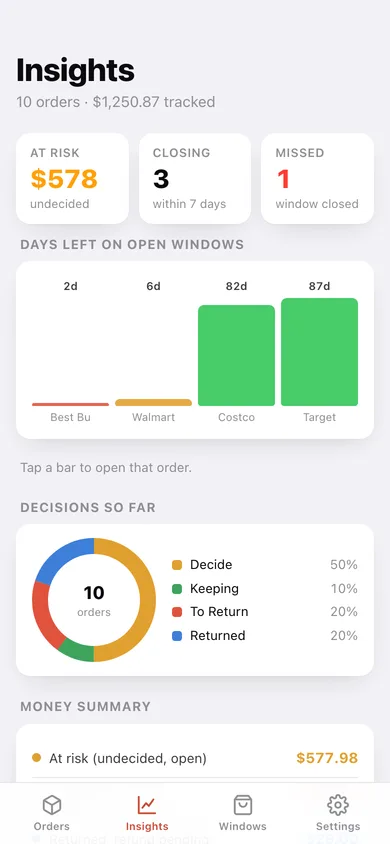
Days-left bars per open window, a decision donut, a money summary from at-risk to banked, your biggest retailers, and the whole log as a spreadsheet.
Screens
Every screen, rebuilt for the browser
-
1
Orders
Dollars at risk, the closing-this-week chips, and every order sorted by how little time is left.
-
2
One order
The countdown ring, the four decision buttons, order details, fees, refund tracking and your note.
-
3
Add an order
Retailer, item, price, order and delivery dates, return window, reminder, fees and notes.
-
4
Insights
Days left on open windows, the decision donut, the money summary and your biggest retailers.
-
5
Retailer windows
The built-in return-window library, overridable per retailer, plus any you add yourself.
-
6
Settings
Default reminder timing, the retailer reference, backup export, sample data and erase.
Try it with sample data: Loads ten orders across nine retailers — Sony headphones with two days left on a Best Buy window, jeans queued to return, an Instant Pot in the amber zone, a Zara shirt whose window already closed, and a Nordstrom blazer already refunded. You can start fresh at any time.
Ready? It's free.
No account, no install, no subscription. Everything you do stays in this browser.
Your say
What should Returnly do? Tell us before we build it.
Tell us what to build next.
Comments need a free Google sign-in, so every one is from a real person.
Sign in with Google to commentNo comments yet — be the first to say what this app should do next.
Questions
Is the web version of Returnly free?+
Yes. Every screen is free to use: no subscription, no in-app purchases, no account.
Do I need an account?+
No. Open Returnly and start using it right away. Sign in with Google only if you want to upvote an app, save it to your list, or leave a comment.
Where is my data stored?+
Only in this browser's local storage. Nothing you enter is sent to our servers, so we can't see it, back it up, or restore it. Clearing site data, a private window, or another device starts empty. Export a backup from the in-app menu to keep it.
Is there a Returnly app for iPhone or Android?+
Not yet. Returnly is a community proposal: the browser version is complete, and we build the iPhone and Android app once 100 people upvote it. Upvoters get one email when it ships.