
Web app · Productivity
Relay
Build the Shortcut schedule first — intervals, exact times, overnight windows
Relay's scheduler in your browser: rules that fire every N minutes or at set times of day, optional active windows, a live countdown to the next trigger, a 24-hour timeline, the LAN trigger reference and the event log. Free, no install.
Stored in your browser only. Nothing you do in the web version is sent to our servers. Clear your browser data and it's gone — so export a backup from the in-app menu if you want to keep it.
In App Review — coming to the App Store
Relay is with Apple now. You can use the full browser version today, and we'll email you the day the app is live.
0 waiting for launch
We'll email you once, when it ships. Unsubscribe anytime.
In your browser
What you can do in Relay on the web
Interval and times-of-day rules
Each rule names one Shortcut and fires every 1–720 minutes, or at an exact list of times — the same scheduler the iPhone app runs.
Active windows, overnight included
Give a rule a daily window (08:00–17:00, or 22:00–06:00) and it sleeps outside it and resumes on its own, with wall-clock catch-up when a fire time passed while paused.
Live countdown and Run Now
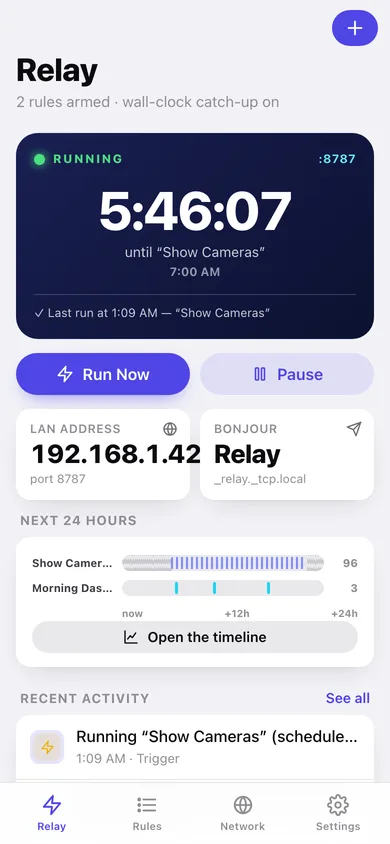
The status card counts down to the next trigger by the second, names the Shortcut, and Run Now logs an immediate run of the rule that is up next.
24-hour timeline
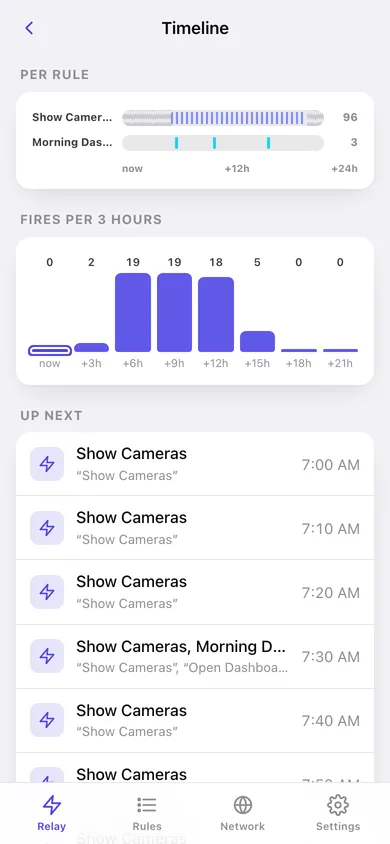
One lane per rule showing every fire in the next day, closed windows hatched out, plus a fires-per-hour chart.
LAN trigger reference
Port, Bonjour name, token with one-tap regeneration, the /health, /run, /next and /rules endpoints and copy-paste curl commands for each.
Event log
Every trigger, LAN request and state change, filterable by kind and grouped by day — capped at the phone app's 250 entries.
Screens
Every screen, rebuilt for the browser
-
1
Relay
Status, live countdown to the next trigger, Run Now, LAN address and the last events.
-
2
Rules
Every rule with its Shortcut, schedule summary and next fire time.
-
3
Rule detail
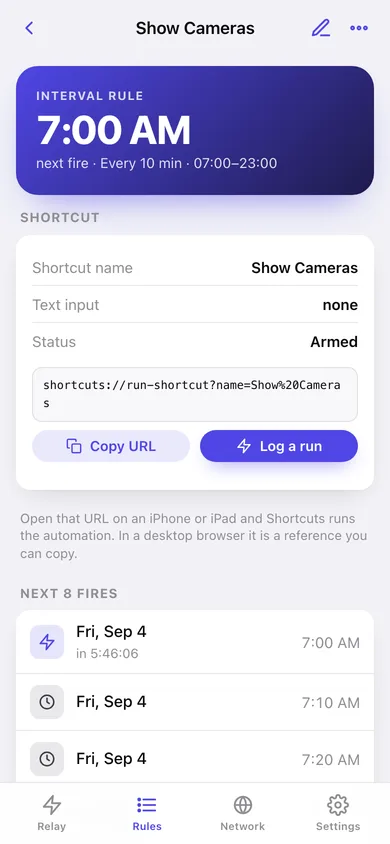
Next eight fires, the shortcuts:// URL, active window and recent runs of one rule.
-
4
Rule editor
Label, exact Shortcut name, text input, interval or times of day, and the active window.
-
5
Timeline
One lane per rule across the next 24 hours plus fires per hour.
-
6
Network
LAN server, port, Bonjour name, access token, endpoints and copy-paste examples.
-
7
Event log
Triggers, LAN requests and state changes, filtered by kind and grouped by day.
-
8
Settings
Schedule pause, kiosk options, Bonjour name, diagnostics, backup, sample data and erase.
Try it with sample data: Adds the Show Cameras, Morning Dashboard and Photo Sync rules plus the last hour of triggers, LAN requests and state changes. You can start fresh at any time.
Ready? It's free.
No account, no install, no subscription. Everything you do stays in this browser.
Your say
What should Relay do? Tell us before we build it.
Tell us what to build next.
Comments need a free Google sign-in, so every one is from a real person.
Sign in with Google to commentNo comments yet — be the first to say what this app should do next.
Questions
Is the web version of Relay free?+
Yes. Every screen is free to use: no subscription, no in-app purchases, no account.
Do I need an account?+
No. Open Relay and start using it right away. Sign in with Google only if you want to upvote an app, save it to your list, or leave a comment.
Where is my data stored?+
Only in this browser's local storage. Nothing you enter is sent to our servers, so we can't see it, back it up, or restore it. Clearing site data, a private window, or another device starts empty. Export a backup from the in-app menu to keep it.
When is the Relay iPhone app out?+
Relay is in App Review with Apple now. Tap “Notify me at launch” and we'll email you once, the day it's live.