
Web app · Sports
RefLedger
The officiating ledger that belongs to you, not to an assignor
Log a game in ten seconds, keep an owed-vs-paid tab on every assignor, league and cash tournament, let saved venues record your round-trip miles, and hand your preparer a Schedule C season CSV. Free, no install, no account.
Stored in your browser only. Nothing you do in the web version is sent to our servers. Clear your browser data and it's gone — so export a backup from the in-app menu if you want to keep it.
This app is a community proposal.
Try the full browser version now. We build the iPhone and Android app once 100 people upvote it.
We'll email you once, when it ships. Unsubscribe anytime.
In your browser
What you can do in RefLedger on the web
Ten-second game log
Sport, role, level, payer, venue, fee — the fee fills itself in from that assignor's preset, and the venue adds its round-trip miles automatically.
A running tab per payer
Assignors, leagues and cash tournaments side by side: what each owes, how many days it has been outstanding, and a PAID? button that clears the line.
Fee schedules by sport, role and level
Store what each payer gives for a JV plate, a varsity center or a tournament flat rate across all six sports — baseball, softball, soccer, basketball, football and volleyball.
Venue library with remembered mileage
Save each field, gym and diamond once with its round-trip distance; every game logged there adds deductible miles. Typed distances, no GPS and no location permission.
Schedule C season summary
Gross income by payer, deductible miles at the standard rate you set, travel fees received and net after mileage — for any season you have logged.
Season CSV export
Download the whole season — payer totals, mileage maths and every game as a row — as a CSV you can hand straight to your tax preparer.
Screens
Every screen, rebuilt for the browser
-
1
Season
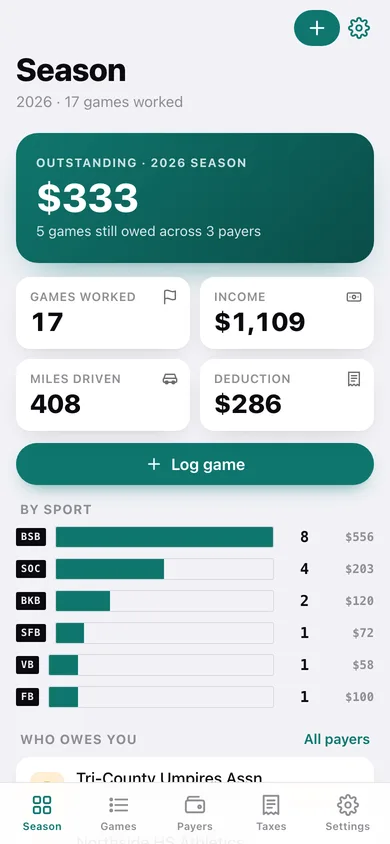
Outstanding balance for the season, games worked, income, miles and deduction, a per-sport breakdown and who still owes you.
-
2
Game log
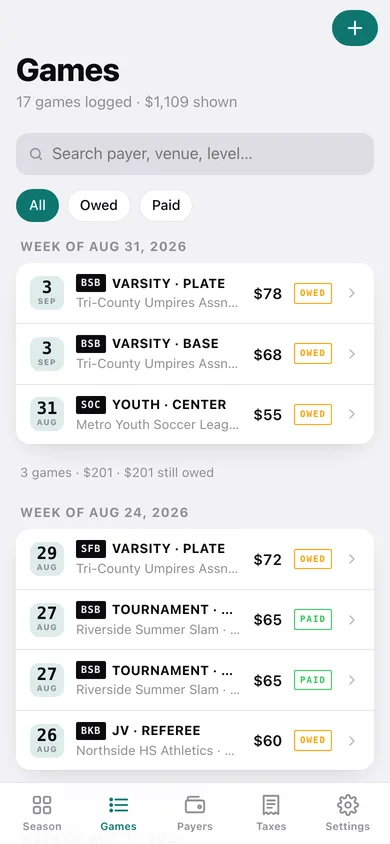
Every game grouped by week with sport chip, level and role, payer, fee and a PAID or OWED stamp; search and filter by status.
-
3
Game card
One game in full — fee, travel fee, venue mileage, days outstanding — with mark-paid by check, cash or direct deposit.
-
4
Log a game
The parking-lot entry form: sport, role, level, date, payer, venue, fee (auto-filled from the preset), travel fee and paid-on-the-spot.
-
5
Payer ledger
A card per assignor, league and tournament showing games and income this season and the outstanding balance.
-
6
The tab
One payer's unpaid games with days outstanding, mark-all-paid, its fee schedule and the paid history.
-
7
Venues
Every field, gym and diamond with its round-trip miles, games logged there and accumulated mileage.
-
8
Fee schedules
What each payer gives by sport, role and level, grouped by assignor.
-
9
Season taxes
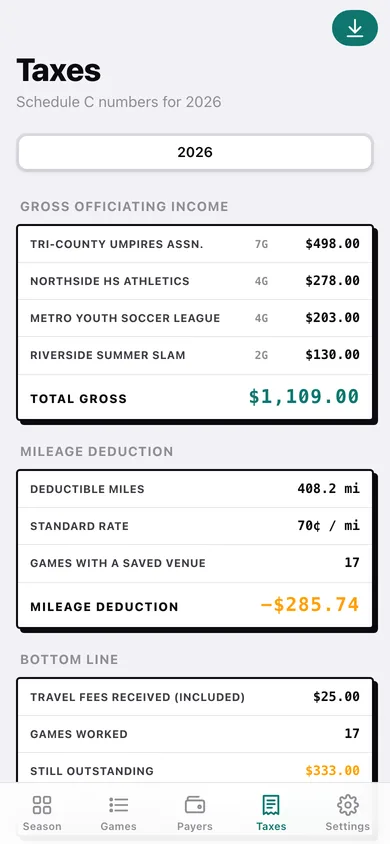
Gross income by payer, mileage deduction at your standard rate, and net after mileage for any season.
-
10
Season export
A preview of the Schedule C report with an optional game-by-game section, ready to download as CSV.
-
11
Settings
Mileage rate, default level, shortcuts to fee schedules and venues, backup export, sample data and erase.
Try it with sample data: Loads four payers (two assignors, a youth league and a cash tournament), five venues with round-trip miles, eight fee presets and seventeen games across the last six weeks — some paid by check, cash or direct deposit, some still on the tab. You can start fresh at any time.
Ready? It's free.
No account, no install, no subscription. Everything you do stays in this browser.
Your say
What should RefLedger do? Tell us before we build it.
Tell us what to build next.
Comments need a free Google sign-in, so every one is from a real person.
Sign in with Google to commentNo comments yet — be the first to say what this app should do next.
Questions
Is the web version of RefLedger free?+
Yes. Every screen is free to use: no subscription, no in-app purchases, no account.
Do I need an account?+
No. Open RefLedger and start using it right away. Sign in with Google only if you want to upvote an app, save it to your list, or leave a comment.
Where is my data stored?+
Only in this browser's local storage. Nothing you enter is sent to our servers, so we can't see it, back it up, or restore it. Clearing site data, a private window, or another device starts empty. Export a backup from the in-app menu to keep it.
Is there a RefLedger app for iPhone or Android?+
Not yet. RefLedger is a community proposal: the browser version is complete, and we build the iPhone and Android app once 100 people upvote it. Upvoters get one email when it ships.