
Web app · Lifestyle
Receiptd
Print your day as a retro thermal receipt
Pick Daily, Habit, Gratitude or Year, fill in a few lines, and watch a receipt print live on torn thermal paper — merchant header, itemized lines, a witty TOTAL, five stars and a faux barcode. Save it to your Shoebox or export a tall PNG. Free, no install.
Stored in your browser only. Nothing you do in the web version is sent to our servers. Clear your browser data and it's gone — so export a backup from the in-app menu if you want to keep it.
In your browser
What you can do in Receiptd on the web
Four templates, fully loaded
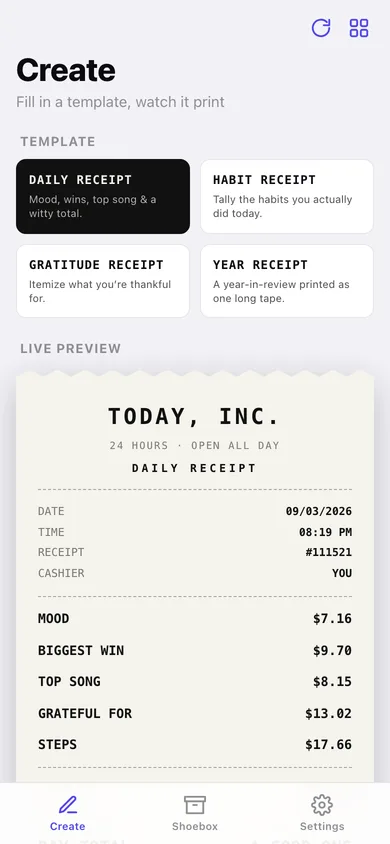
Daily Receipt, Habit Receipt, Gratitude Receipt and Year Receipt each arrive with their own merchant, subtitle, total label, thank-you line and starter lines — then you change every word.
Live receipt as you type
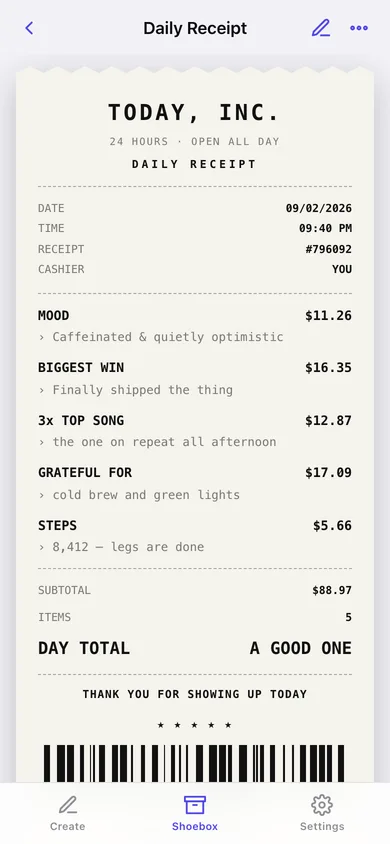
The card redraws on every keystroke: uppercase monospace, dashed rules, torn top and bottom edges, faded ink and a quantity prefix like 3x TOP SONG.
Deterministic faux prices and barcode
Each line gets a stable decorative price between $0.50 and $20.00, the subtotal adds them up by quantity, and the 64-bar barcode plus 13-digit number come from the same seed — identical every redraw and in the export.
Export a tall PNG
The receipt is redrawn onto a canvas with the same torn edges and barcode and saved as a shareable image — or copy it as plain monospaced text.
A Shoebox of everything printed
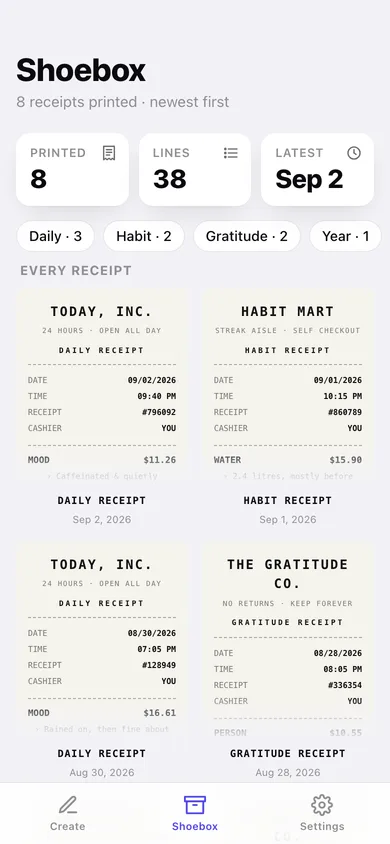
Every saved receipt as a thumbnail grid, newest first, with counts per template; open one to reprint, duplicate onto fresh tape or tear it up.
Your register, your rules
Set the default template, name the cashier line, and turn the faux prices off if you would rather the receipt stayed wordless about money.
Screens
Every screen, rebuilt for the browser
-
1
Create
Template picker, header, line items, total and footer with the receipt printing live underneath.
-
2
Shoebox
Every receipt you have printed as a thumbnail grid, newest first.
-
3
Receipt
One full receipt with save-PNG, share, copy-as-text, duplicate and delete.
-
4
Templates
What each of the four layouts preloads: merchant, subtitle, total line, footer and starter fields.
-
5
Edit receipt
Reopen a saved receipt in the composer and reprint it.
-
6
Settings
Default template, faux prices, the cashier line, backup, sample data and erase.
Try it with sample data: Loads eight printed receipts from the last month — three Daily, two Habit, two Gratitude and one Year Receipt — so the Shoebox and the thumbnails are full. You can start fresh at any time.
Ready? It's free.
No account, no install, no subscription. Everything you do stays in this browser.
Your say
Is Receiptd useful? Tell us what to build next.
Sign in with Google to vote.
Tell us what to build next.
Comments need a free Google sign-in, so every one is from a real person.
Sign in with Google to commentNo comments yet — be the first to say what this app should do next.
Questions
Is the web version of Receiptd free?+
Yes. Every screen is free to use: no subscription, no in-app purchases, no account.
Do I need an account?+
No. Open Receiptd and start using it right away. Sign in with Google only if you want to upvote an app, save it to your list, or leave a comment.
Where is my data stored?+
Only in this browser's local storage. Nothing you enter is sent to our servers, so we can't see it, back it up, or restore it. Clearing site data, a private window, or another device starts empty. Export a backup from the in-app menu to keep it.
How is the web version different from the Receiptd phone app?+
The iPhone app hands the image to the system share sheet; the browser version saves the PNG to your downloads and shares the plain-text version instead. PNG export uses your browser's built-in monospaced font, so the tape can look slightly different from the iPhone rendering. Receipts are saved in this browser only — export a JSON backup to move your Shoebox somewhere else. The receipt look, prices and barcode are a decorative novelty: no real store, transaction or payment, and the barcode is not scannable.