
Web app · Lifestyle
Readyhold
The household binder for the day everything breaks — in your browser
Where the deed is, who has the spare key, which accounts exist, what the 72-hour shelf is still short, and the four-phase runbook for wildfire, hurricane, tornado, earthquake, winter storm, flood, outage and family separation. Free, no install, nothing leaves this browser.
Stored in your browser only. Nothing you do in the web version is sent to our servers. Clear your browser data and it's gone — so export a backup from the in-app menu if you want to keep it.
This app is a community proposal.
Try the full browser version now. We build the iPhone and Android app once 100 people upvote it.
We'll email you once, when it ships. Unsubscribe anytime.
In your browser
What you can do in Readyhold on the web
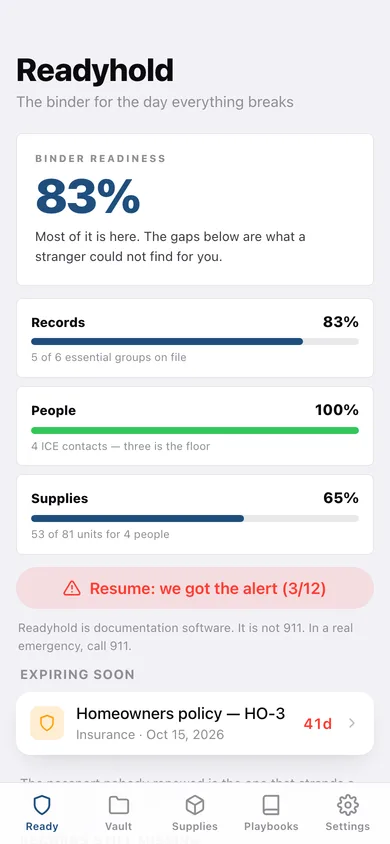
Binder readiness in one number
Records, people and supplies scored as three pillars, with the essential document groups you have not filed listed by name.
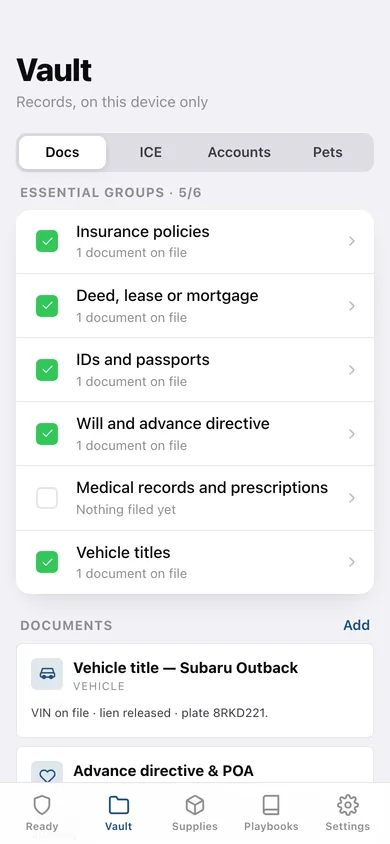
Document vault with expiry watch
Insurance, deed, will, advance directive, passports, IDs, vehicle titles and prescriptions across eleven categories, with a countdown on anything expiring in the next 60 days.
ICE roster and account inventory
Call order, alternate numbers and access notes (spare key, garage code, safe combination), plus every bank, brokerage, retirement, utility and subscription account — recorded as existing and known-by, never as a password.
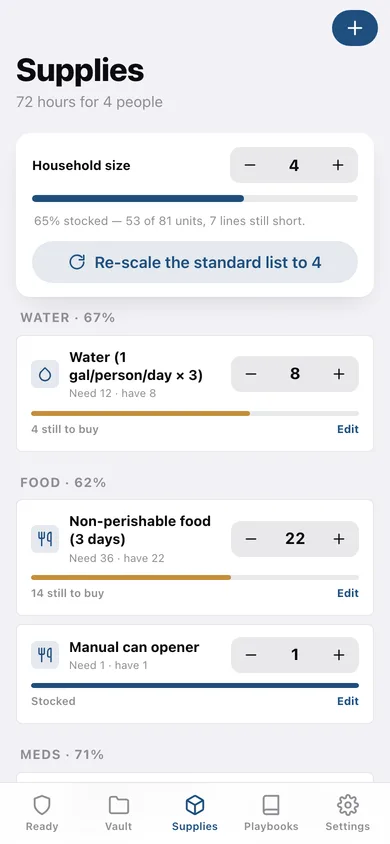
72-hour supplies sized to your household
The FEMA and Red Cross list — 1 gallon of water per person per day, 3 days of food, 7 days of prescriptions — rescaled the moment you change the household size, with per-category stocked percentages.
Eight hazard playbooks, four phases each
Wildfire, hurricane, tornado, earthquake, winter storm, flood, prolonged outage and family separation — Prepare, Warning, Active and Recovery steps you can tick off, sourced from Cal Fire, NHC, NWS, USGS, FEMA and Red Cross guidance.
The mid-event tap-through
"We got the alert": twelve steps in the order that matters, with the first calls to make and the supply lines still short pulled in beside them.
Screens
Every screen, rebuilt for the browser
-
1
Readiness
Binder readiness score, the three pillars, expiring documents and the records still missing.
-
2
Vault
Documents, ICE roster, account inventory and pet plan behind one segmented control.
-
3
72-hour supplies
Household size stepper, the standard list rescaled, and stocked percentages per category.
-
4
Playbooks
All eight per-hazard runbooks with their step counts.
-
5
Hazard runbook
Prepare, Warning, Active and Recovery steps for one hazard, each tickable, with its sources.
-
6
We got the alert
The twelve-step mid-event workflow with progress, first calls and short supply lines.
-
7
Settings
Household size, binder counts, JSON backup, printable ICE roster CSV, sample data and erase.
Try it with sample data: Loads a started binder for a household of four: five documents (two with expiry dates inside 60 days), four ICE contacts, four inventoried accounts, a twelve-line 72-hour checklist that is partly stocked, two pets, and a mid-event checklist three steps in. You can start fresh at any time.
Ready? It's free.
No account, no install, no subscription. Everything you do stays in this browser.
Your say
What should Readyhold do? Tell us before we build it.
Tell us what to build next.
Comments need a free Google sign-in, so every one is from a real person.
Sign in with Google to commentNo comments yet — be the first to say what this app should do next.
Questions
Is the web version of Readyhold free?+
Yes. Every screen is free to use: no subscription, no in-app purchases, no account.
Do I need an account?+
No. Open Readyhold and start using it right away. Sign in with Google only if you want to upvote an app, save it to your list, or leave a comment.
Where is my data stored?+
Only in this browser's local storage. Nothing you enter is sent to our servers, so we can't see it, back it up, or restore it. Clearing site data, a private window, or another device starts empty. Export a backup from the in-app menu to keep it.
Is there a Readyhold app for iPhone or Android?+
Not yet. Readyhold is a community proposal: the browser version is complete, and we build the iPhone and Android app once 100 people upvote it. Upvoters get one email when it ships.