
Web app · Weather
RainBook
The logbook for the rain gauge on the fence post — offline, in your browser
Log every gauge on the place, tenth by tenth, with trace amounts and empty checks. Water-year and calendar-year totals per gauge and per pasture, the season measured against your normal and last year, and a dated rainfall record for FSA, LFP and PRF files. Free, no account.
Stored in your browser only. Nothing you do in the web version is sent to our servers. Clear your browser data and it's gone — so export a backup from the in-app menu if you want to keep it.
This app is a community proposal.
Try the full browser version now. We build the iPhone and Android app once 100 people upvote it.
We'll email you once, when it ships. Unsubscribe anytime.
In your browser
What you can do in RainBook on the web
Unlimited physical gauges
Headquarters, North Pivot, Creek Crossing — each gauge keeps its own dated ledger of readings with the note that goes with the storm.
Two-tap logging with trace and empty checks
Pick the gauge, dial the tenths, save — then Save & Next Gauge walks the rest of the run. A trace logs as T; an empty check keeps a dated record that the gauge read dry, so the record shows the dry spells as clearly as the wet ones.
Pasture roll-ups
Group gauges by grazing unit and rainfall rolls up per pasture — the water that pasture actually caught, which is what rotation and stocking calls run on.
Water-year totals against normal and last year
Set your water-year start month and your long-term normal; RainBook shows ranch average versus the pace line, month-by-month bars, and any two water years side by side with cumulative curves.
Dated rainfall record
Pick a range and a scope and RainBook assembles a chronological, dated record — per-gauge tables with totals plus the condition-note appendix — to download, copy or print for the FSA office, your insurance agent or your own files.
Condition notes
Dated pasture-condition notes — forage state, pond levels, hail damage — carried alongside the rain record as supporting evidence.
Screens
Every screen, rebuilt for the browser
-
1
Gauges
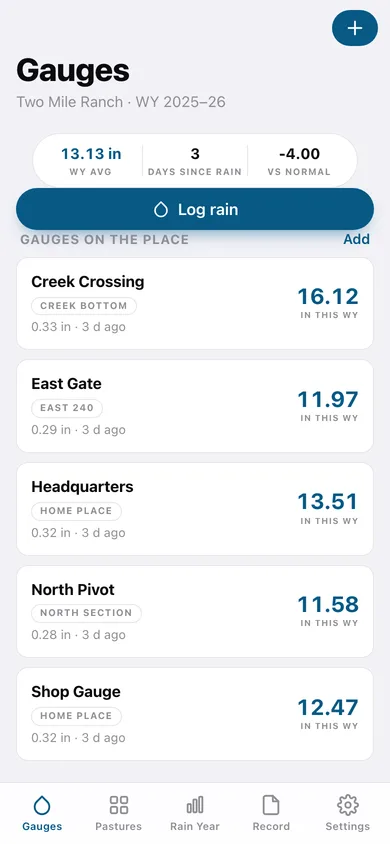
Water-year average, days since rain and pace versus normal, then every gauge with its water-year total.
-
2
Log rain
Pick the gauge, dial the tenths, mark trace or empty check, add the note, then Save & Next Gauge down the run.
-
3
Gauge
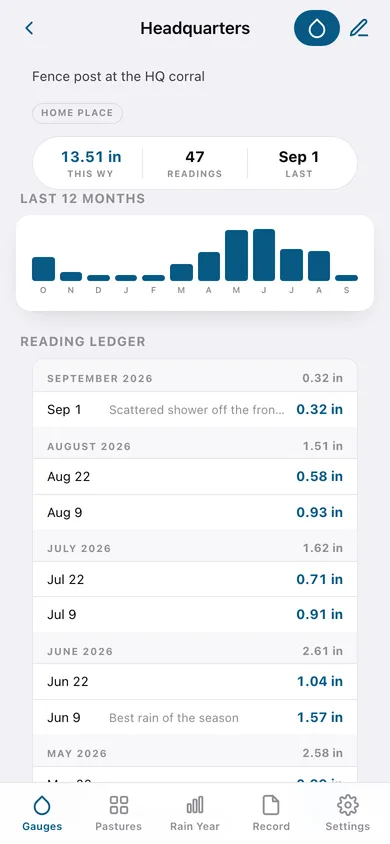
One gauge: water-year total, twelve months of bars, and the dated reading ledger grouped by month.
-
4
Add or edit a gauge
Name, where it stands, which pasture it belongs to, and retiring a gauge without losing its record.
-
5
Pastures
Every grazing unit with acres, gauge count and its water-year rainfall roll-up.
-
6
Pasture
One pasture: acres, gauges, its water-year average and the condition notes filed against it.
-
7
Add or edit a pasture
Name, acres and the detail line that says what the country is.
-
8
Condition notes
Every dated pasture-condition note — forage, ponds, hail — newest first.
-
9
Condition note
Date, pasture and what the country looks like.
-
10
Rain year
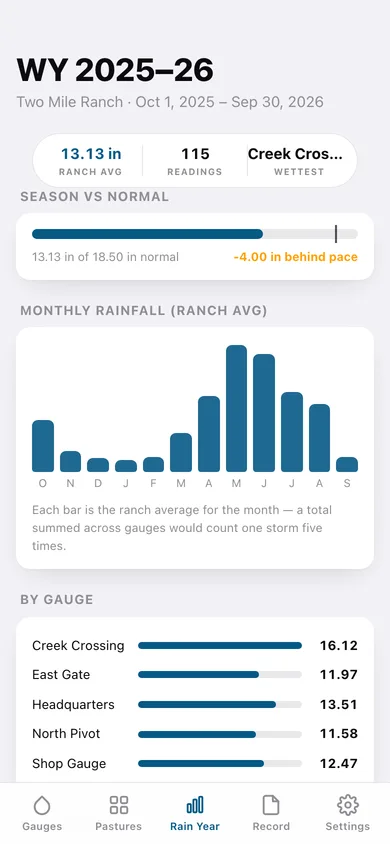
Season versus normal with a pace marker, monthly ranch-average bars, and breakdowns by gauge and by pasture.
-
11
Compare years
Any two water years side by side, month by month, with cumulative curves and the through-this-month delta.
-
12
Rainfall record
Choose the range — water year, calendar year or a program interval — the scope and whether notes ride along.
-
13
Record preview
The dated rainfall record itself, with per-gauge tables, totals and the condition-note appendix, ready to download, copy or print.
-
14
Settings
Ranch name, water-year start month, inches or millimetres, your normal annual rainfall, CSV and JSON backups.
Try it with sample data: Loads Two Mile Ranch — four pastures, five gauges, two full water years of dated readings including traces and empty checks, and six condition notes from a drying season. You can start fresh at any time.
Ready? It's free.
No account, no install, no subscription. Everything you do stays in this browser.
Your say
What should RainBook do? Tell us before we build it.
Tell us what to build next.
Comments need a free Google sign-in, so every one is from a real person.
Sign in with Google to commentNo comments yet — be the first to say what this app should do next.
Questions
Is the web version of RainBook free?+
Yes. Every screen is free to use: no subscription, no in-app purchases, no account.
Do I need an account?+
No. Open RainBook and start using it right away. Sign in with Google only if you want to upvote an app, save it to your list, or leave a comment.
Where is my data stored?+
Only in this browser's local storage. Nothing you enter is sent to our servers, so we can't see it, back it up, or restore it. Clearing site data, a private window, or another device starts empty. Export a backup from the in-app menu to keep it.
Is there a RainBook app for iPhone or Android?+
Not yet. RainBook is a community proposal: the browser version is complete, and we build the iPhone and Android app once 100 people upvote it. Upvoters get one email when it ships.