
Web app · Lifestyle
Quincebook
Plan the quinceañera without the spreadsheet
A 12-month countdown keyed to your party date, a padrino ledger that tracks pledged → received → thanked, a budget board with sponsorships netted out, the court of honour roster and vendor cards with balances. Free, nothing uploaded.
Stored in your browser only. Nothing you do in the web version is sent to our servers. Clear your browser data and it's gone — so export a backup from the in-app menu if you want to keep it.
This app is a community proposal.
Try the full browser version now. We build the iPhone and Android app once 100 people upvote it.
We'll email you once, when it ships. Unsubscribe anytime.
In your browser
What you can do in Quincebook on the web
Countdown keyed to the date
Set the party date and every task sits in a stage — 12–9 months, 9–6, 6–3, the final month and party week — with its own due date and a done count per stage.
Padrino ledger
Each padrino or madrina with what they sponsor, the amount, and a status that moves pledged → received → thanked, so a promise never gets counted as money in hand.
Budget with sponsorship netted out
Estimated versus spent per category, with linked padrino money subtracted, so the family's true out-of-pocket is always the headline number.
Court of honour roster
Damas and chambelanes with fitting status, a practice-attendance chart and a parent's number — so you see who is wobbling before they drop out.
Vendor cards
Quote, deposit paid, balance still due, the date it's due and the notes from every tasting and walkthrough.
It stays on this device
No account and nothing uploaded. Export the padrino ledger as a CSV or the whole binder as JSON whenever you want.
Screens
Every screen, rebuilt for the browser
-
1
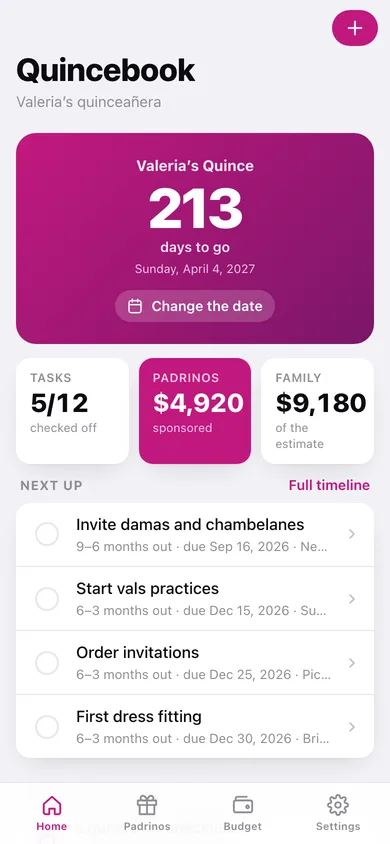
Home
Days to go, tasks done, sponsored versus family share, what's next, and a donut of who is paying.
-
2
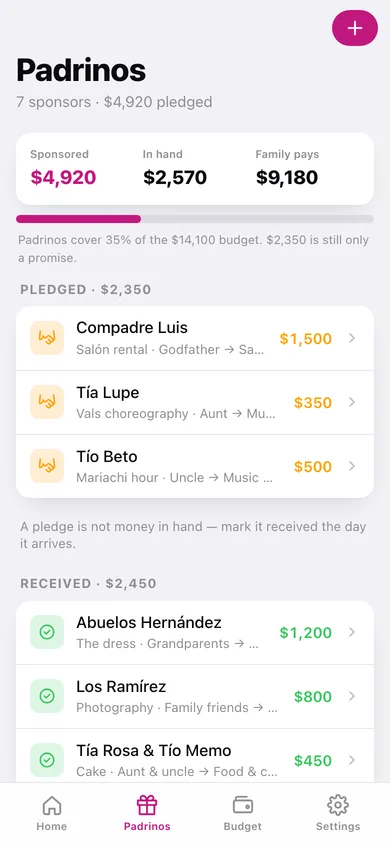
Padrinos
Sponsored, in hand and family share, a coverage bar, and every padrino grouped by pledged, received and thanked.
-
3
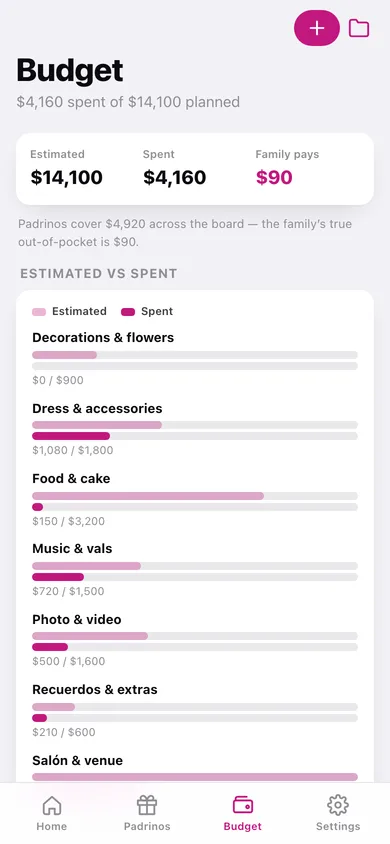
Budget
Estimated versus spent per category as paired bars, with over/under and the family's real out-of-pocket.
-
4
Countdown
Every task by planning stage with checkboxes and a done count per stage.
-
5
Budget line
One category's estimate, payments, linked padrinos and what the family actually pays.
-
6
Court of honour
Damas and chambelanes, fittings done, a practice-attendance chart and who needs chasing.
-
7
Vendors
Quote, deposit, balance and due date on a card per vendor, with the notes from each walkthrough.
-
8
Settings
The quinceañera's name and party date, binder counts, CSV and JSON export, sample data and erase.
Try it with sample data: Loads Valeria's quince seven months out: twelve countdown tasks across five stages, seven padrinos totalling $4,920, seven budget categories with eight logged payments, an eight-person court and six vendors with deposits and balance dates. You can start fresh at any time.
Ready? It's free.
No account, no install, no subscription. Everything you do stays in this browser.
Your say
What should Quincebook do? Tell us before we build it.
Tell us what to build next.
Comments need a free Google sign-in, so every one is from a real person.
Sign in with Google to commentNo comments yet — be the first to say what this app should do next.
Questions
Is the web version of Quincebook free?+
Yes. Every screen is free to use: no subscription, no in-app purchases, no account.
Do I need an account?+
No. Open Quincebook and start using it right away. Sign in with Google only if you want to upvote an app, save it to your list, or leave a comment.
Where is my data stored?+
Only in this browser's local storage. Nothing you enter is sent to our servers, so we can't see it, back it up, or restore it. Clearing site data, a private window, or another device starts empty. Export a backup from the in-app menu to keep it.
Is there a Quincebook app for iPhone or Android?+
Not yet. Quincebook is a community proposal: the browser version is complete, and we build the iPhone and Android app once 100 people upvote it. Upvoters get one email when it ships.