
Web app · Lifestyle
Psalmbook
A private prayer journal that never leaves your browser
Keep a tagged prayer list, write freeform entries, walk the five-step Ignatian Examen, and move answered prayers onto the faithfulness shelf — with 120 bundled passages on a day-by-day rotation. Free, no account, nothing uploaded.
Stored in your browser only. Nothing you do in the web version is sent to our servers. Clear your browser data and it's gone — so export a backup from the in-app menu if you want to keep it.
This app is a community proposal.
Try the full browser version now. We build the iPhone and Android app once 100 people upvote it.
We'll email you once, when it ships. Unsubscribe anytime.
In your browser
What you can do in Psalmbook on the web
Tagged prayer list
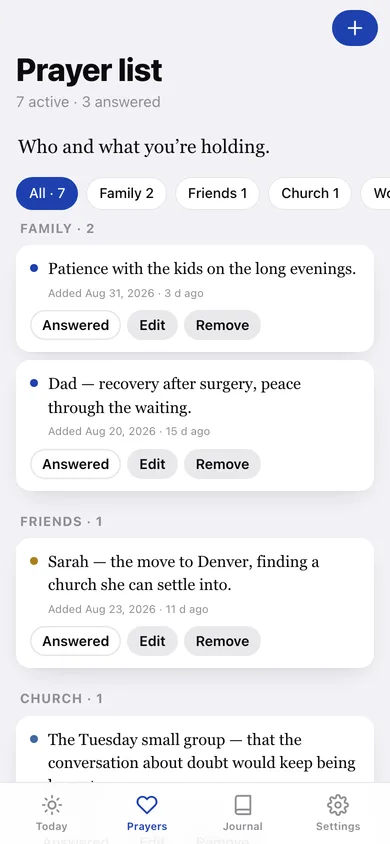
Names and intentions filed under Family, Friends, Church, Work, World or Self, each with the date you started carrying it.
Freeform journal
Long-form entries tagged gratitude, lament, request, confession or general — searchable, filterable, and grouped by the day you wrote them.
The Ignatian Examen
The five steps — gratitude, ask for light, review the day, acknowledge shortcoming, look forward — saved as one entry that keeps its sections.
Answered-prayer shelf
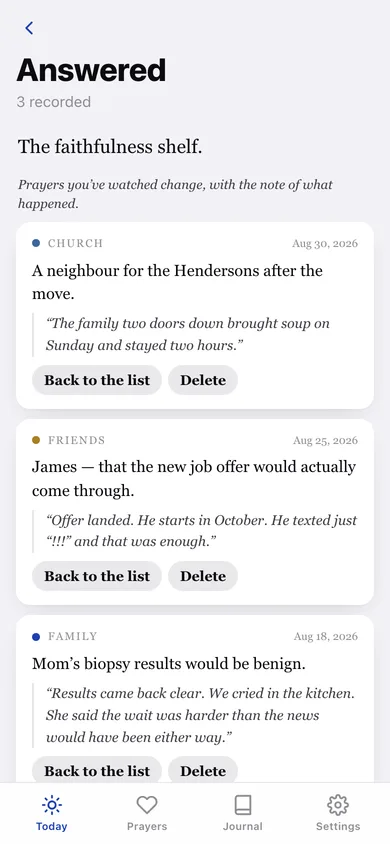
Mark a prayer answered, write what happened, and watch the record of faithfulness grow. Anything can be moved back to the list.
120 bundled passages
Psalms, wisdom, prophets, gospels and letters on a day-of-year rotation you can narrow to one part of the book, plus your own scripture shelf.
Nothing is sent anywhere
Prayers, entries and verses are saved in this browser only. Export a JSON backup whenever you want one.
Screens
Every screen, rebuilt for the browser
-
1
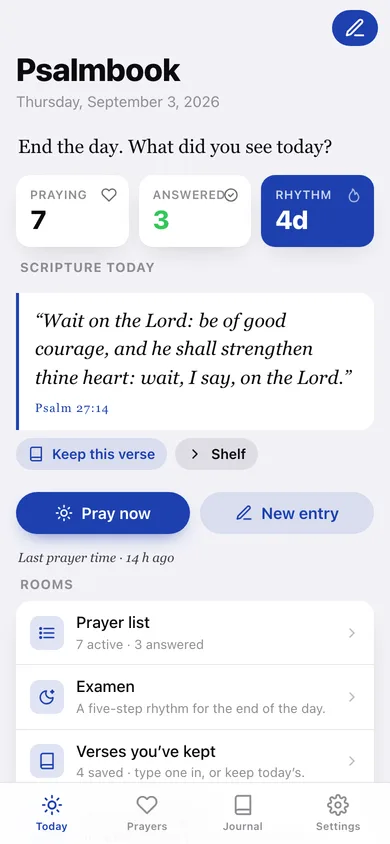
Today
The date, a greeting, today's passage, your rhythm streak, and a snapshot of who you're praying for.
-
2
Prayer list
Active intentions grouped by tag, with tag filters and a one-tap Answered button on every row.
-
3
Answered
The faithfulness shelf — every answered prayer with the note of what happened.
-
4
Journal
Entries per week, a 12-week rhythm heatmap, search, tag filters and every entry by day.
-
5
Entry
Read one entry — or the five sections of an examen — retag it, attach a verse, or delete it.
-
6
New entry
Write what you're carrying, pick a tag, or start from today's passage.
-
7
Examen
The five prompts with a box under each, saved as a single tagged entry.
-
8
Scripture
This week's rotation and the shelf of verses you've kept, with references.
-
9
Pray now
Be still: today's passage large, every active intention listed, and a quiet clock.
-
10
Settings
Which part of the book the rotation draws from, your default entry tag, journal counts, backup and erase.
Try it with sample data: Loads ten prayers (three already answered with their notes), seven journal entries and two examens across the last four weeks, four kept verses, and twenty logged prayer times so the streak and heatmap are populated. You can start fresh at any time.
Ready? It's free.
No account, no install, no subscription. Everything you do stays in this browser.
Your say
What should Psalmbook do? Tell us before we build it.
Tell us what to build next.
Comments need a free Google sign-in, so every one is from a real person.
Sign in with Google to commentNo comments yet — be the first to say what this app should do next.
Questions
Is the web version of Psalmbook free?+
Yes. Every screen is free to use: no subscription, no in-app purchases, no account.
Do I need an account?+
No. Open Psalmbook and start using it right away. Sign in with Google only if you want to upvote an app, save it to your list, or leave a comment.
Where is my data stored?+
Only in this browser's local storage. Nothing you enter is sent to our servers, so we can't see it, back it up, or restore it. Clearing site data, a private window, or another device starts empty. Export a backup from the in-app menu to keep it.
Is there a Psalmbook app for iPhone or Android?+
Not yet. Psalmbook is a community proposal: the browser version is complete, and we build the iPhone and Android app once 100 people upvote it. Upvoters get one email when it ships.