
Web app · Medical
PSA Watch
Is that PSA rise real progression, or just noise?
Log every PSA draw and PSA Watch runs the active-surveillance math your lab report doesn't: velocity in ng/mL/yr, doubling time in months, PSA density from prostate volume — plotted against the reference band, with a plain-language readout and a summary you can hand to your urologist. Free, no account.
Stored in your browser only. Nothing you do in the web version is sent to our servers. Clear your browser data and it's gone — so export a backup from the in-app menu if you want to keep it.
This app is a community proposal.
Try the full browser version now. We build the iPhone and Android app once 100 people upvote it.
We'll email you once, when it ships. Unsubscribe anytime.
In your browser
What you can do in PSA Watch on the web
PSA velocity from a real fit
Ordinary least squares across every draw you have logged, in ng/mL/yr, read against the commonly cited 0.75 ng/mL/yr figure — not a difference between the last two numbers.
Doubling time from ln(PSA)
A regression on the natural log of your PSA gives doubling time in months, checked against the ~36-month figure that draws a closer look. A flat or falling trend reports "not doubling" instead of dividing by zero.
PSA density and free/total ratio
Enter the prostate volume from an MRI or ultrasound report and PSA Watch computes density (PSA ÷ volume) against 0.15 ng/mL/cc, and tracks your free/total ratio alongside.
"Real progression, or noise?"
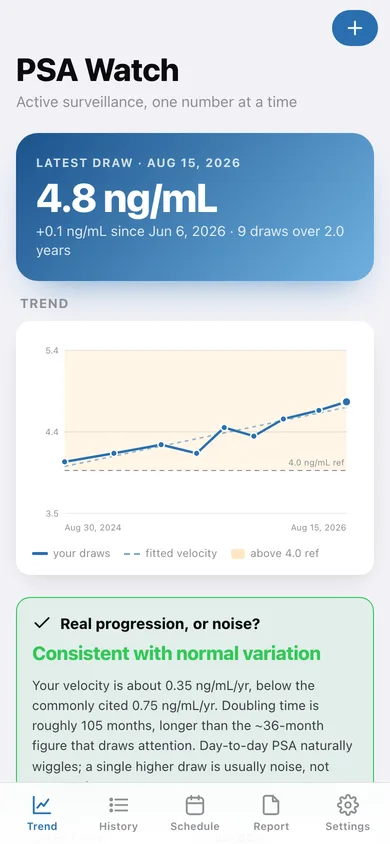
One card, in plain language: whether your velocity and doubling time look consistent with ordinary PSA variation, or are a pattern worth raising. Written as context for a conversation, never as a diagnosis.
The trend chart with the reference band
Every draw plotted on a true time axis with the shaded band above your reference line and the fitted velocity drawn in dashes, so you can see the trend and the wobble at once.
Schedule and a report to hand over
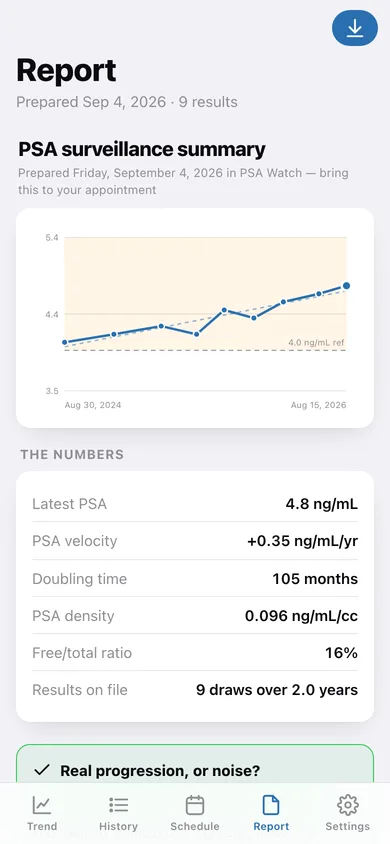
Next PSA draw, MRI, biopsy or urology visit with a countdown, plus a one-page surveillance summary you can copy, share or download for the appointment.
Screens
Every screen, rebuilt for the browser
-
1
Trend
Latest PSA, the trend chart with its reference band, the progression-or-noise readout and the four surveillance numbers.
-
2
History
Every draw by year with the change from the one before, plus lowest, highest and how many sit above your reference line.
-
3
One draw
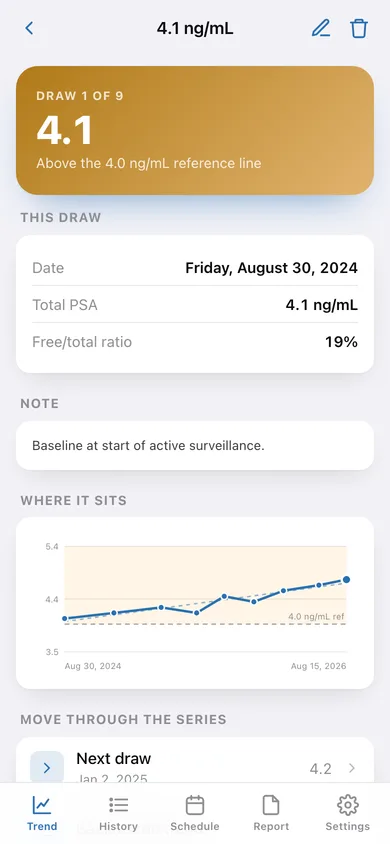
A single result: PSA, free/total ratio, volume, density, the change and rate since the previous draw, and where it sits on the series.
-
4
Log a result
Date, total PSA, optional free/total ratio and prostate volume, and a note — with validation on the value and the date.
-
5
Schedule
Upcoming and past PSA draws, MRI, biopsy and urology visits, counting down in days.
-
6
Appointment
Add or edit an appointment: type, date, reminder offsets and a note about what to bring.
-
7
Report
The surveillance summary: chart, the four numbers, the readout, your next appointment and every result in a table — copy, share or download it.
-
8
Settings
Your chart reference line, the published thresholds the readout uses, default reminders, export, sample data and erase.
Try it with sample data: Loads nine PSA draws across two years trending gently 4.1 → 4.8 ng/mL (two carrying a prostate volume for density, four with a free/total ratio), plus an MRI in five weeks, the next routine draw, and a past urology visit. You can start fresh at any time.
Ready? It's free.
No account, no install, no subscription. Everything you do stays in this browser.
Your say
What should PSA Watch do? Tell us before we build it.
Tell us what to build next.
Comments need a free Google sign-in, so every one is from a real person.
Sign in with Google to commentNo comments yet — be the first to say what this app should do next.
Questions
Is the web version of PSA Watch free?+
Yes. Every screen is free to use: no subscription, no in-app purchases, no account.
Do I need an account?+
No. Open PSA Watch and start using it right away. Sign in with Google only if you want to upvote an app, save it to your list, or leave a comment.
Where is my data stored?+
Only in this browser's local storage. Nothing you enter is sent to our servers, so we can't see it, back it up, or restore it. Clearing site data, a private window, or another device starts empty. Export a backup from the in-app menu to keep it.
Is there a PSA Watch app for iPhone or Android?+
Not yet. PSA Watch is a community proposal: the browser version is complete, and we build the iPhone and Android app once 100 people upvote it. Upvoters get one email when it ships.