
Web app · Medical
Priornaught
Track every prior authorization — and file the appeal before the window closes
A patient-side workbench for a denied or pending prior auth: the auth register with CPT codes and status, a multi-plan vault, 30 denial reasons with counter-argument templates, appeal windows counting down, a call log, and a one-tap appeal packet. Free, no account.
Stored in your browser only. Nothing you do in the web version is sent to our servers. Clear your browser data and it's gone — so export a backup from the in-app menu if you want to keep it.
This app is a community proposal.
Try the full browser version now. We build the iPhone and Android app once 100 people upvote it.
We'll email you once, when it ships. Unsubscribe anytime.
In your browser
What you can do in Priornaught on the web
Auth register with live clocks
Service, CPT/HCPCS, ordering provider, plan, request date and status (pending, peer-to-peer, denied, appealed, approved, withdrawn) — with a decision-due bar on every open request.
Internal appeal + external review countdowns
Each denial opens an internal-appeal window from your plan's own day count (180 on a PPO, 60 on Medicare Advantage), and filing opens the external-review clock. Red inside 7 days, amber inside 30 — the same 14/7/3/1 ladder the iPhone app notifies on.
30-reason denial taxonomy
Not medically necessary, step therapy, formulary exclusion, off-label, experimental, cosmetic, lifetime cap, No Surprises balance billing and 22 more — each with a copyable counter-argument paragraph and the evidence list to enclose.
Multi-plan vault
Carrier, plan name and type, member and group numbers, prior-auth and member-services phones, fax line, appeal address and the plan's appeal windows — for split households tracking two parents on two plans.
Communication log
Every call, fax, portal message, letter and peer-to-peer — dated, with the name and badge or reference number of whoever was on the other end, hung off the authorization it was about.
Assembled appeal packet
One tap builds the cover sheet: carrier appeals address, member and auth numbers, the denial reason, the counter-argument, your clinical rationale, the enclosure list and the full contact trail — ready to copy or download.
Screens
Every screen, rebuilt for the browser
-
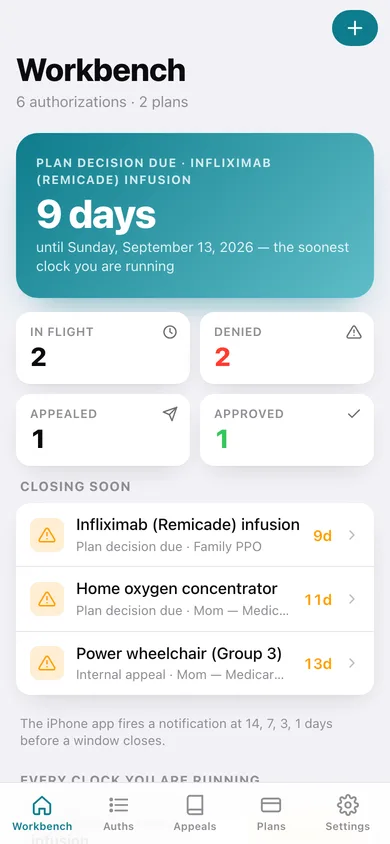
1
Workbench
The soonest-closing appeal windows, what is denied right now, and the register at a glance.
-
2
Authorizations
The whole register, filterable by status, with each request's plan and clock.
-
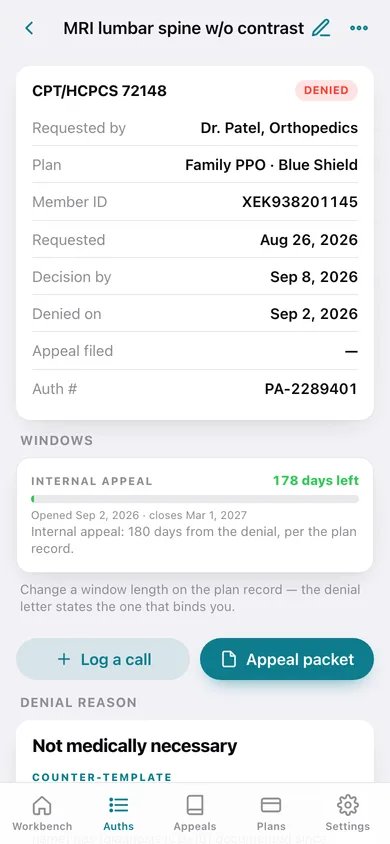
3
Authorization
One request: status, windows counting down, the denial reason and its counter-template, calls logged against it, and the packet button.
-
4
Edit authorization
Service, CPT/HCPCS, provider, plan, request and denial dates, status and clinical rationale.
-
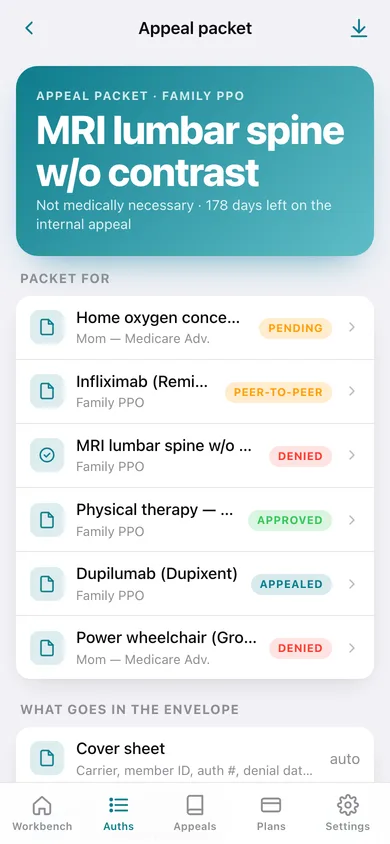
5
Appeal packet
The assembled cover sheet with the denial, the counter-argument, the enclosure list and the contact trail.
-
6
Denial taxonomy
All 30 denial reasons, searchable, with counter-argument templates.
-
7
Denial reason
One reason's counter-argument paragraph, its evidence checklist, and your authorizations denied for it.
-
8
Plans
The plan vault — every carrier you are fighting, with its appeal windows.
-
9
Plan
Carrier contacts, member and group numbers, appeal address and fax, and the authorizations on this plan.
-
10
Edit plan
Carrier, plan type, IDs, phones, fax, appeal address and the internal/external appeal day counts.
-
11
Communication log
Every call, fax, letter and portal message across all authorizations, newest first.
-
12
Log a communication
Who you spoke to, their badge or reference number, and what they committed to.
-
13
Settings
Deadline alert ladder, default appeal windows for new plans, vault counts, export, sample data and erase.
Try it with sample data: Loads two plans (a family PPO and a parent's Medicare Advantage), six authorizations mid-fight — a denied lumbar MRI, an infliximab peer-to-peer, an appealed Dupixent formulary exclusion, a tight 60-day power-wheelchair denial, a pending oxygen concentrator and an approved PT course — plus seven logged calls, faxes and portal messages. You can start fresh at any time.
Ready? It's free.
No account, no install, no subscription. Everything you do stays in this browser.
Your say
What should Priornaught do? Tell us before we build it.
Tell us what to build next.
Comments need a free Google sign-in, so every one is from a real person.
Sign in with Google to commentNo comments yet — be the first to say what this app should do next.
Questions
Is the web version of Priornaught free?+
Yes. Every screen is free to use: no subscription, no in-app purchases, no account.
Do I need an account?+
No. Open Priornaught and start using it right away. Sign in with Google only if you want to upvote an app, save it to your list, or leave a comment.
Where is my data stored?+
Only in this browser's local storage. Nothing you enter is sent to our servers, so we can't see it, back it up, or restore it. Clearing site data, a private window, or another device starts empty. Export a backup from the in-app menu to keep it.
Is there a Priornaught app for iPhone or Android?+
Not yet. Priornaught is a community proposal: the browser version is complete, and we build the iPhone and Android app once 100 people upvote it. Upvoters get one email when it ships.