
Web app · Utilities
Printbed
Know what's left on every spool — and the settings that made the print work
Add your filament spools with brand, material, colour and starting weight, then log each print with grams, hours, result and a settings note. Printbed decrements the spool for you and warns you before you run dry. Free, no install, no printer connection.
Stored in your browser only. Nothing you do in the web version is sent to our servers. Clear your browser data and it's gone — so export a backup from the in-app menu if you want to keep it.
This app is a community proposal.
Try the full browser version now. We build the iPhone and Android app once 100 people upvote it.
We'll email you once, when it ships. Unsubscribe anytime.
In your browser
What you can do in Printbed on the web
Spools that decrement themselves
Every logged print subtracts its grams from the spool, so the card always shows real grams left — no lifting a spool onto the kitchen scale mid-job.
Metres left, not just grams
Printbed converts the remaining weight into metres of 1.75 mm filament using the real density of PLA, PETG, ABS, TPU, ASA, Nylon and resin, so you know whether a 200 g print will fit.
A print journal with the settings that worked
Model name, grams, hours and minutes, success / partial / fail, and the free-text note with your temperature, speed, walls and supports — the note you want at 11pm when it fails again.
Cost per print
Give a spool its price and Printbed works out the cost per gram and what each print actually cost in filament.
Stats that show the truth
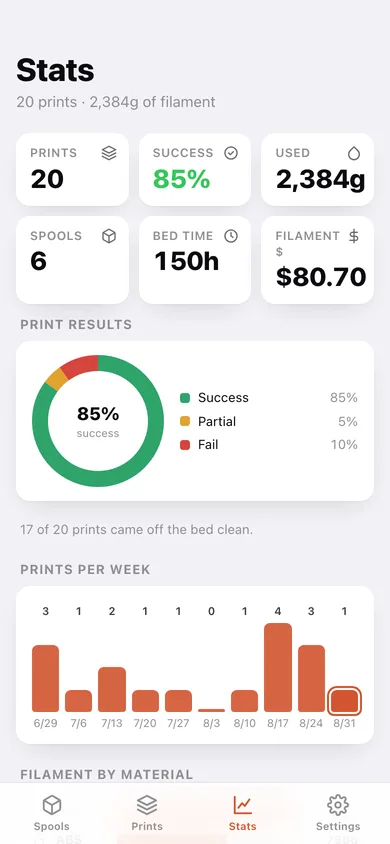
Success-rate donut, prints per week, filament by material, hours on the bed and a spool inventory ranked by what is left — the bottom of that list is your reorder list.
Low-spool warnings and a material guide
Set your own low threshold, and keep the nozzle/bed starting window for every material one tap away in Settings.
Screens
Every screen, rebuilt for the browser
-
1
Spools
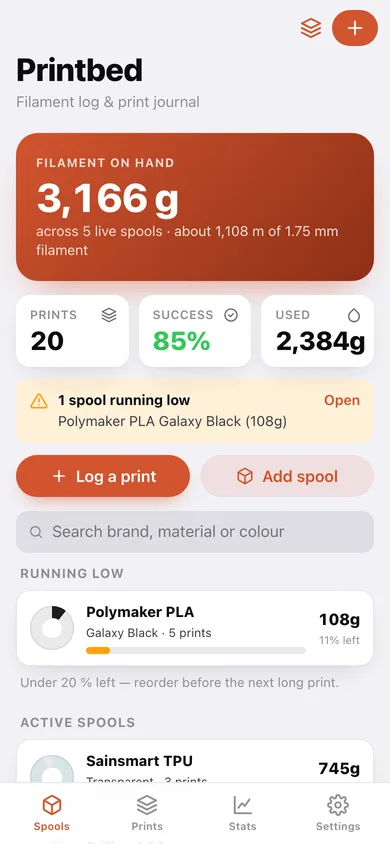
Filament on hand, low-spool warnings, and every spool as a filament disc with grams left.
-
2
Spool
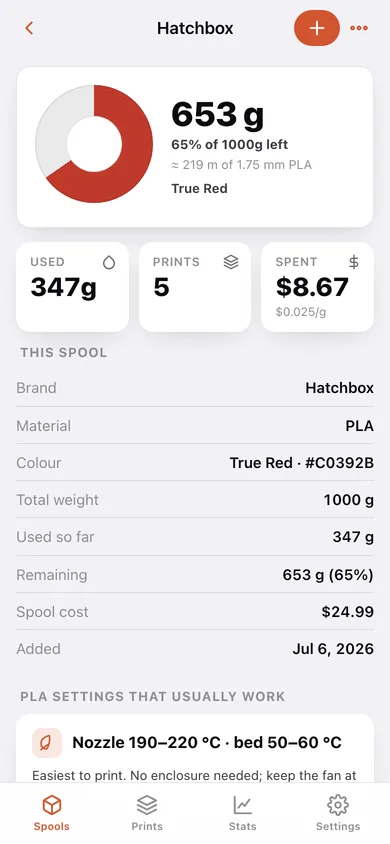
The big remaining-filament disc, grams and metres left, cost spent, material settings and the spool's own print history.
-
3
New spool
Brand, material, colour swatch and hex, total weight, grams already used, cost and notes.
-
4
Prints
The whole print journal by month, filterable to success, partial or fail.
-
5
Print
One print: result banner, filament and time used, what it cost, and the full settings note.
-
6
Log a print
Model, spool, date, result, grams, hours and minutes, settings note — with a live preview of what the spool will read afterwards.
-
7
Stats
Success rate, prints per week, filament by material and the spool inventory.
-
8
Settings
Low-spool threshold, the material temperature guide, CSV exports, backup and erase.
Try it with sample data: Loads six spools — Hatchbox PLA, Polymaker PLA, eSUN PETG, Sainsmart TPU, MatterHackers ABS and Priline ASA — and twenty prints across three months, including a failed phone stand and its successful retry, so the spools, the success rate and the low-stock warning all read like a real workshop. You can start fresh at any time.
Ready? It's free.
No account, no install, no subscription. Everything you do stays in this browser.
Your say
What should Printbed do? Tell us before we build it.
Tell us what to build next.
Comments need a free Google sign-in, so every one is from a real person.
Sign in with Google to commentNo comments yet — be the first to say what this app should do next.
Questions
Is the web version of Printbed free?+
Yes. Every screen is free to use: no subscription, no in-app purchases, no account.
Do I need an account?+
No. Open Printbed and start using it right away. Sign in with Google only if you want to upvote an app, save it to your list, or leave a comment.
Where is my data stored?+
Only in this browser's local storage. Nothing you enter is sent to our servers, so we can't see it, back it up, or restore it. Clearing site data, a private window, or another device starts empty. Export a backup from the in-app menu to keep it.
Is there a Printbed app for iPhone or Android?+
Not yet. Printbed is a community proposal: the browser version is complete, and we build the iPhone and Android app once 100 people upvote it. Upvoters get one email when it ships.