
Web app · Lifestyle
Pottytime
One tap per trip, a timer that tells you when to try again, and a sticker for every win
Potty training in a browser tab: attempt, success, accident and dry night in one tap, a live count-up since the last trip that goes amber at 60 minutes and red at 90, hour-by-hour patterns, a sticker reward chart with streaks and milestones, and a daycare summary you can paste anywhere. Free, offline, no account.
Stored in your browser only. Nothing you do in the web version is sent to our servers. Clear your browser data and it's gone — so export a backup from the in-app menu if you want to keep it.
This app is a community proposal.
Try the full browser version now. We build the iPhone and Android app once 100 people upvote it.
We'll email you once, when it ships. Unsubscribe anytime.
In your browser
What you can do in Pottytime on the web
One-tap logging
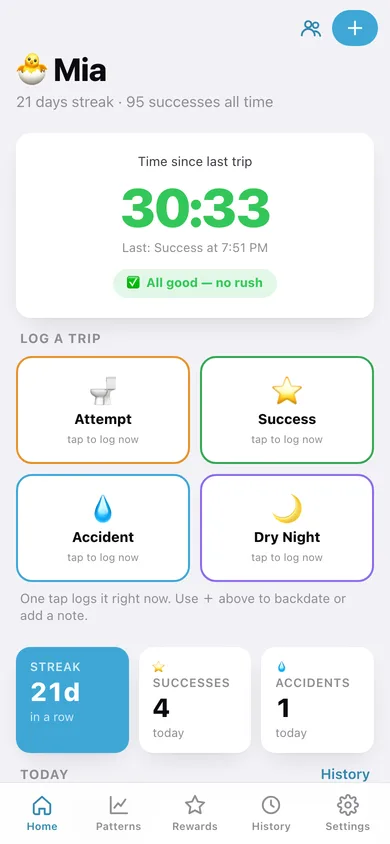
Four big buttons — Attempt, Success, Accident, Dry night — log the moment you tap them, with a cheer and a sticker for every success. Backdate or add a note when you need to.
The time-since-last-trip timer
Counts up live and changes colour the way the three-day method wants it to: green under an hour, 'time to try soon' at 60 minutes, 'try now!' at 90.
Hour-of-day patterns
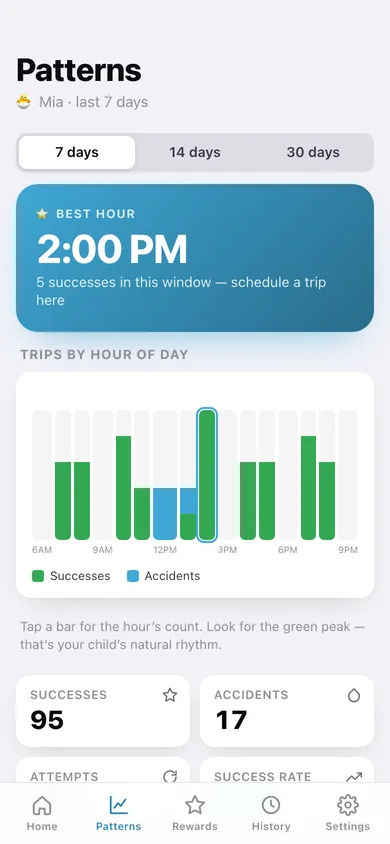
Successes and accidents stacked by hour from 6am to 9pm over 7, 14 or 30 days, with the best hour called out so you can schedule trips around your child's rhythm.
Sticker chart, streak and milestones
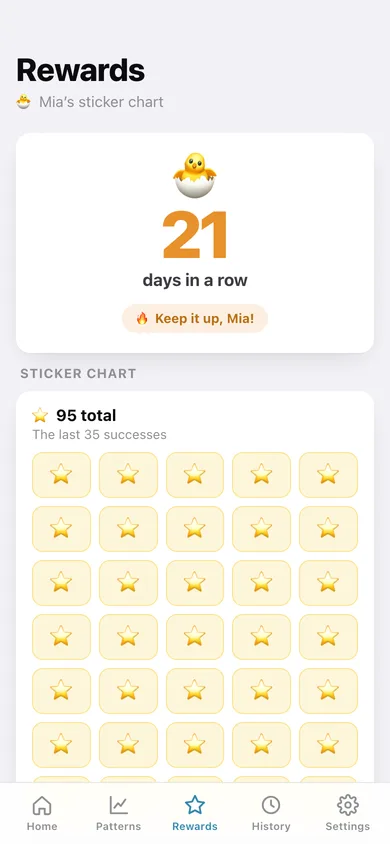
The last 35 successes as a grid of stars, the consecutive-day streak in big orange numerals, and progress towards 5, 10, 25, 50 and 100 successes.
The daycare summary
Any day's events, counts and streak as plain text — copy it into a message or the daycare logbook and close the home-to-daycare gap.
A log per child
Siblings each get their own character, events, streak and stickers, with a switcher on the home screen.
Screens
Every screen, rebuilt for the browser
-
1
Home
The live timer since the last trip, the four one-tap buttons, today's counts and today's events.
-
2
Log a trip
Pick the type, set the time and add a note — for backdating or editing an entry.
-
3
Patterns
Successes and accidents by hour of day, the best hour, success rate and the gaps between successes.
-
4
Rewards
Streak hero, the sticker chart and progress to the next milestone.
-
5
History
Every day's events with counts, plus the daycare summary to copy or share.
-
6
Child
Name, character, totals and the switcher for siblings.
-
7
Settings
Children, pattern window, cheers, backup, CSV export, sample data and erase.
Try it with sample data: Loads Mia, three weeks into training with around a hundred trips, improving accidents and dry nights starting, plus Leo who started three days ago. You can start fresh at any time.
Ready? It's free.
No account, no install, no subscription. Everything you do stays in this browser.
Your say
What should Pottytime do? Tell us before we build it.
Tell us what to build next.
Comments need a free Google sign-in, so every one is from a real person.
Sign in with Google to commentNo comments yet — be the first to say what this app should do next.
Questions
Is the web version of Pottytime free?+
Yes. Every screen is free to use: no subscription, no in-app purchases, no account.
Do I need an account?+
No. Open Pottytime and start using it right away. Sign in with Google only if you want to upvote an app, save it to your list, or leave a comment.
Where is my data stored?+
Only in this browser's local storage. Nothing you enter is sent to our servers, so we can't see it, back it up, or restore it. Clearing site data, a private window, or another device starts empty. Export a backup from the in-app menu to keep it.
Is there a Pottytime app for iPhone or Android?+
Not yet. Pottytime is a community proposal: the browser version is complete, and we build the iPhone and Android app once 100 people upvote it. Upvoters get one email when it ships.