
Web app · Lifestyle
Poollog
Log FC, pH, TA and CYA — and get told what to add, in plain English
The backyard pool logbook: every test strip reading with target-range badges, dosing notes worked out for your gallons, a chemical dose log, 7/30/90-day trends with the ideal band shaded in, and the spring-open and fall-close checklists. Free, no account, offline.
Stored in your browser only. Nothing you do in the web version is sent to our servers. Clear your browser data and it's gone — so export a backup from the in-app menu if you want to keep it.
This app is a community proposal.
Try the full browser version now. We build the iPhone and Android app once 100 people upvote it.
We'll email you once, when it ships. Unsubscribe anytime.
In your browser
What you can do in Poollog on the web
Four parameters, four badges
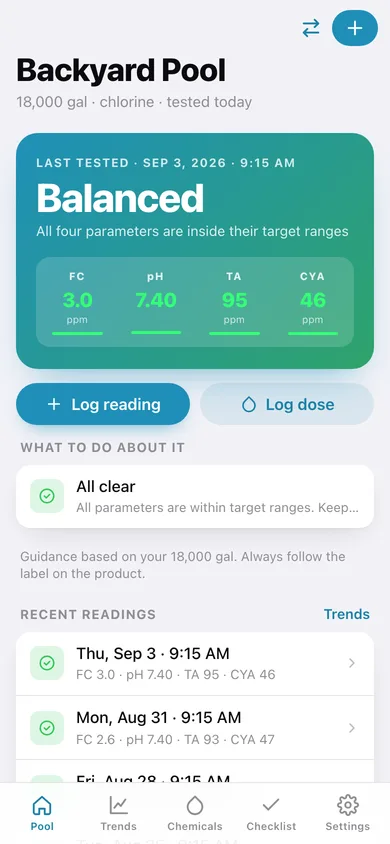
Free chlorine, pH, total alkalinity and stabilizer against the standard outdoor-pool ranges — 2–4 ppm, 7.2–7.6, 80–120 ppm, 30–50 ppm — each in range, drifting or out of range.
Dosing notes for your volume
The same arithmetic the iPhone app runs: how many ounces of shock, fluid ounces of muriatic acid, pounds of baking soda or stabilizer, scaled to your pool's gallons, with the retest interval.
A live dosing preview
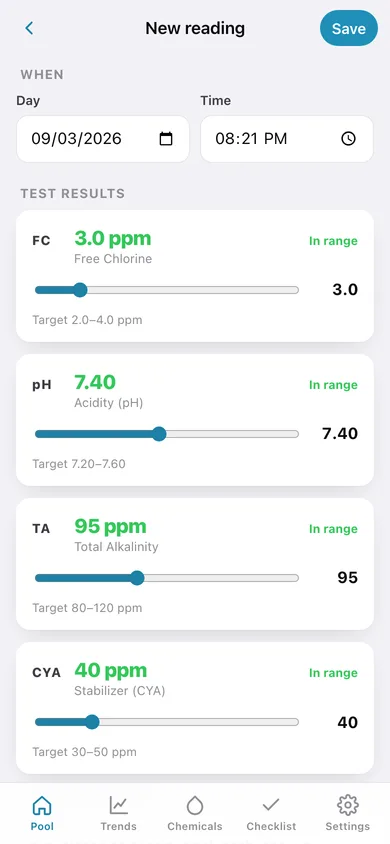
Drag a slider on the new-reading screen and the notes rewrite themselves before you save, so you know what you are walking back to the shed for.
A chemical dose log you can audit
Product, amount, unit and reason with a date — twelve common products preloaded, plus repeat-that-dose from any past entry.
Trends with the ideal band
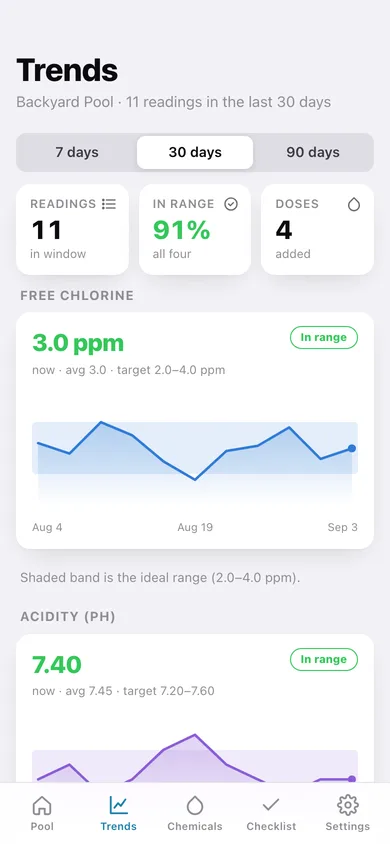
A line per parameter over 7, 30 or 90 days with the target range shaded behind it, the current value, the window average and the percentage of readings fully in range.
Spring-open and fall-close checklists
The full ten-step lists — cover off, pump primed, filter backwashed, shock, algaecide … right through to blowing out the lines — with a progress ring, custom steps and a season reset.
As many pools as you own
Pool, spa, the one at the cabin — each with its own volume, chlorine or salt water, readings, doses and checklists.
Screens
Every screen, rebuilt for the browser
-
1
Pool
Latest reading with the four parameter badges, what to do about it, recent tests and the last chemicals added.
-
2
Reading
One test against every target range, with its dosing notes and your note.
-
3
New reading
Sliders for FC, pH, TA and CYA with a live dosing preview.
-
4
Chemical log
Every dose by month with product, amount, unit and reason.
-
5
Log dose
Twelve common products, amount and unit, reason and time.
-
6
Trends
A line per parameter with the ideal range shaded behind it over 7, 30 or 90 days.
-
7
Checklists
Spring opening and fall closing, ten steps each, with progress and custom steps.
-
8
Pool
Name, gallons, chlorine or salt water, and this pool's totals.
-
9
Settings
Pools, the target ranges, trend window, backup, CSV export, sample data and erase.
Try it with sample data: Loads a 18,000-gallon Backyard Pool with eleven readings over the last month, four chemical doses, both seasonal checklists part-ticked, and a 400-gallon Spa with three readings. You can start fresh at any time.
Ready? It's free.
No account, no install, no subscription. Everything you do stays in this browser.
Your say
What should Poollog do? Tell us before we build it.
Tell us what to build next.
Comments need a free Google sign-in, so every one is from a real person.
Sign in with Google to commentNo comments yet — be the first to say what this app should do next.
Questions
Is the web version of Poollog free?+
Yes. Every screen is free to use: no subscription, no in-app purchases, no account.
Do I need an account?+
No. Open Poollog and start using it right away. Sign in with Google only if you want to upvote an app, save it to your list, or leave a comment.
Where is my data stored?+
Only in this browser's local storage. Nothing you enter is sent to our servers, so we can't see it, back it up, or restore it. Clearing site data, a private window, or another device starts empty. Export a backup from the in-app menu to keep it.
Is there a Poollog app for iPhone or Android?+
Not yet. Poollog is a community proposal: the browser version is complete, and we build the iPhone and Android app once 100 people upvote it. Upvoters get one email when it ships.