
Web app · Health And Fitness
Polarize
Audit your real 80/20 training split, week by week
Log each session by minutes and zone, then see one honest bar: easy on one side, hard on the other, the moderate gray middle called out between them — measured against a polarized, pyramidal or threshold target. Free, offline, no straps to pair.
Stored in your browser only. Nothing you do in the web version is sent to our servers. Clear your browser data and it's gone — so export a backup from the in-app menu if you want to keep it.
This app is a community proposal.
Try the full browser version now. We build the iPhone and Android app once 100 people upvote it.
We'll email you once, when it ships. Unsubscribe anytime.
In your browser
What you can do in Polarize on the web
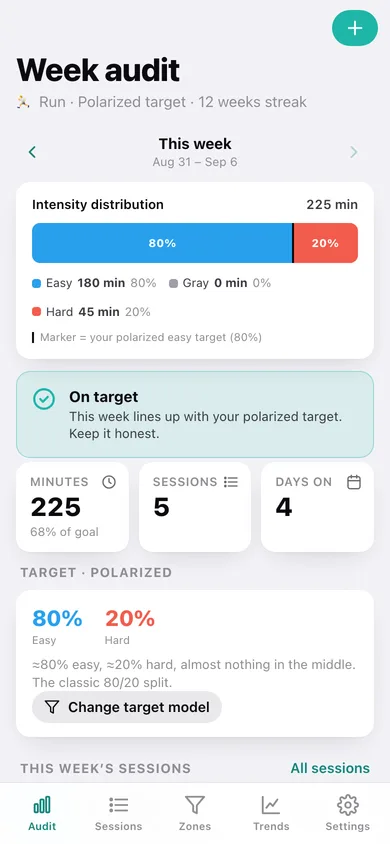
One weekly distribution bar
Every session in the Monday-anchored week stacks into a single easy / gray / hard bar with a marker at your target easy share, plus minutes and percentages for each band.
A plain-language verdict
On target, gray-zone creep, skewed easy or too much hard — the same rules the iPhone app uses, with what to do about it.
Zones without sensors
Log minutes and tap Z1–Z5 by feel. No GPS, no heart-rate strap, no pairing, nothing to import.
Your own zone ladder
Guided setup builds zones from threshold HR, max HR or threshold pace, then you can nudge each ceiling — moving Z2's ceiling moves what counts as easy and re-audits every week.
Creep alerts and trends
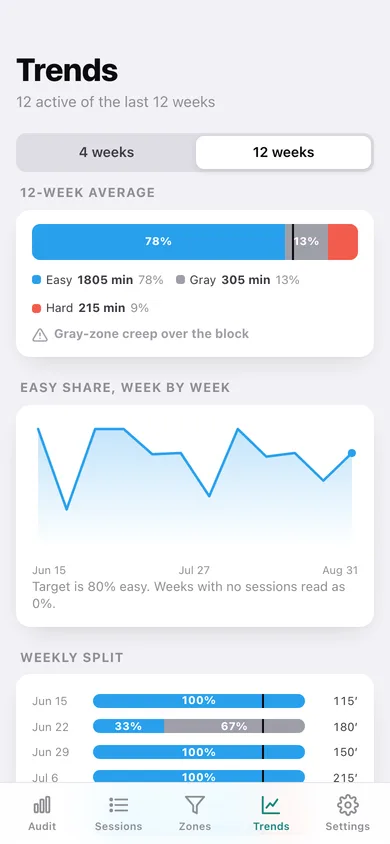
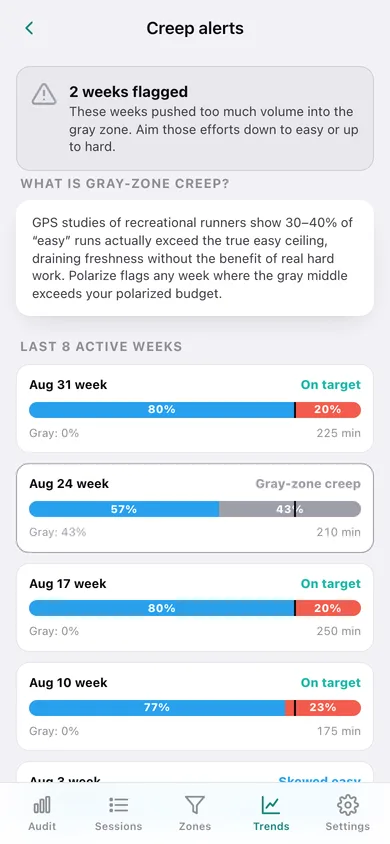
Scan the last eight active weeks for gray-zone creep and chart 4- or 12-week easy-share drift, weekly splits and volume against your goal.
Three target models
Polarized 80/0/20, pyramidal 75/15/10 or threshold 55/30/15 — pick the block you are actually in and the audit follows.
Screens
Every screen, rebuilt for the browser
-
1
Week audit
The week's distribution bar, verdict, volume, and the sessions behind it.
-
2
Log a session
Date, sport, minutes and the zone picker with what each zone feels like.
-
3
Session
One workout's share of the week, with inline minute and zone edits.
-
4
Sessions
Full history grouped by week, each week with its own split bar.
-
5
Trends
4- and 12-week averages, easy-share drift, weekly splits and volume.
-
6
Creep alerts
Every recent active week scanned for volume stuck in the moderate middle.
-
7
Zones
Anchor number, the five-zone ladder in bpm or pace, target model and ceiling tuning.
-
8
Zone setup
The four-question guided flow: sport, method, anchor number, target model.
-
9
Settings
Weekly goal, audit options, per-zone CSV, backup, sample data and erase.
Try it with sample data: Adds twelve weeks of a half-marathon build — 47 sessions across runs, bike and erg, including two deliberately gray-zone weeks so the creep alerts have something to catch. You can start fresh at any time.
Ready? It's free.
No account, no install, no subscription. Everything you do stays in this browser.
Your say
What should Polarize do? Tell us before we build it.
Tell us what to build next.
Comments need a free Google sign-in, so every one is from a real person.
Sign in with Google to commentNo comments yet — be the first to say what this app should do next.
Questions
Is the web version of Polarize free?+
Yes. Every screen is free to use: no subscription, no in-app purchases, no account.
Do I need an account?+
No. Open Polarize and start using it right away. Sign in with Google only if you want to upvote an app, save it to your list, or leave a comment.
Where is my data stored?+
Only in this browser's local storage. Nothing you enter is sent to our servers, so we can't see it, back it up, or restore it. Clearing site data, a private window, or another device starts empty. Export a backup from the in-app menu to keep it.
Is there a Polarize app for iPhone or Android?+
Not yet. Polarize is a community proposal: the browser version is complete, and we build the iPhone and Android app once 100 people upvote it. Upvoters get one email when it ships.