
Web app · Music
PocketClock: Timing Trainer
The metronome that measures how many milliseconds you rush or drag
Play along with the grid and PocketClock times every note against it: a live drift ribbon, a consistency score, the gap-click challenge where the click goes silent, and a tendency report that names your bias. Free, no install.
Stored in your browser only. Nothing you do in the web version is sent to our servers. Clear your browser data and it's gone — so export a backup from the in-app menu if you want to keep it.
This app is a community proposal.
Try the full browser version now. We build the iPhone and Android app once 100 people upvote it.
We'll email you once, when it ships. Unsubscribe anytime.
In your browser
What you can do in PocketClock: Timing Trainer on the web
Live drift ribbon
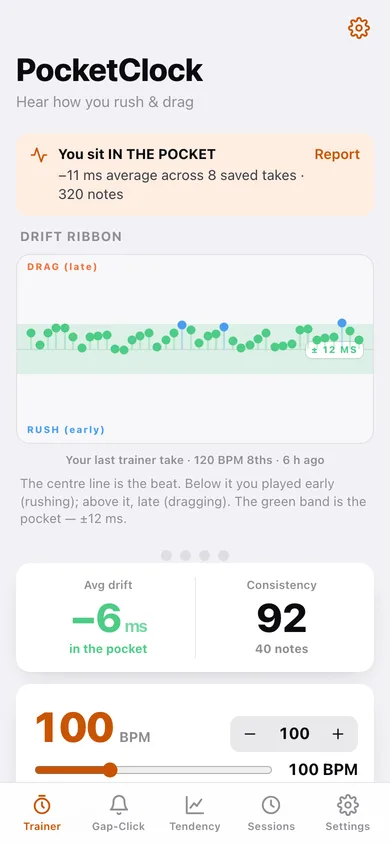
Every note you play lands on a scope where the centre line is the beat — cool blue below means you rushed, warm orange above means you dragged, green is the pocket.
Signed drift and consistency
The same maths as the iPhone app: signed mean drift in milliseconds, the standard deviation across the take, and a 0–100 consistency score (100 − stdev × 2).
Gap-click challenge
Two bars of click, then two bars of silence while you keep the groove — notes played in the gap are ringed on the ribbon and scored on their own.
Quarters, 8ths, triplets and 16ths at 30–260 BPM
Pick the subdivision and tempo; PocketClock shows the exact millisecond spacing of the grid you are playing against.
Tendency report
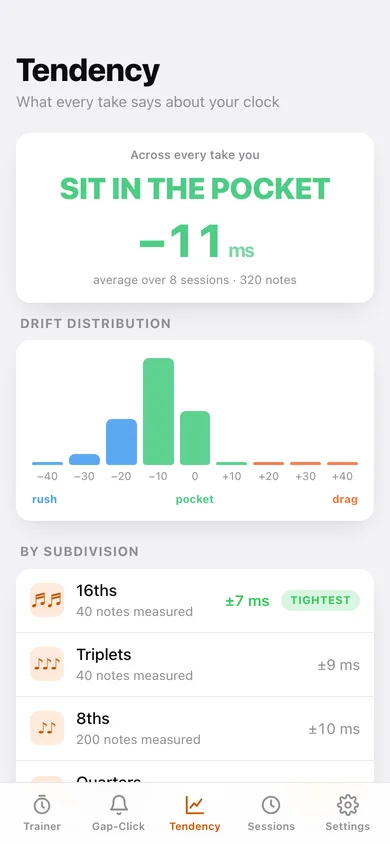
Across every saved take: your rush/drag headline, a drift histogram, tightest and loosest subdivision, and a consistency trend line.
Session history you can export
Each take is saved with tempo, subdivision, mode, average drift and consistency — export the lot as JSON or CSV.
Screens
Every screen, rebuilt for the browser
-
1
Trainer
Drift ribbon, tempo and subdivision, the tap pad and your live average drift.
-
2
Gap-Click
The click counts you in then drops out — keep time through the silence and get a gap score.
-
3
Tendency
Rush/drag headline, drift histogram, per-subdivision breakdown and consistency trend.
-
4
Sessions
Every saved take grouped by day with tempo, drift and consistency.
-
5
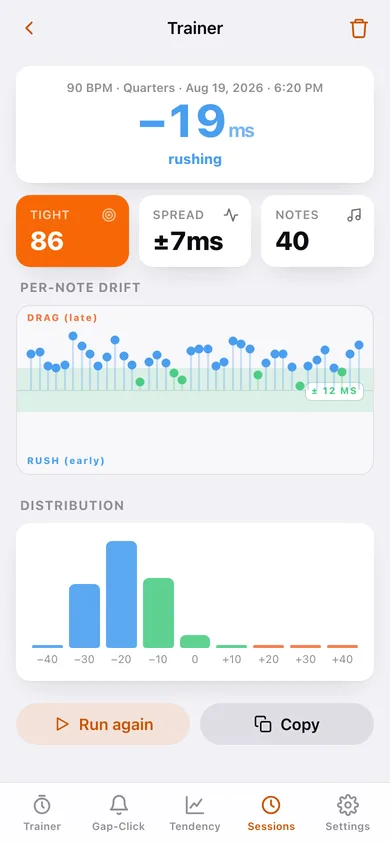
Take detail
One take's per-note drift ribbon, distribution and summary.
-
6
Settings
Accent, tap latency offset, pocket window, gap-click bar counts, export and erase.
Try it with sample data: Loads eight takes spanning the last two and a half weeks — a player with a mild rushing habit who tightens from ±19 ms to ±4 ms, including two gap-click challenges. You can start fresh at any time.
Ready? It's free.
No account, no install, no subscription. Everything you do stays in this browser.
Your say
What should PocketClock: Timing Trainer do? Tell us before we build it.
Tell us what to build next.
Comments need a free Google sign-in, so every one is from a real person.
Sign in with Google to commentNo comments yet — be the first to say what this app should do next.
Questions
Is the web version of PocketClock: Timing Trainer free?+
Yes. Every screen is free to use: no subscription, no in-app purchases, no account.
Do I need an account?+
No. Open PocketClock: Timing Trainer and start using it right away. Sign in with Google only if you want to upvote an app, save it to your list, or leave a comment.
Where is my data stored?+
Only in this browser's local storage. Nothing you enter is sent to our servers, so we can't see it, back it up, or restore it. Clearing site data, a private window, or another device starts empty. Export a backup from the in-app menu to keep it.
Is there a PocketClock: Timing Trainer app for iPhone or Android?+
Not yet. PocketClock: Timing Trainer is a community proposal: the browser version is complete, and we build the iPhone and Android app once 100 people upvote it. Upvoters get one email when it ships.