
Web app · Medical
PillPath
Track your parents' medications — a roster, not a single patient
Mom, Dad, in-laws, grandparent: each with their own meds, doses, schedules, vitals and side-effect notes. One calm digest instead of fifty alarms, 30-day adherence, and a doctor-visit summary you can hand over. Free, no install, no account.
Stored in your browser only. Nothing you do in the web version is sent to our servers. Clear your browser data and it's gone — so export a backup from the in-app menu if you want to keep it.
This app is a community proposal.
Try the full browser version now. We build the iPhone and Android app once 100 people upvote it.
We'll email you once, when it ships. Unsubscribe anytime.
In your browser
What you can do in PillPath on the web
A roster, not one patient
Add everyone you care for — name, relation, birth year, conditions, allergies, doctor, pharmacy — and switch between them with one tap. No paywall on the second person.
Medications with real schedules
Name, dosage, once/twice/three/four times daily, every other day, weekly or as-needed, plus the exact hours. A pill shape and colour picker so “the small pink round one” means something.
The calm digest
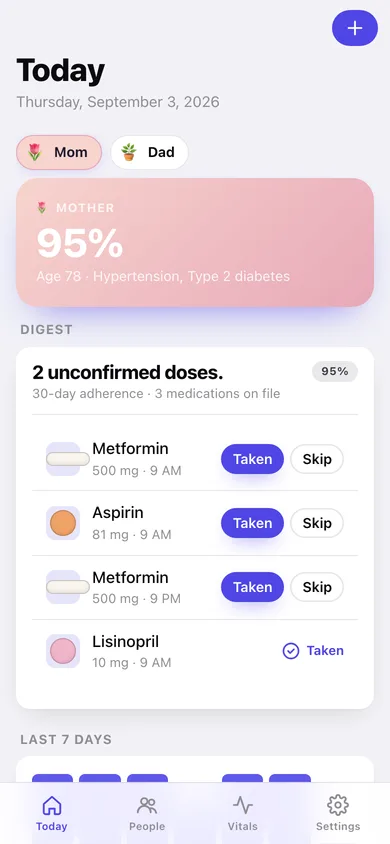
Today shows “2 unconfirmed doses” with a Taken / Skip button on each one, plus the whole day already confirmed — instead of an alarm per pill.
30-day adherence, the way the app computes it
Every scheduled slot in the window counted against every dose confirmed taken — per person, per medication, and a seven-day bar strip on the home screen.
Vitals and side-effect notes
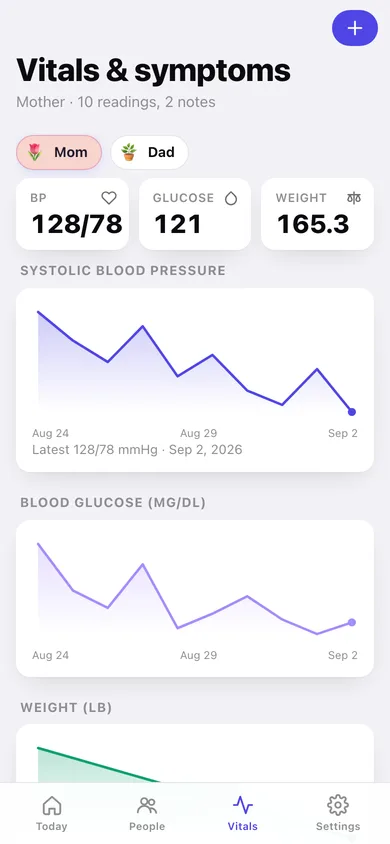
Blood pressure, pulse, glucose and weight with trend lines, and dated notes graded mild / moderate / concerning.
Doctor-visit summary
A 30/60/90-day write-up — every med with its adherence, the vitals, the side effects — to copy, download or export as a dose-log CSV.
Screens
Every screen, rebuilt for the browser
-
1
Today
The selected person's digest: unconfirmed doses with Taken/Skip, 30-day adherence and a seven-day strip.
-
2
Your roster
Every person you care for as a colour-coded card, plus how many of today's doses each one has confirmed.
-
3
Person
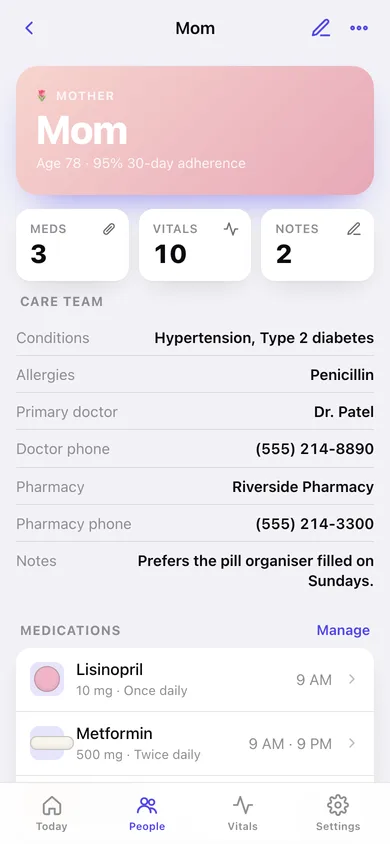
One person's profile: care team, conditions, allergies, medications and recent side-effect notes.
-
4
Add or edit a person
Name, relation, avatar, card colour, birth year, conditions, allergies, doctor and pharmacy.
-
5
Medications
The selected person's medication list with per-med 30-day adherence.
-
6
Medication
One medication: today's doses, schedule, pill look, refill date and the last fourteen logs.
-
7
Add or edit a medication
Dosage, frequency, the exact times of day, pill shape and colour with a live preview.
-
8
Vitals & symptoms
Blood pressure, glucose and weight trend lines with the side-effect notes underneath.
-
9
Add a vital sign
Blood pressure, pulse, glucose and weight with range checks.
-
10
Side-effect note
A dated note graded mild, moderate or concerning.
-
11
Doctor-visit summary
30/60/90-day summary of medications, adherence, vitals and side effects, ready to copy or download.
-
12
Settings
Digest times, home-screen options, your people, backup, sample data and erase.
Try it with sample data: Loads Mom and Dad with six medications, three weeks of dose history, seventeen vitals readings and four side-effect notes. You can start fresh at any time.
Ready? It's free.
No account, no install, no subscription. Everything you do stays in this browser.
Your say
What should PillPath do? Tell us before we build it.
Tell us what to build next.
Comments need a free Google sign-in, so every one is from a real person.
Sign in with Google to commentNo comments yet — be the first to say what this app should do next.
Questions
Is the web version of PillPath free?+
Yes. Every screen is free to use: no subscription, no in-app purchases, no account.
Do I need an account?+
No. Open PillPath and start using it right away. Sign in with Google only if you want to upvote an app, save it to your list, or leave a comment.
Where is my data stored?+
Only in this browser's local storage. Nothing you enter is sent to our servers, so we can't see it, back it up, or restore it. Clearing site data, a private window, or another device starts empty. Export a backup from the in-app menu to keep it.
Is there a PillPath app for iPhone or Android?+
Not yet. PillPath is a community proposal: the browser version is complete, and we build the iPhone and Android app once 100 people upvote it. Upvoters get one email when it ships.