
Web app · Sports
Pichanga
Roster, fair teams and the cancha fee — your pichanga armada in the browser
Keep the squad book with private skill ratings, flip everyone to in / maybe / out as the group chat replies land, deal two balanced sides with one snake-draft tap, split the cancha rental with paid checkmarks, and stack up the season leaderboard. Free, no install, no account.
Stored in your browser only. Nothing you do in the web version is sent to our servers. Clear your browser data and it's gone — so export a backup from the in-app menu if you want to keep it.
This app is a community proposal.
Try the full browser version now. We build the iPhone and Android app once 100 people upvote it.
We'll email you once, when it ships. Unsubscribe anytime.
In your browser
What you can do in Pichanga on the web
Squad book with private ratings
Add each player once with their apodo, preferred position — arco, defensa, medio or delantero — and a 1–5 skill rating only you see. Retire someone and they keep their history but drop off new rosters.
In / maybe / out with a live headcount
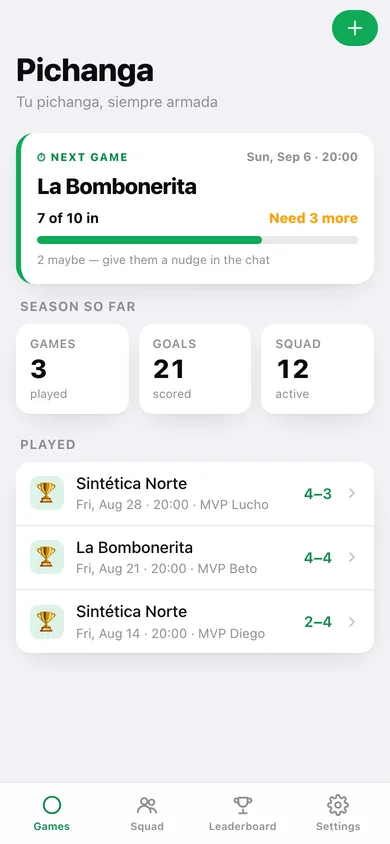
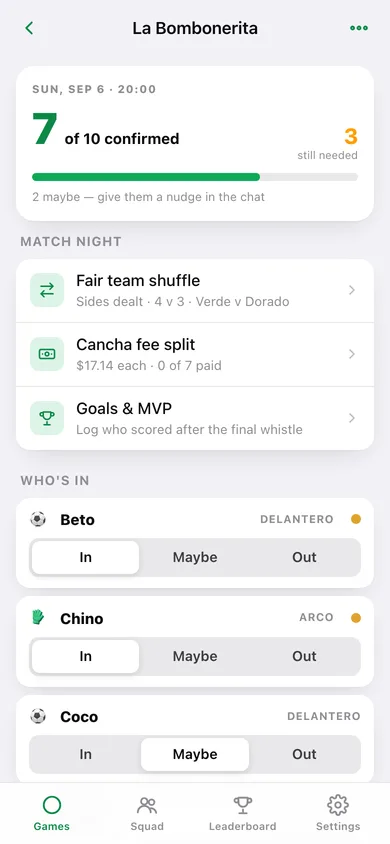
Every game night opens with a big confirmed-of-target number, a progress bar and how many you still need, so you know at a glance whether the pichanga is on.
One-tap snake-draft shuffle
Goalkeepers go to opposite sides first, then everyone else is dealt best-to-weakest onto whichever team is lighter — even sizes, close total skill. Tap two players to swap them, then lock the sides.
Cancha fee split with paid checkmarks
Enter the rental and it divides evenly across the players who actually confirmed, with collected vs. outstanding totals, a tap-to-settle checkmark each, and a paste-ready list for the group chat.
Goals, MVP and the season table
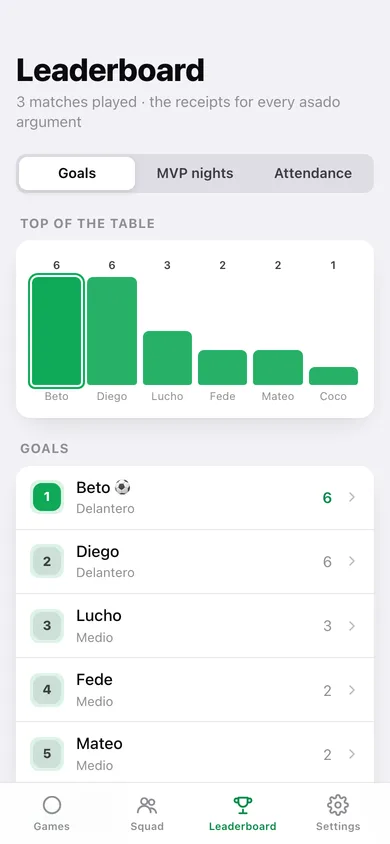
Log who scored, crown the night's MVP, and the leaderboard ranks the crew by goals, MVP nights or attendance across every completed match — the receipts for every asado argument.
Season CSV export
Pull every game, roster line, goal, MVP night and payment out as a CSV, or take a full JSON backup. Everything stays in this browser.
Screens
Every screen, rebuilt for the browser
-
1
Games
The next pichanga with its headcount bar, the season tally, and every upcoming and played game night.
-
2
Game night
The confirmed-of-target headcount banner over an in / maybe / out roster row for every squad member.
-
3
New game night
Cancha, kickoff, players needed and the rental fee — the whole active squad gets a roster row.
-
4
Team shuffle
Team Verde and Team Dorado dealt by snake draft over the skill ratings, with tap-to-swap and a lock.
-
5
Cancha fee split
Share per player, collected vs. outstanding, and a paid checkmark for everyone who confirmed.
-
6
Match log
The Verde–Dorado scoreline, a goal stepper per player and the MVP of the night.
-
7
Squad
Your crew with positions, skill dots and goals this season, plus a breakdown by position.
-
8
Player
One player's season stats, position, private skill rating and retirement switch.
-
9
Leaderboard
The season table by goals, MVP nights or attendance, with a chart of the top of the table.
-
10
Settings
Defaults for a new pichanga, the goalkeeper-splitting rule, CSV export, backup, sample data and erase.
Try it with sample data: Loads a twelve-player squad and four game nights — this week's pichanga with replies still landing, plus three played matches with dealt teams, goals, MVPs and one share still unpaid. You can start fresh at any time.
Ready? It's free.
No account, no install, no subscription. Everything you do stays in this browser.
Your say
What should Pichanga do? Tell us before we build it.
Tell us what to build next.
Comments need a free Google sign-in, so every one is from a real person.
Sign in with Google to commentNo comments yet — be the first to say what this app should do next.
Questions
Is the web version of Pichanga free?+
Yes. Every screen is free to use: no subscription, no in-app purchases, no account.
Do I need an account?+
No. Open Pichanga and start using it right away. Sign in with Google only if you want to upvote an app, save it to your list, or leave a comment.
Where is my data stored?+
Only in this browser's local storage. Nothing you enter is sent to our servers, so we can't see it, back it up, or restore it. Clearing site data, a private window, or another device starts empty. Export a backup from the in-app menu to keep it.
Is there a Pichanga app for iPhone or Android?+
Not yet. Pichanga is a community proposal: the browser version is complete, and we build the iPhone and Android app once 100 people upvote it. Upvoters get one email when it ships.