
Web app · Lifestyle
Petrobot
Tell the robot exactly what your pets need while you're out
Write a routine per pet — feeds, walks, water, litter, meds — add the special instructions (the cat hides if startled), say how long you're away, and Petrobot works out whether that's one walk or three, then hands over the whole brief. Free, no account, all on this device.
Stored in your browser only. Nothing you do in the web version is sent to our servers. Clear your browser data and it's gone — so export a backup from the in-app menu if you want to keep it.
This app is a community proposal.
Try the full browser version now. We build the iPhone and Android app once 100 people upvote it.
We'll email you once, when it ships. Unsubscribe anytime.
In your browser
What you can do in Petrobot on the web
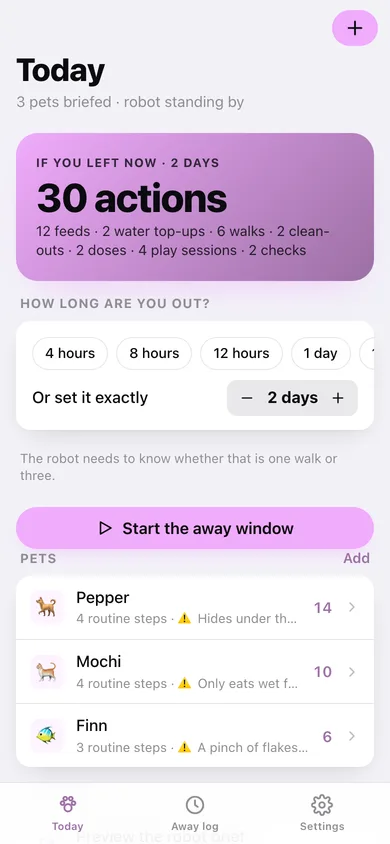
Away duration does the maths
Set the window and every routine step expands into dated, timed actions: a walk every 8 hours over two days becomes six walks, not a vague note.
A routine per pet, per species
Add a dog, cat, bird, fish or small animal and Petrobot fills in a sensible starter routine you edit — instruction, detail for the robot, and either times of day, an interval, or a one-off.
Special instructions first
The thing that actually matters — hides under the bed, only eats wet food, half a tablet crushed in the evening pouch — rides at the top of the brief with an emergency contact.
A brief you can hand over
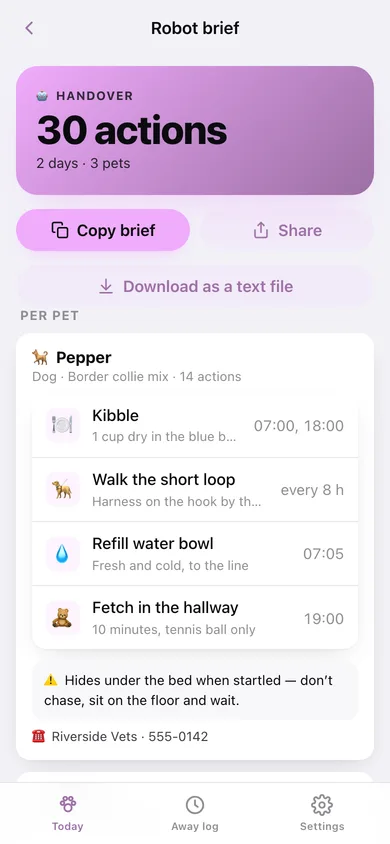
One plain-text handover with every routine, every caution and the full schedule — copy it into the robot app, message it to a sitter, or download it as a file.
Tick actions off while you're away
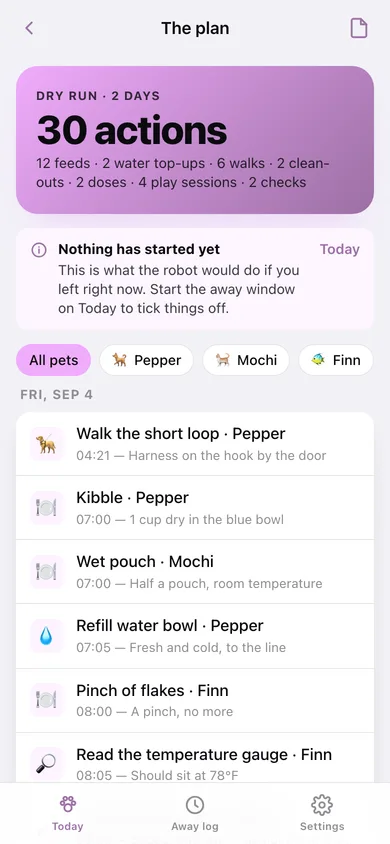
The live plan shows what is next and what is overdue; tick each action as the robot confirms it and the away window keeps a completion record.
An away log that remembers
Every window you have been out: how long, how many actions were briefed, and what percentage was actually confirmed.
Screens
Every screen, rebuilt for the browser
-
1
Today
Away duration, the action count if you left now, your pets and the live window when the robot is on duty.
-
2
The plan
Every action expanded across the window, grouped by day, filterable per pet and tickable while you are out.
-
3
Robot brief
The handover: routines, special instructions and the full schedule as copyable, shareable, downloadable text.
-
4
Pet
One pet's routine steps, special instructions and emergency contact — plus the species starter routine.
-
5
Away log
Every away window with duration, actions briefed and the percentage confirmed.
-
6
Away window
One window: when you left, when you were back, and everything the robot ticked off.
-
7
Settings
Default away duration, overdue warnings, backup, CSV export, sample data and erase.
Try it with sample data: Loads Pepper the border collie mix, Mochi the cat and Finn the betta with full routines and cautions, plus three finished away windows the robot mostly ticked off. You can start fresh at any time.
Ready? It's free.
No account, no install, no subscription. Everything you do stays in this browser.
Your say
What should Petrobot do? Tell us before we build it.
Tell us what to build next.
Comments need a free Google sign-in, so every one is from a real person.
Sign in with Google to commentNo comments yet — be the first to say what this app should do next.
Questions
Is the web version of Petrobot free?+
Yes. Every screen is free to use: no subscription, no in-app purchases, no account.
Do I need an account?+
No. Open Petrobot and start using it right away. Sign in with Google only if you want to upvote an app, save it to your list, or leave a comment.
Where is my data stored?+
Only in this browser's local storage. Nothing you enter is sent to our servers, so we can't see it, back it up, or restore it. Clearing site data, a private window, or another device starts empty. Export a backup from the in-app menu to keep it.
Is there a Petrobot app for iPhone or Android?+
Not yet. Petrobot is a community proposal: the browser version is complete, and we build the iPhone and Android app once 100 people upvote it. Upvoters get one email when it ships.