
Web app · Productivity
Peshi
The litigant's case diary — every tareekh, every rupee, in one place
For the person paying for the case, not the advocate managing a hundred. Write down what happened at each hearing, what the court asked for, and the next date your lawyer gave you; keep a rupee-by-rupee fee ledger and a document checklist. Free, no account, nothing leaves your browser.
Stored in your browser only. Nothing you do in the web version is sent to our servers. Clear your browser data and it's gone — so export a backup from the in-app menu if you want to keep it.
This app is a community proposal.
Try the full browser version now. We build the iPhone and Android app once 100 people upvote it.
We'll email you once, when it ships. Unsubscribe anytime.
In your browser
What you can do in Peshi on the web
A hearing timeline per case
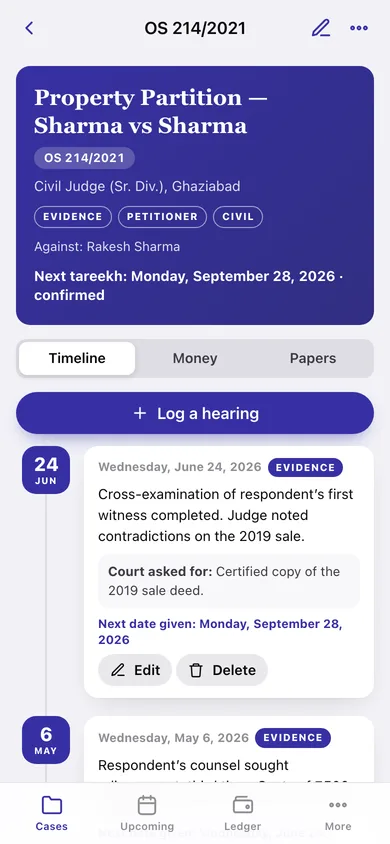
Date, what happened in court, what the judge asked for, the next date given, and whether you were there — thirty seconds of typing on the courthouse steps becomes a record you can read back in three years.
The upcoming tareekh board
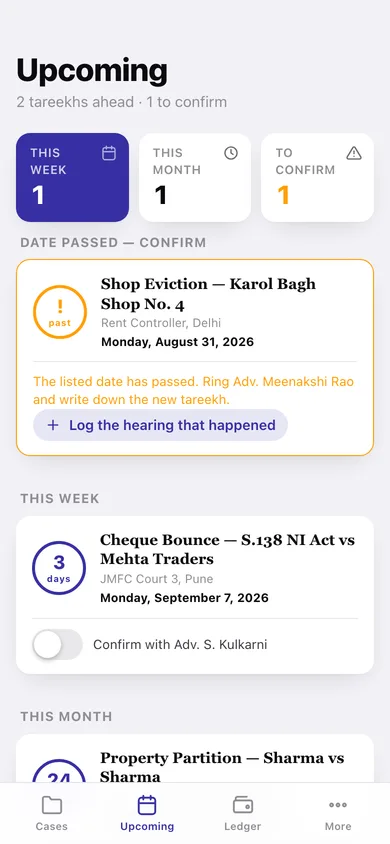
Every next date across every case, grouped into date-passed, this week, this month and later, with the confirm-with-your-lawyer prompt inside the three-day window.
Honest about dates that move
When a listed date has passed, Peshi says so in amber and asks you to ring the office for the new tareekh rather than pretending it knows.
Rupee-by-rupee fee ledger
Date, amount, purpose and mode for every payment, with per-case totals and a grand total in Indian digit grouping — ₹1,50,000, not $150,000.
Document checklist
What the court asked for and what you have actually collected, in six kinds — order, receipt, notice, evidence, identity, other — ticked off as they come in hand.
Full case history, ready to hand over
One page with the whole diary — hearings, fees and papers — to copy or download when it is time for an appeal or a new advocate.
Screens
Every screen, rebuilt for the browser
-
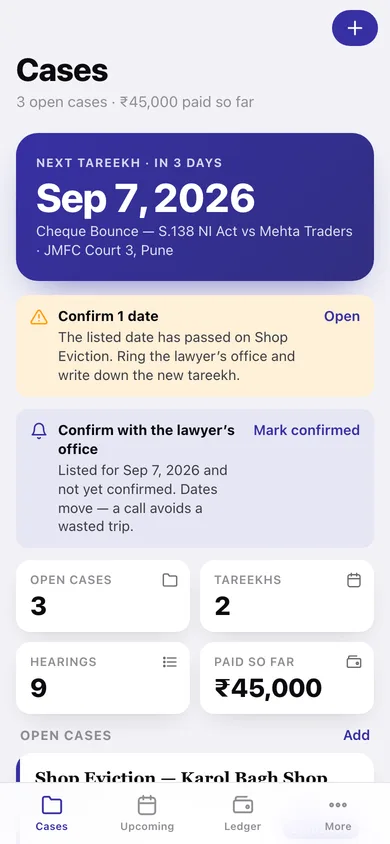
1
Cases
Your next tareekh, open cases sorted by date, dates to confirm, and total paid so far.
-
2
Case file
The indigo case-file header with Timeline, Money and Papers for one case.
-
3
Add or edit a case
Title, case number, court, type, your side, stage, filing date, next tareekh and lawyer.
-
4
Log a hearing
What happened, what the court asked for, the stage, and the next date given.
-
5
Upcoming
Every next date grouped by how close it is, with the confirm-with-the-office toggle.
-
6
Ledger
Grand total across cases, how you paid, and every payment line by case.
-
7
Case history
The whole diary as one page you can copy or download for a new advocate.
-
8
More
Reminder preferences, per-case history, JSON and CSV backup, privacy and erase.
Try it with sample data: Loads four cases — a property partition, a cheque-bounce complaint, a shop eviction with a date already passed, and a closed consumer matter — with nine hearings, eight fee payments and eight papers on the checklist. You can start fresh at any time.
Ready? It's free.
No account, no install, no subscription. Everything you do stays in this browser.
Your say
What should Peshi do? Tell us before we build it.
Tell us what to build next.
Comments need a free Google sign-in, so every one is from a real person.
Sign in with Google to commentNo comments yet — be the first to say what this app should do next.
Questions
Is the web version of Peshi free?+
Yes. Every screen is free to use: no subscription, no in-app purchases, no account.
Do I need an account?+
No. Open Peshi and start using it right away. Sign in with Google only if you want to upvote an app, save it to your list, or leave a comment.
Where is my data stored?+
Only in this browser's local storage. Nothing you enter is sent to our servers, so we can't see it, back it up, or restore it. Clearing site data, a private window, or another device starts empty. Export a backup from the in-app menu to keep it.
Is there a Peshi app for iPhone or Android?+
Not yet. Peshi is a community proposal: the browser version is complete, and we build the iPhone and Android app once 100 people upvote it. Upvoters get one email when it ships.