
Web app · Health And Fitness
Crashscope
When a crash hits, one tap rebuilds the 72 hours that caused it
A thirty-second taps-only energy check-in, tap-based activity logging with one-minute backfill, and a crash investigator that assembles the prior 72 hours automatically — effort load, morning energy, every activity with a suspect flag. Free, offline, no account, no wearable.
Stored in your browser only. Nothing you do in the web version is sent to our servers. Clear your browser data and it's gone — so export a backup from the in-app menu if you want to keep it.
This app is a community proposal.
Try the full browser version now. We build the iPhone and Android app once 100 people upvote it.
We'll email you once, when it ships. Unsubscribe anytime.
In your browser
What you can do in Crashscope on the web
Thirty-second check-in
Energy on a 0-10 dot scale, symptom load (calm / elevated / flaring), sleep quality (poor / fair / good), and an optional one-line note — taps only, for the days when typing is too much.
Four-tap activity log
Ten categories — rest, screen time, social, shower and hygiene, chores, errand, appointment, work, exercise, other — with effort 1-4 (resting, light, moderate, heavy) and a duration preset. Each entry carries its effort-hours.
The crash investigator
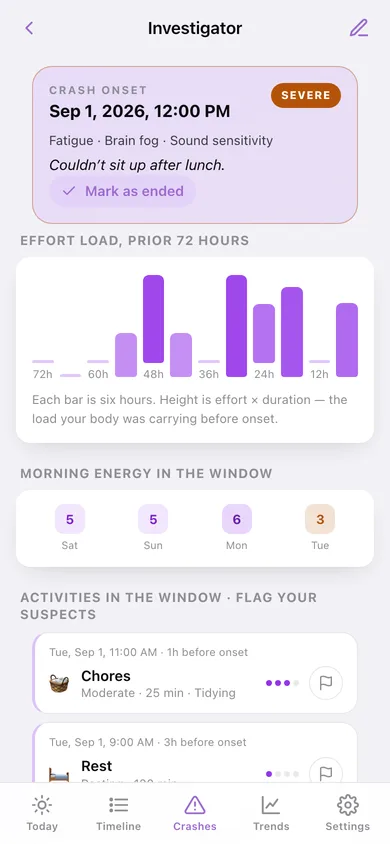
Record onset, severity and symptoms, and the previous 72 hours assemble themselves: twelve six-hour effort-load bars, every morning energy score in the window, and each activity with a flag-as-suspect toggle.
Cross-crash trigger patterns
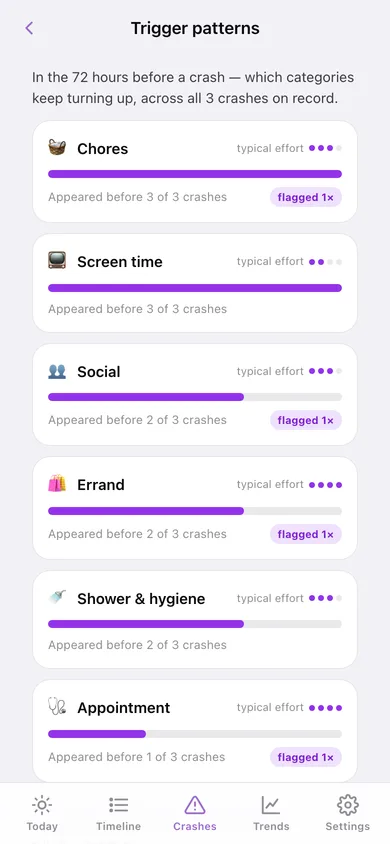
Looks across every crash on record and ranks which categories keep appearing in the danger window — 'appeared before 2 of 3 crashes', with typical effort and how often you flagged it. Rest is excluded on purpose.
One-minute backfill
Reconstruct any of the last seven days in coarse morning, afternoon and evening strokes, so a bad day never leaves a hole in the record. Backfilled entries stay marked as reconstructed.
Energy envelope trend
Weekly average morning energy with crash weeks marked in amber, the activity load line beside it, and a plain summary of whether the envelope is expanding, holding or shrinking.
Screens
Every screen, rebuilt for the browser
-
1
Today
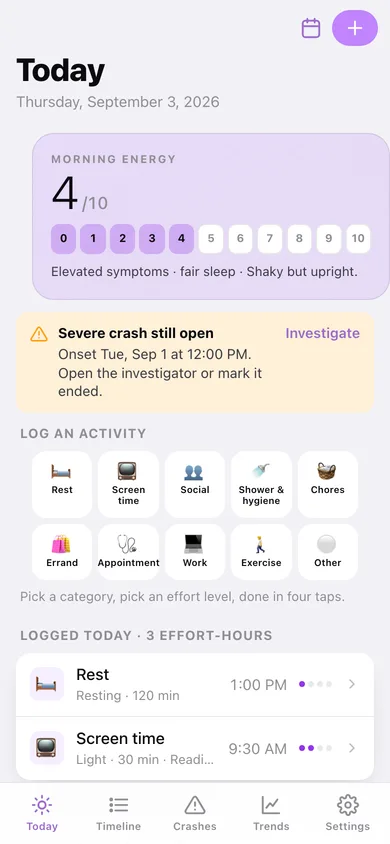
Morning energy on its dot scale, the ten activity tiles, what you logged today, and the record-a-crash entry point.
-
2
Daily check-in
Energy, symptom load and sleep in taps, with your recent check-ins underneath.
-
3
Activity
Category tile, effort level, duration preset, time and note — with the effort-hours it costs.
-
4
Timeline
A 12-week effort-load heatmap, category filters, and every day's entries with its energy score.
-
5
Backfill
Rebuild a missed day in morning, afternoon and evening strokes.
-
6
Crashes
Every crash on record with severity, symptoms and how many activities you flagged.
-
7
Investigator
The crash header above its automatic 72-hour window: effort-load bars, morning energy, and flaggable suspects.
-
8
Record a crash
Onset day and time, severity, symptom chips and a note.
-
9
Trigger patterns
Which categories keep turning up in the danger window across all your crashes.
-
10
Trends
Average morning energy per week with crash markers, the activity-load line, and the envelope summary.
-
11
Settings
Check-in options, the category list, CSV appointment summary, JSON backup, sample data and erase.
Try it with sample data: Loads six weeks of daily check-ins, around eighty activity entries (including the clinic trip, the pharmacy run and the deep-cleaned kitchen), and three crashes — one still open — with suspects already flagged. You can start fresh at any time.
Ready? It's free.
No account, no install, no subscription. Everything you do stays in this browser.
Your say
What should Crashscope do? Tell us before we build it.
Tell us what to build next.
Comments need a free Google sign-in, so every one is from a real person.
Sign in with Google to commentNo comments yet — be the first to say what this app should do next.
Questions
Is the web version of Crashscope free?+
Yes. Every screen is free to use: no subscription, no in-app purchases, no account.
Do I need an account?+
No. Open Crashscope and start using it right away. Sign in with Google only if you want to upvote an app, save it to your list, or leave a comment.
Where is my data stored?+
Only in this browser's local storage. Nothing you enter is sent to our servers, so we can't see it, back it up, or restore it. Clearing site data, a private window, or another device starts empty. Export a backup from the in-app menu to keep it.
Is there a Crashscope app for iPhone or Android?+
Not yet. Crashscope is a community proposal: the browser version is complete, and we build the iPhone and Android app once 100 people upvote it. Upvoters get one email when it ships.