
Web app · Lifestyle
Pawmark
Your dog's adventures, stamped with a pawprint — free, in any browser
A keepsake journal, not a health record: log the hike, the brewery patio, the road trip in three steps, tick off an 80-item curated bucket list, watch milestones unlock themselves, and pull an annual recap for the family. No account, no ads, everything unlocked.
Stored in your browser only. Nothing you do in the web version is sent to our servers. Clear your browser data and it's gone — so export a backup from the in-app menu if you want to keep it.
This app is a community proposal.
Try the full browser version now. We build the iPhone and Android app once 100 people upvote it.
We'll email you once, when it ships. Unsubscribe anytime.
In your browser
What you can do in Pawmark on the web
Three-step Add Adventure
Pick one of the 11 kinds — hike, dog park, beach, restaurant, brewery, vacation, road trip, friend's house, new trick, first time, other — then when and where, then notes and who came along. Saving drops the pawprint stamp.
The whole 80-item bucket list
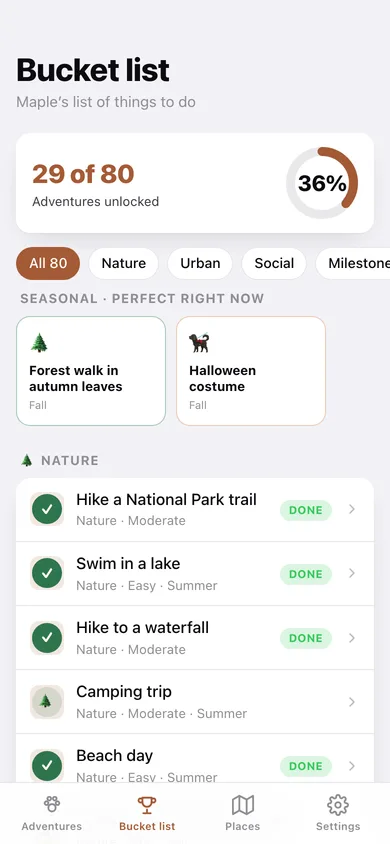
Every curated adventure from the iPhone app across nature, urban, social, milestones, travel and training, with difficulty, season and a 'perfect right now' seasonal row — tick one off or log it straight as an adventure.
Milestones found for you
First adventure, first of each type, 10th / 25th / 50th / 100th / 200th / 500th, plus a countdown to the next birthday and gotcha-day anniversary.
Stats worth bragging about
Adventures, types tried, current streak, total distance walked in miles or km, top type and most-visited place — for each pet, all free.
Places, plotted with pawprints
Every adventure with coordinates lands on a latitude/longitude plot with a coloured pawprint pin, alongside a most-visited list and a by-type breakdown.
Annual recap you can send to grandma
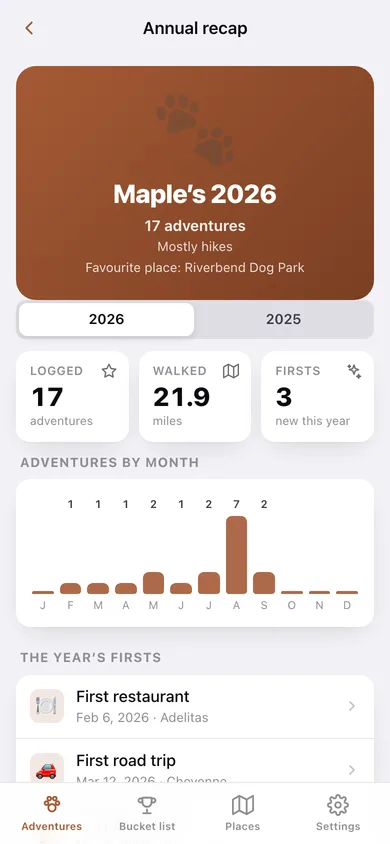
Pick a year: adventures per month, the year's firsts, distance, favourite place and highlights on a shareable card you can copy or share.
Multi-pet and memorial mode
Every dog (or cat) gets their own album with a switcher; memorial mode turns an album into a keepsake with careful copy — and is reversible.
Screens
Every screen, rebuilt for the browser
-
1
Adventures
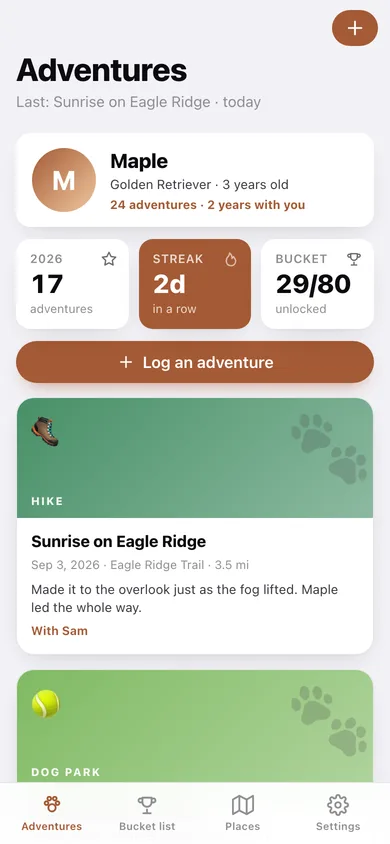
Pet header, this-year and streak stats, and the vertical timeline of adventure cards.
-
2
Adventure detail
One adventure: type, place, distance, companions, notes, and a copyable caption.
-
3
Add adventure
The three-step flow — kind, when and where, notes and companions — ending in the pawprint stamp.
-
4
Bucket list
All 80 curated adventures with a progress ring, category filter and the seasonal row.
-
5
Bucket item
One bucket-list adventure with its description, difficulty and season — mark it done or log it.
-
6
Places
Pawprint pins plotted by latitude and longitude, most-visited places and adventures by type.
-
7
Pet profile
Avatar, age, years with you, six stats, milestones, edit, memorial mode.
-
8
Milestones
Everything unlocked so far and what is coming next.
-
9
Annual recap
The year on one card: adventures per month, firsts, distance and highlights.
-
10
Settings
Pets, miles or kilometres, seasonal suggestions, JSON backup, CSV export, sample data and erase.
Try it with sample data: Loads Maple, a three-year-old Golden Retriever, with 24 adventures across the last two years — hikes, beaches, breweries, road trips and a first snow — plus 20-odd bucket-list items already ticked off. You can start fresh at any time.
Ready? It's free.
No account, no install, no subscription. Everything you do stays in this browser.
Your say
What should Pawmark do? Tell us before we build it.
Tell us what to build next.
Comments need a free Google sign-in, so every one is from a real person.
Sign in with Google to commentNo comments yet — be the first to say what this app should do next.
Questions
Is the web version of Pawmark free?+
Yes. Every screen is free to use: no subscription, no in-app purchases, no account.
Do I need an account?+
No. Open Pawmark and start using it right away. Sign in with Google only if you want to upvote an app, save it to your list, or leave a comment.
Where is my data stored?+
Only in this browser's local storage. Nothing you enter is sent to our servers, so we can't see it, back it up, or restore it. Clearing site data, a private window, or another device starts empty. Export a backup from the in-app menu to keep it.
Is there a Pawmark app for iPhone or Android?+
Not yet. Pawmark is a community proposal: the browser version is complete, and we build the iPhone and Android app once 100 people upvote it. Upvoters get one email when it ships.