
Web app · Utilities
Pattern
Log stalking and harassment incidents — and see the pattern they make
Structured, SPARC-aligned incidents that sort themselves into a timeline, a frequency-and-escalation reading that shows whether it is getting worse, and a printable record for a protective-order petition. Free, no account, stays in your browser.
Stored in your browser only. Nothing you do in the web version is sent to our servers. Clear your browser data and it's gone — so export a backup from the in-app menu if you want to keep it.
This app is a community proposal.
Try the full browser version now. We build the iPhone and Android app once 100 people upvote it.
We'll email you once, when it ships. Unsubscribe anytime.
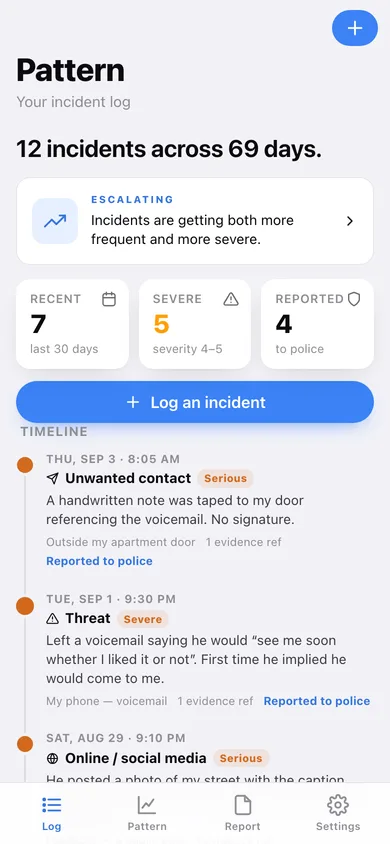
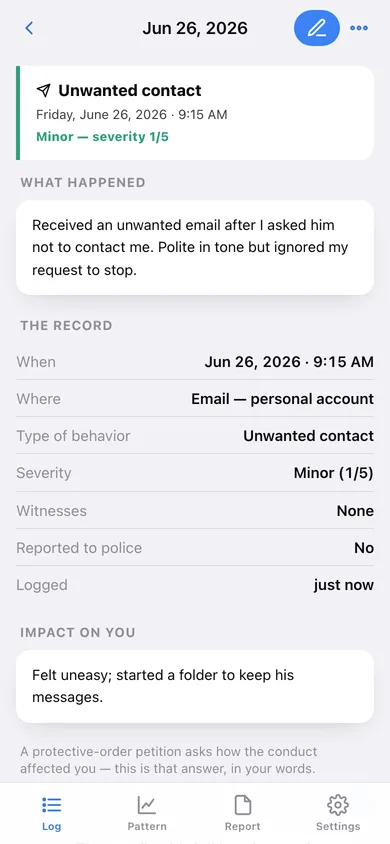
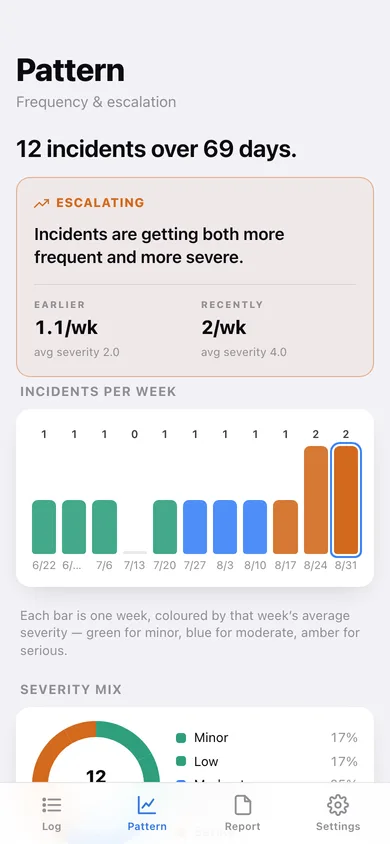
In your browser
What you can do in Pattern on the web
Structured incidents, not loose notes
Date and time, location, exactly what happened, who witnessed it, the impact on you, the behavior type and a 1–5 severity — the fields SPARC's documentation log asks for.
A timeline that builds itself
Every incident drops into a chronological timeline with a severity-sized dot, the behavior type, the place and whether police were told — no sorting, no retyping.
Frequency and escalation, at a glance
Weekly bars coloured by that week's average severity, a severity mix, a behavior breakdown, and an earlier-vs-recently reading of incidents per week and average severity.
A court-ready record
A summary block, the full chronological record and the escalation reading, formatted for a protective-order petition — preview it, copy it, or download it as a text file or a CSV.
Evidence references, never the files
Note what a screenshot, voicemail, email or document is and where you keep it. Pattern stores only the pointer, so there is nothing extra on the device to lose.
No account, no sync, nothing on a server
The log lives in this browser alone. There is no sign-up, no email trail and no vendor copy — offline is the safety requirement, not a feature.
Screens
Every screen, rebuilt for the browser
-
1
The log
How many incidents across how many days, the escalation line, and the auto-built timeline.
-
2
Incident
One incident in full: the narrative, every SPARC field, the impact statement and its evidence references.
-
3
Log an incident
The structured entry form — when, type of behavior, where, what happened, witnesses, impact, severity and police report.
-
4
Evidence references
Add and edit pointers to the screenshots, voicemails and emails you keep elsewhere.
-
5
Pattern & escalation
Escalation card, incidents per week, severity mix and the behaviors logged.
-
6
Court report
Options, a live preview of the full record, and copy / text / CSV export.
-
7
Settings
Privacy, staying private on a shared computer, your local data, backup and erase.
Try it with sample data: Loads an example ten-week record: twelve incidents that start sparse and minor and end frequent and severe — an email, a grocery-store approach, an unwanted delivery, DMs from a new account, a followed drive, a slashed tyre, a public post and a threatening voicemail — with nine evidence references and three police case numbers. You can start fresh at any time.
Ready? It's free.
No account, no install, no subscription. Everything you do stays in this browser.
Your say
What should Pattern do? Tell us before we build it.
Tell us what to build next.
Comments need a free Google sign-in, so every one is from a real person.
Sign in with Google to commentNo comments yet — be the first to say what this app should do next.
Questions
Is the web version of Pattern free?+
Yes. Every screen is free to use: no subscription, no in-app purchases, no account.
Do I need an account?+
No. Open Pattern and start using it right away. Sign in with Google only if you want to upvote an app, save it to your list, or leave a comment.
Where is my data stored?+
Only in this browser's local storage. Nothing you enter is sent to our servers, so we can't see it, back it up, or restore it. Clearing site data, a private window, or another device starts empty. Export a backup from the in-app menu to keep it.
Is there a Pattern app for iPhone or Android?+
Not yet. Pattern is a community proposal: the browser version is complete, and we build the iPhone and Android app once 100 people upvote it. Upvoters get one email when it ships.