
Web app · Travel
Inkpass
Catalog every cancellation stamp in your passport book, in the browser
399 National Park Service units in the nine official passport regions, a cancellation log per stamping station with date, ink colour and bonus flag, region rings, state-by-state coverage and a trip journal. Free, no account, nothing leaves this browser.
Stored in your browser only. Nothing you do in the web version is sent to our servers. Clear your browser data and it's gone — so export a backup from the in-app menu if you want to keep it.
This app is a community proposal.
Try the full browser version now. We build the iPhone and Android app once 100 people upvote it.
We'll email you once, when it ships. Unsubscribe anytime.
In your browser
What you can do in Inkpass on the web
The whole unit catalog, not just the 63
399 parks, monuments, battlefields, seashores, memorials and historic sites, grouped into the nine official passport regions exactly the way the blue book is.
Stamp-by-stamp, station-by-station
A park with six stamping stations gets six entries — each with the station name, the date on the dater, the ink colour, a bonus/special-event flag and a note.
Region rings and closest-to-done
A progress ring per passport region plus a banner naming the region you are nearest to closing out, so the next road trip plans itself.
State-by-state coverage
Every state and territory ranked by how much of its passport you have collected, with the fully closed-out ones sealed.
Trip journal
Bundle an outing into a trip — dates, who came, free-form notes — and every stamp collected on it lists under the parks you hit.
Collecting pace and ink mix
A twelve-month bar chart of cancellations collected and a donut of the ink colours filling your book.
Screens
Every screen, rebuilt for the browser
-
1
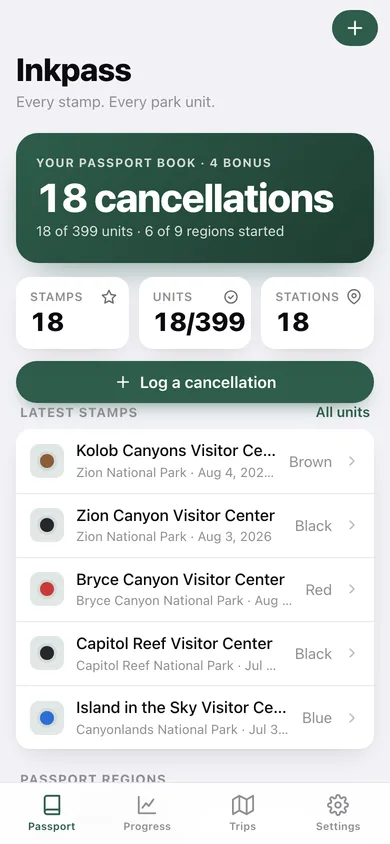
Passport
Cancellation count, units visited, latest stamps and a progress bar for each of the nine passport regions.
-
2
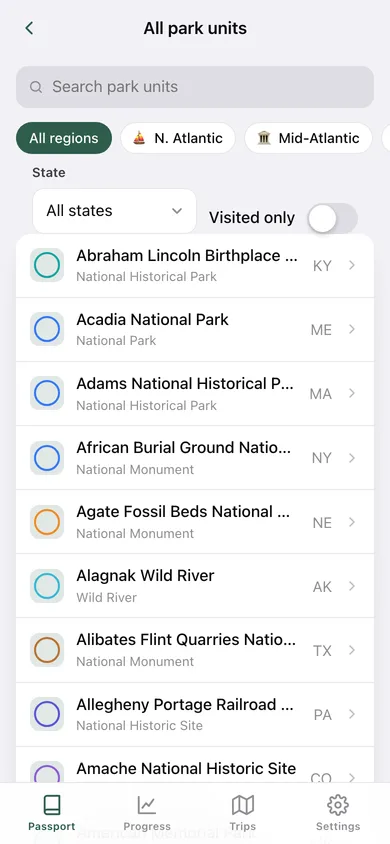
Park units
The full catalog with search, region chips, a state filter and a visited-only switch.
-
3
Park unit
One unit: region, designation, visited switch with first-visit date, every cancellation logged there and your notes.
-
4
Log a stamp
Pick the unit, name the station, set the date on the dater, choose the ink, flag a bonus and tie it to a trip.
-
5
Cancellation
One cancellation drawn as a rubber-stamp badge in its own ink, with unit, station, date, trip and note.
-
6
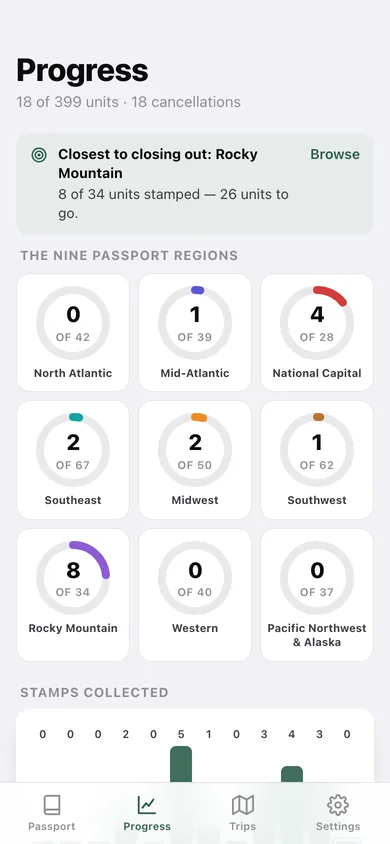
Progress
Nine region rings, twelve months of collecting pace, the ink mix in your book and bonus/station totals.
-
7
By state
State-by-state passport coverage, visited units first, with a seal on the ones you have closed out.
-
8
Trip Journal
Every outing in reverse-chronological order with its park and stamp counts.
-
9
Trip
One trip: dates, companions, journal notes, the parks it covered and the cancellations collected.
-
10
New trip
Name, dates, who came along and the journal entry for an outing.
-
11
Settings
Default ink, auto-mark-visited, restore the catalog, JSON backup, CSV export, sample data and erase.
Try it with sample data: Loads three trips — Utah Mighty Five, a Smokies long weekend and a DC spring break — with eighteen cancellations across Arches, Canyonlands, Zion, the Smokies and the National Mall, plus five parks visited before the log began. You can start fresh at any time.
Ready? It's free.
No account, no install, no subscription. Everything you do stays in this browser.
Your say
What should Inkpass do? Tell us before we build it.
Tell us what to build next.
Comments need a free Google sign-in, so every one is from a real person.
Sign in with Google to commentNo comments yet — be the first to say what this app should do next.
Questions
Is the web version of Inkpass free?+
Yes. Every screen is free to use: no subscription, no in-app purchases, no account.
Do I need an account?+
No. Open Inkpass and start using it right away. Sign in with Google only if you want to upvote an app, save it to your list, or leave a comment.
Where is my data stored?+
Only in this browser's local storage. Nothing you enter is sent to our servers, so we can't see it, back it up, or restore it. Clearing site data, a private window, or another device starts empty. Export a backup from the in-app menu to keep it.
Is there a Inkpass app for iPhone or Android?+
Not yet. Inkpass is a community proposal: the browser version is complete, and we build the iPhone and Android app once 100 people upvote it. Upvoters get one email when it ships.